3.1 Measuring Distance

The goal of this example is to show you how to measure distance using an ultrasonic sensor HC-SR04 and the NULA MINI board.
The sensor uses ultrasonic sound waves to determine how far an object is from it by measuring the time it takes for a sound pulse to travel to the object and back.
The calculated distance is displayed in centimeters on the Serial Monitor.
In this documentation you will learn:
- How the HC-SR04 ultrasonic sensor works.
- How to connect and read data from the sensor using the NULA MINI board.
- How to calculate distance using the speed of sound.
- How to display the result in the Serial Monitor.
Hardware required
- 1× Soldered NULA MINI board
- 1× HC-SR04 ultrasonic sensor
- 1× Breadboard
- Jumper wires
- USB-C cable
Putting the components together
1. Connect the ultrasonic sensor
The HC-SR04 has four pins: VCC, TRIG, ECHO, and GND.
We connect the sensor to the NULA MINI as shown below.
| HC-SR04 Pin | NULA MINI Pin |
|---|---|
| VCC | 3.3V |
| TRIG | IO4 |
| ECHO | IO3 |
| GND | GND |
The HC-SR04 sensor is typically designed for 5V, but it also works on 3.3V with slightly reduced range.
Make sure to connect both TRIG and ECHO pins directly to NULA MINI GPIO pins, so no level shifter is required.
How the Ultrasonic Sensor Works
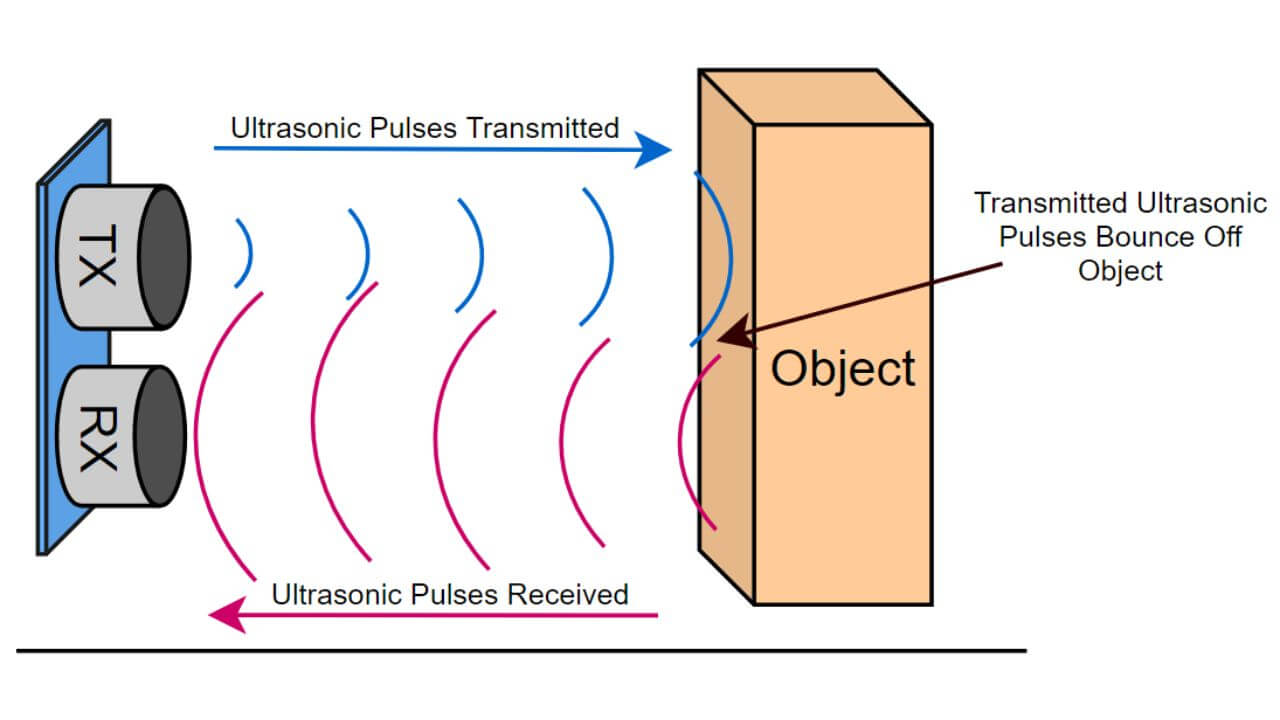
The HC-SR04 ultrasonic sensor measures distance by using sound waves that travel through the air. Whan the program starts a measurement, the TRIG pin sends out a short ultrasonic pulse, a burst of sound waves at about 40 kHz, whisc is far above human hearing spectrum. These sound waves move forward until they hit a nearby object. Once they reach that surface, they bounce back toward the sensor, and the ECHO pin detects their return.
The sensor then measures the time between sending and receiving the sound pulse. Since the speed of sound in air is approximately 343 meters per second, or 0.0343 cm/us, we can calculate the distance the sound traveled:
Distance = (Duration * 0.0343) / 2
Code
Below is the full example code that measures distance and prints it to the Serial Monitor at 115200 baud!
#include "Ultrasonic-distance-sensor-easyC-SOLDERED.h"   // Include Soldered Ultrasonic Sensor library

// --- Pin definitions ---
#define TRIG_PIN  4     // Trigger pin for the ultrasonic sensor
#define ECHO_PIN  3     // Echo pin for the ultrasonic sensor

// --- Create ultrasonic sensor object ---
Ultrasonic_Sensor hc(TRIG_PIN, ECHO_PIN);

void setup() {
  Serial.begin(115200);   // Start Serial Monitor communication
  hc.begin();             // Initialize the ultrasonic sensor

  Serial.println("Ultrasonic Measuring Distance Example started!");
  Serial.println("Move an object in front of the sensor to see the distance change.");
}

void loop() {
  // --- Measure distance in centimeters ---
  float distance = hc.getDistance();

  // --- Print distance to Serial Monitor ---
  Serial.print("Distance: ");
  Serial.print(distance, 2);
  Serial.println(" cm");

  delay(500);  // Short delay between readings
}
Full example
Check out the full example code on the link below:
3.1_Measuring_Distance.ino
Example that uses the Soldered Ultrasonic Sensor library to measure distance.