7.2 Mini Piano
The goal of this project is to create a simple mini piano using four buttons and a passive buzzer.
Each button represents a musical note, and pressing one plays its corresponding frequency through the buzzer.
This project combines concepts like digital inputs, sound generation, and timing, giving you a taste of how simple musical instruments work.
In this documentation you will learn:
- How to generate tones using the
tone()andnoTone()functions. - How to assign different frequencies to multiple buttons.
- How to wire a passive buzzer and buttons to create a basic piano.
- How to handle simple input logic with multiple buttons.
Hardware required
- 1× Soldered NULA MINI board
- 1× Passive buzzer
- 4× Push buttons
- 4× 10kΩ resistors
- Breadboard
- Jumper wires
- USB-C cable

How it works
The passive buzzer can produce tones of different frequencies, corresponding to different musical notes.
By using the tone() function, we can send a square wave signal to the buzzer, and its frequency determines the pitch of the sound.
Each button triggers a different tone: C4, D4, E4, and F4.
When a button is pressed, its corresponding note plays; releasing all buttons stops the sound using noTone().
Only one note can play at a time — whichever button is pressed first takes priority.
Circuit connection
| Component | NULA MINI Pin | Description |
|---|---|---|
| Buzzer | IO18 | Output pin that generates tones |
| Button 1 | IO2 | Plays Note C4 (262 Hz) |
| Button 2 | IO3 | Plays Note D4 (294 Hz) |
| Button 3 | IO4 | Plays Note E4 (330 Hz) |
| Button 4 | IO5 | Plays Note F4 (349 Hz) |
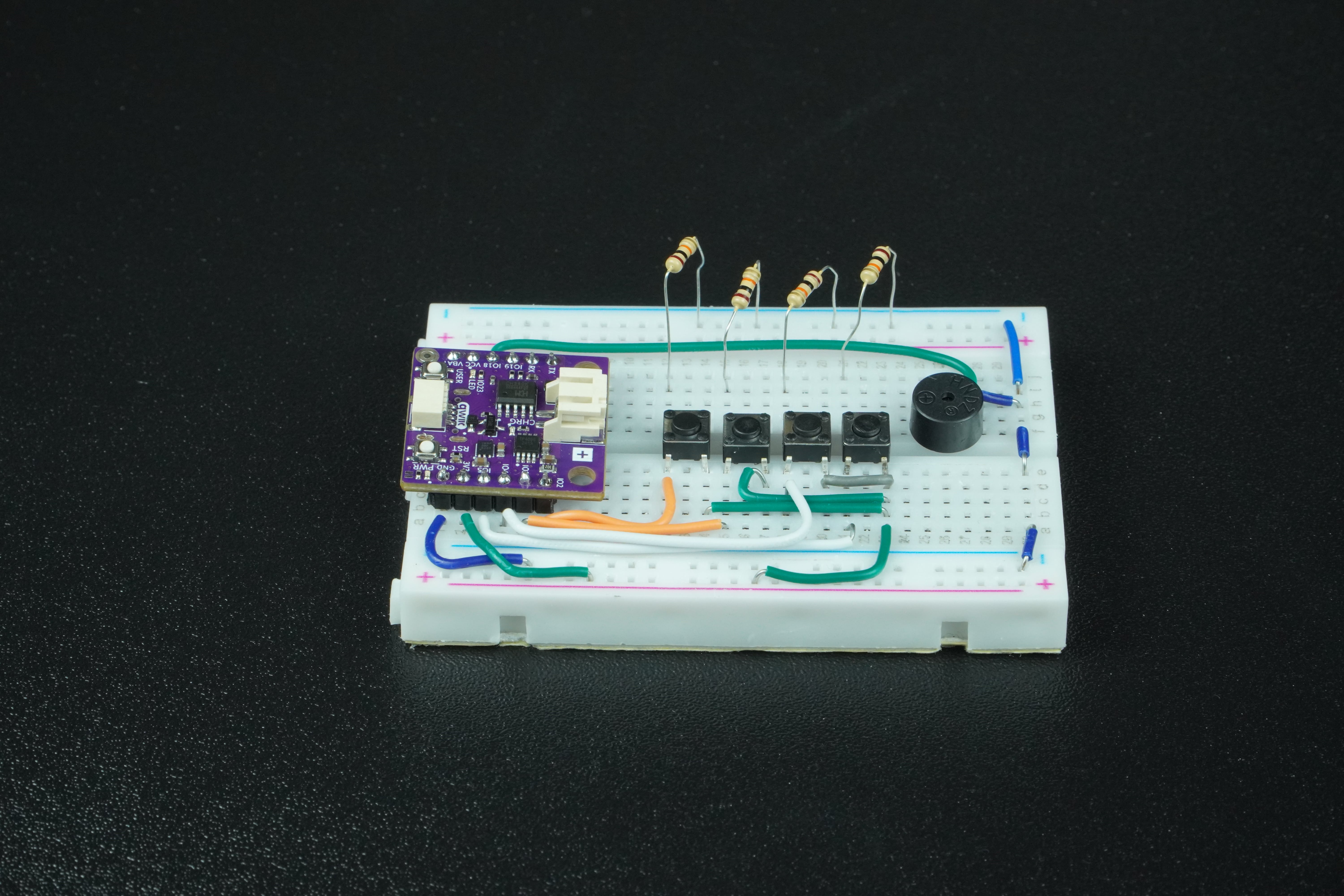
Each button should be connected with a pull-down resistor (10kΩ) to prevent floating inputs.
When the button is pressed, the corresponding pin reads HIGH, activating its tone.
Code
Below is the full example code:
#define BUZZER_PIN 18

// Button pins
#define BTN1 2
#define BTN2 3
#define BTN3 4
#define BTN4 5

// Frequencies for each button (in Hz)
#define NOTE_C4 262
#define NOTE_D4 294
#define NOTE_E4 330
#define NOTE_F4 349

void setup() {
  // Initialize button pins as inputs with external pull-down ressitors
  pinMode(BTN1, INPUT);
  pinMode(BTN2, INPUT);
  pinMode(BTN3, INPUT);
  pinMode(BTN4, INPUT);

  // Initialize buzzer pin
  pinMode(BUZZER_PIN, OUTPUT);
}

void loop() {
  // Check buttons (active HIGH)
  if (digitalRead(BTN1) == HIGH) {
    tone(BUZZER_PIN, NOTE_C4);
  }
  else if (digitalRead(BTN2) == HIGH) {
    tone(BUZZER_PIN, NOTE_D4);
  }
  else if (digitalRead(BTN3) == HIGH) {
    tone(BUZZER_PIN, NOTE_E4);
  }
  else if (digitalRead(BTN4) == HIGH) {
    tone(BUZZER_PIN, NOTE_F4);
  }
  else {
    // No button pressed – stop tone
    noTone(BUZZER_PIN);
  }

  delay(50); // Small debounce delay
}
Full example
Check out the full example code on the link below:
7.5_Mini_Piano.ino
Project that creates a simple piano using 4 buttons and a passive buzzer. Each button produces a unique note.