2.3 Photoresistor Analog Read
The goal of this example is to show you how to measure light intensity using a photoresistor (LDR) connected to one of the analog input pins on the NULA MINI board.
You’ll learn how to use the analogRead() function to read a continuous range of values instead of simple ON/OFF signals.
This is your first step into analog input, essential for sensors like light, temperature, or sound sensors.
In this documentation you will learn:
- How analog inputs differ from digital inputs.
- How to connect a photoresistor to the NULA MINI board.
- How to read analog values using
analogRead(). - How to display light intensity values in the Serial Monitor.
Hardware required
- 1× Soldered NULA MINI board
- 1× Photoresistor (LDR)
- 1× 10kΩ resistor
- 1× Breadboard
- Jumper wires
- USB-C cable

Putting the components together
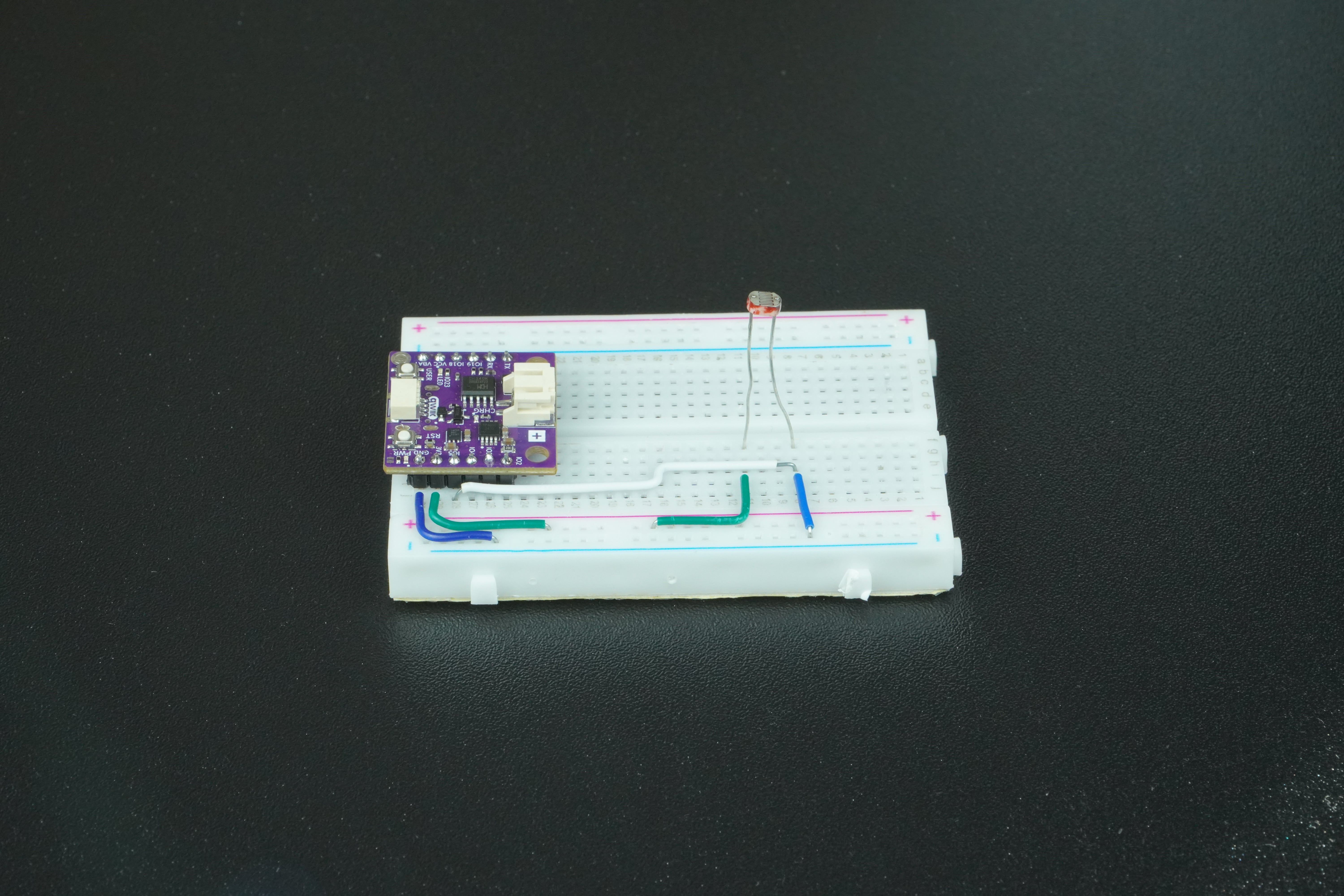
1. Connect the photoresistor
To measure light levels, we connect the photoresistor (LDR) as part of a voltage divider circuit.
As light changes, the resistance of the LDR changes, producing a varying voltage that the NULA MINI can measure.
| Component | NULA MINI Pin |
|---|---|
| One leg of photoresistor | 3.3V |
| Second leg of photoresistor | IO5 (Analog Input) |
| 10kΩ resistor | Between IO5 and GND |
A voltage divider converts resistance changes from the LDR into measurable voltage changes.
When the light is bright, the LDR’s resistance drops and voltage at IO5 increases.
When it’s dark, resistance increases and voltage decreases.
Understanding analog input
Unlike digital pins that only read HIGH (1) or LOW (0), analog pins can measure a continuous range of voltages between 0V and 3.3V.
The ADC (Analog-to-Digital Converter) inside the NULA MINI converts these voltages into numbers between 0 and 4095, because it uses a 12-bit ADC.
| Lighting Condition | Approx. Reading |
|---|---|
| Bright light | 3000–4095 |
| Medium light | 1500–3000 |
| Dark | 0–1500 |
Code
/*
This is a variable to which we assign the number of the pin that we connected the photoresistor's output to.
The NULA MINI board uses analog-capable pins (ADC pins) to read varying voltages.
In this example, we will use IO5, which supports analog input.
*/
const int LDR_PIN = 5;  // Analog input pin for photoresistor

/*
This variable will store the raw analog value read from the sensor.
Since the NULA board uses a 12-bit ADC, the returned value will range from 0 to 4095.
*/
int lightValue = 0;

void setup() {

  /*
  Serial.begin() starts serial communication between the board and the computer.
  We use it to display the measured values on the Serial Monitor.
  */
  Serial.begin(115200);

  /*
  analogReadResolution() defines how many bits are used for ADC readings.
  The NULA MINI supports 12-bit resolution, which means analogRead() returns values from 0 to 4095.
  */
  analogReadResolution(12);

  /*
  Print a startup message to confirm that the program is running.
  */
  Serial.println("Cover or shine light on the sensor to see value changes...");
}

void loop() {

  /*
  analogRead() reads the voltage at the given analog pin and converts it into a digital number.
  The higher the light intensity, the lower the resistance of the photoresistor, and the higher the voltage read.
  */
  lightValue = analogRead(LDR_PIN);

  /*
  Print the measured value to the Serial Monitor.
  */
  Serial.print("Light level: ");
  Serial.println(lightValue);

  /*
  Add a short delay so the readings are easier to observe.
  */
  delay(500);
}
Full example
Check out the full example code on the link below:
2.3_Photoresistor_Analog_Read.ino
Example that shows how to read analog values from a photoresistor and display light levels on the Serial Monitor.