7.1 Smart Weather Station
The goal of this project is to build a Smart Weather Station using the Soldered NULA MINI board.
It measures temperature and humidity using the SHTC3 sensor, displays live readings on an LCD, and sends the same data to the internet using a Wi-Fi POST request to webhook.site.
This is your first complete IoT (Internet of Things) project — combining sensors, display, networking, and cloud communication.
In this documentation you will learn:
- How to connect and use the SHTC3 temperature and humidity sensor.
- How to display live readings on an LCD using I²C communication.
- How to connect your NULA MINI to Wi-Fi.
- How to send sensor data to an online service using an HTTP POST request.
Hardware required
- 1× Soldered NULA MINI board
- 1× Soldered SHTC3 temperature and humidity sensor
- 1× 16×2 Qwiic LCD display
- 2× Qwiic connectors
- 1× USB-C cable

How it works
The NULA MINI continuously measures temperature and humidity using the SHTC3 sensor, then displays these readings on a 16×2 LCD.
Every 30 seconds, the board also sends this data to webhook.site as an HTTP POST request, which you can view in your web browser in real time.
Wiring and connections
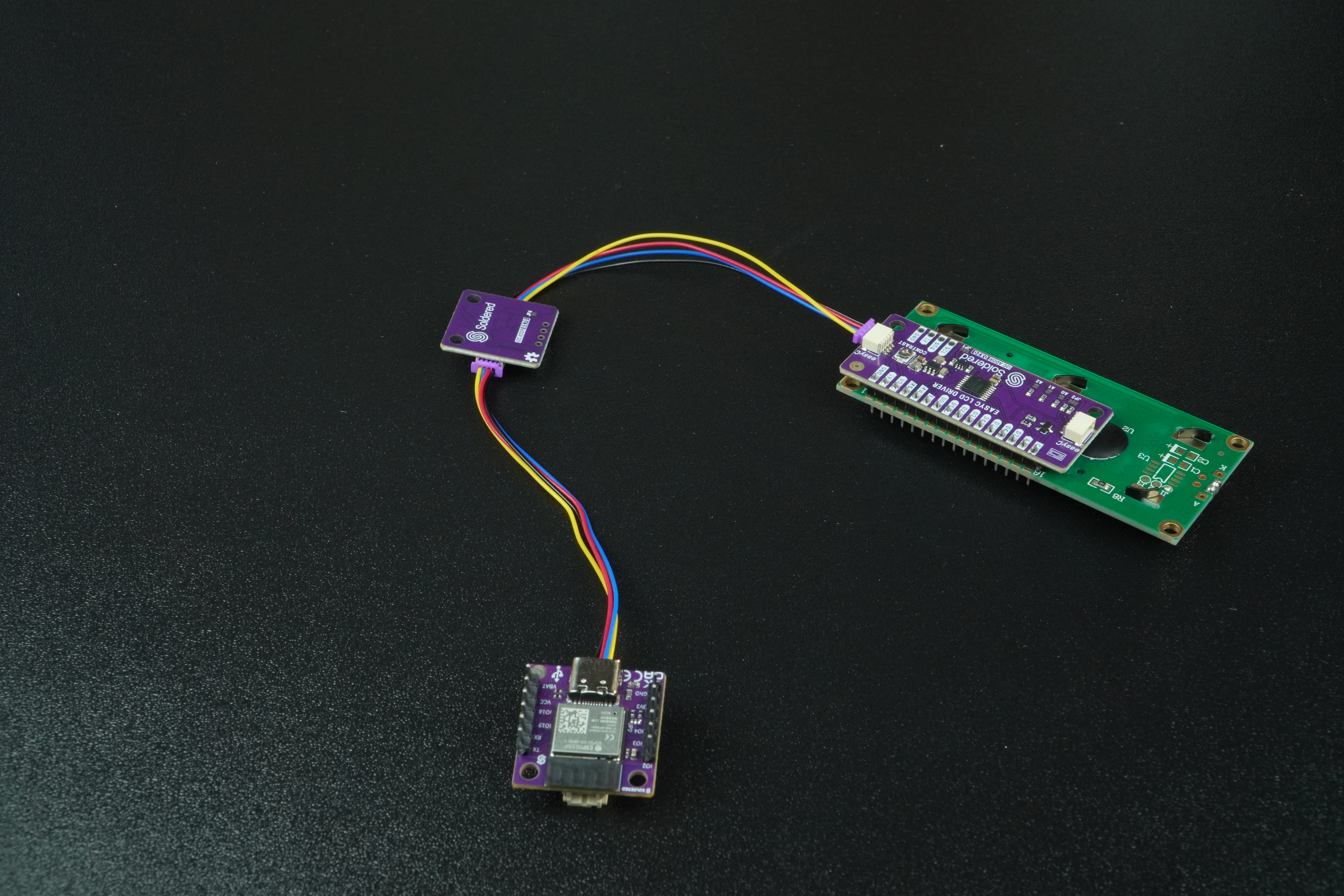
Both the SHTC3 sensor and the LCD use Qwiic (I²C) connections.
You can simply daisy-chain them together using Qwiic cables.
No extra wiring is needed — just connect one Qwiic cable from the NULA MINI to the sensor, and another from the sensor to the LCD.
| BREAKOUT BOARDS | NULA MINI |
|---|---|
| Qwiic | Qwiic |
Setting up webhook.site
- Go to webhook.site.
- Copy the unique URL shown at the top of the page, it is in the following format:
https://webhook.site/your-unique-id - Replace the value of the
webhookURLvariable in your code:
const *char webhookURL = "https://webhook.site/your-unique-id";
Code
Below is the complete example code for the project.
#include <WiFi.h>
#include <HTTPClient.h>
#include "SHTC3-SOLDERED.h"
#include "LCD-SOLDERED.h"

const char* ssid = "Soldered";
const char* password = "dasduino";
const char* webhookURL = "https://webhook.site/42ff81ac-52d9-4cfa-95d4-ce933fee1f34";

SHTC3 shtc3;
LCD lcd(16, 2);

float temperature = 0.0;
float humidity = 0.0;
unsigned long lastUpdate = 0;
const unsigned long UPDATE_MS = 30000; // 30 seconds

void setup() {
  Serial.begin(115200);
  delay(500);

  lcd.begin();
  lcd.backlight();
  lcd.clear();
  lcd.setCursor(0, 0);
  lcd.print("Weather Station");
  lcd.setCursor(0, 1);
  lcd.print("Starting...");
  delay(1000);
  lcd.clear();

  if (!shtc3.begin()) {
    Serial.println("SHTC3 init failed!");
    lcd.print("SHTC3 error!");
    while (1) delay(100);
  }

  Serial.print("Connecting to Wi-Fi");
  lcd.setCursor(0, 0);
  lcd.print("Connecting WiFi");
  WiFi.begin(ssid, password);

  while (WiFi.status() != WL_CONNECTED) {
    delay(500);
    Serial.print(".");
    lcd.setCursor(0, 1);
    lcd.print(".");
  }

  Serial.println();
  Serial.println("Wi-Fi connected!");
  Serial.print("IP: ");
  Serial.println(WiFi.localIP());

  lcd.clear();
  lcd.print("WiFi Connected!");
  delay(800);
  lcd.clear();

  Serial.println("Smart Weather Station ready!");
}

void loop() {
  unsigned long now = millis();

  if (now - lastUpdate >= UPDATE_MS) {
    lastUpdate = now;

    shtc3.sample();
    temperature = shtc3.readTempC();
    humidity = shtc3.readHumidity();

    Serial.print("Temperature: ");
    Serial.print(temperature, 2);
    Serial.print(" °C, Humidity: ");
    Serial.print(humidity, 2);
    Serial.println(" %");

    lcd.clear();
    lcd.setCursor(0, 0);
    lcd.print("Temp: ");
    lcd.print(temperature, 1);
    lcd.print((char)223);
    lcd.print("C");

    lcd.setCursor(0, 1);
    lcd.print("Hum: ");
    lcd.print(humidity, 1);
    lcd.print(" %");

    if (WiFi.status() == WL_CONNECTED) {
      HTTPClient http;
      http.begin(webhookURL);
      http.addHeader("Content-Type", "application/x-www-form-urlencoded");

      String postData = "temperature=" + String(temperature, 2) + "&humidity=" + String(humidity, 2);
      int httpCode = http.POST(postData);

      if (httpCode > 0) {
        Serial.print("POST successful! Response code: ");
        Serial.println(httpCode);
      } else {
        Serial.print("POST failed. Error: ");
        Serial.println(http.errorToString(httpCode));
      }

      http.end();
    } else {
      Serial.println("Wi-Fi disconnected. Trying to reconnect...");
      WiFi.begin(ssid, password);
    }
  }
}
Full example
Check out the full example code on the link below:
7.1_Smart_Weather_Station.ino
Project that measures temperature and humidity with the SHTC3 sensor, displays data on an LCD, and sends readings to webhook.site every 30 seconds.