7.6. Morse Code

A project that uses an LED and a buzzer to transmit user-input messages in Morse code. User can enter a message through the serial monitor, each character is then encoded and signaled accordingly.
At the end of this example you will learn:
- How to read text from serial input
- How to encode text characters using Morse code
Parts required:
- Soldered NULA Mini Board
- Breadboard
- 1 x LED
- 1 x Buzzer
- 1 x 330Ω Resistor
- Some jumper wires
Putting the components together
- Place the buzzer on the breadboard, connect the positive pin on GPIO 4, and other pin to GND.
- Place the LED so that each leg is in a different row, connect the positive (longer) leg to GPIO 4, and negative (shorter) leg to GND using a resistor.
Code Example
Import necessary libraries.
from machine import Pin, PWM
import time
Define pins used for an LED and a buzzer.
LED_PIN = 3
BUZZER_PIN = 4
This is how long the pause between signals will be.
# Unit time in seconds (dot length)
UNIT = 0.12
Initialize the Pin object for LED and PWM object for the buzzer. Set them off initially.
led = Pin(LED_PIN, Pin.OUT)
led.value(0)

buzz = PWM(Pin(BUZZER_PIN))
buzz.freq(800)
buzz.duty(0)
Functions for playing/muting buzzer.
def buzzer_on():
    buzz.duty(512)

def buzzer_off():
    buzz.duty(0)
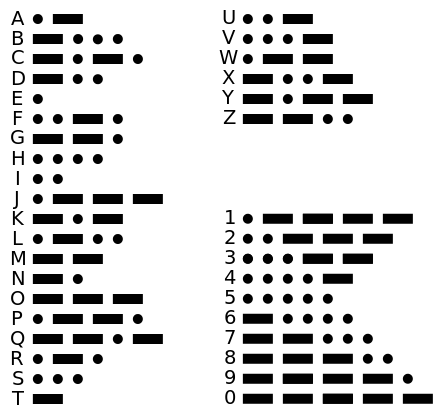
Dictionary which maps characters to their Morse code strings.
# Morse code map (International)
MORSE = {
    'A': '.-',    'B': '-...',  'C': '-.-.', 'D': '-..',  'E': '.',
    'F': '..-.',  'G': '--.',   'H': '....', 'I': '..',   'J': '.---',
    'K': '-.-',   'L': '.-..',  'M': '--',   'N': '-.',   'O': '---',
    'P': '.--.',  'Q': '--.-',  'R': '.-.',  'S': '...',  'T': '-',
    'U': '..-',   'V': '...-',  'W': '.--',  'X': '-..-', 'Y': '-.--',
    'Z': '--..', '0': '-----', '1': '.----', '2': '..---', '3': '...--',
    '4': '....-', '5': '.....', '6': '-....', '7': '--...', '8': '---..',
    '9': '----.'
}
Morse signaling functions for 'dot' and 'dash'.
def dot():
    led.value(1)
    buzzer_on()
    time.sleep(UNIT)         # Dot = 1 unit
    led.value(0)
    buzzer_off()
    time.sleep(UNIT)

def dash():
    led.value(1)
    buzzer_on()
    time.sleep(UNIT * 3)     # dash = 3 units
    led.value(0)
    buzzer_off()
    time.sleep(UNIT)
Function that sends a single character in Morse code. After each character is signaled, wait 3 units before signaling next.
def send_character(morse_code):
    for _, s in enumerate(morse_code):
        if s == '.':
            dot()
        elif s == '-':
            dash()
    # After character, wait additional 2 units (since last dot/dash already waited 1)
    time.sleep(UNIT * 2)
Function that takes user input from serial monitor as parameter and goes through each character. For every character found in the dictionary send a corresponding Morse code, if the character is not in the dictionary, pause briefly and continue.
def send_text(msg):
    msg = msg.strip()
    for _, ch in enumerate(msg):
        if ch == ' ':
            # Word gap: 7 units total, previous character added 3 units
            time.sleep(UNIT * 4)  # send_character already added 3 units total (1 after last symbol + 2)
            continue
        code = MORSE.get(ch.upper())
        if code:
            send_character(code)
        else:
            time.sleep(UNIT * 3)
Main loop that takes a user input from serial using input() method and transmits the message as Morse code.
# Main loop
print("Morse transmitter ready. Type a message and press Enter.")
try:
    while True:
        try:
            line = input()
        except Exception:
            line = ''
        if not line:
            continue
        print("Sending:", line)
        send_text(line)
        print("Done.")
except KeyboardInterrupt:
    print("Stopped by user")
finally:
    led.value(0)
    buzzer_off()