3.2 Distance Fade LED

The goal of this example is to show you how to use an ultrasonic distance sensor to control the brightness of an LED.
The closer an object is to the sensor, the brighter the LED becomes.
This project combines distance measurement with PWM LED control, helping you visualize sensor data through light intensity.
In this documentation you will learn:
- How to connect an HC-SR04 ultrasonic sensor to the NULA MINI board.
- How to measure distance using the Soldered Ultrasonic Sensor library.
- How to use the
map()function to convert distance into brightness. - How to control LED brightness using PWM (
analogWrite()). - How to print both distance and brightness values to the Serial Monitor.
Hardware required:
- 1× Soldered NULA MINI board
- 1× HC-SR04 ultrasonic sensor
- 1× LED (any color)
- 1× 330Ω resistor
- 1× Breadboard
- Jumper wires
- USB-C cable
Putting the components together
1. Connect the LED
We will start by connecting the LED the same way as in 1.1 LED Blinking.
- Connect the anode (long leg) of the LED through a 330Ω resistor to IO02 on the NULA MINI board.
- Connect the cathode (short leg) directly to GND.
2. Connect the ultrasonic sensor
| HC-SR04 Pin | NULA MINI Pin |
|---|---|
| VCC | 3.3V |
| GND | GND |
| TRIG | IO04 |
| ECHO | IO03 |
The TRIG pin sends a short ultrasonic pulse to start a measurement.
The ECHO pin receives the reflected signal and measures how long it took for the sound wave to return.
Make sure the sensor is pointed toward a flat object (like a wall) for accurate readings.
How does the ultrasonic sensor work?
The HC-SR04 measures distance by sending out a short burst of ultrasonic sound waves and timing how long it takes for them to bounce back from a nearby object.
Because the speed of sound in air is approximately 343 m/s, the sensor can calculate the distance by multiplying the travel time by that speed and dividing by two (to account for the round trip).
The Soldered Ultrasonic Sensor library makes this process easy.
Instead of manually handling pulse timing, you simply call getDistance() to receive the current distance in centimeters, and getDuration() if you want to see the raw echo time.
Understanding PWM and brightness control
The NULA MINI doesn't output true analog voltages, it uses Pulse Width Modulation (PWM). PWM rapidly turns the pin ON and OFF, and by adjusting how long it stays ON (the duty cycle), we can control how bright the LED appears.
| Duty cycle | Visual effect |
|---|---|
| 0% | LED completely OFF |
| 50% | LED at half brightness |
| 100% | LED fully ON |
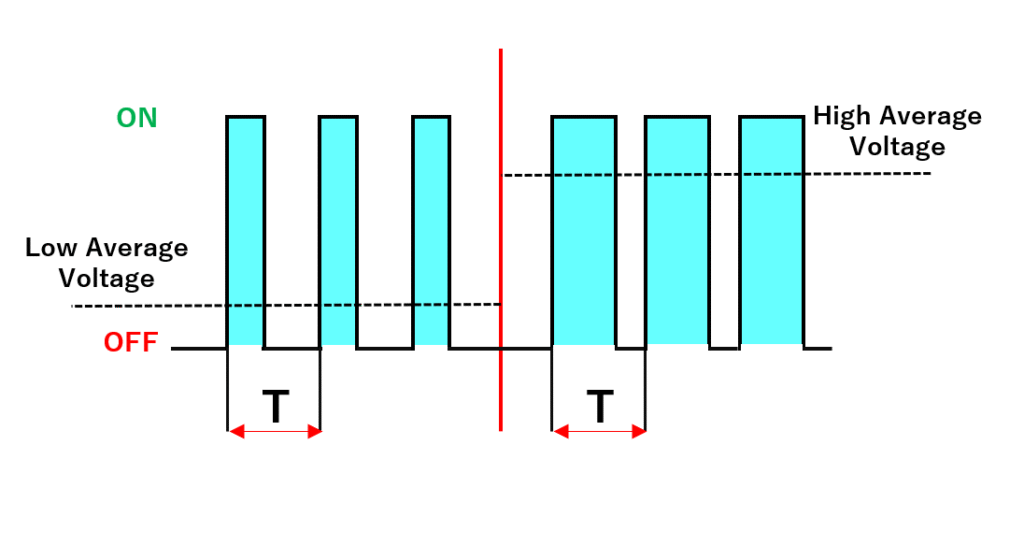
The analogWrite(pin, value) function sets this duty cycle. The higher the value, the brighter the LED.
Code
Below is the full example code that reads the distance from the sensor and uses it to control the LED brightness.
#include "Ultrasonic-distance-sensor-easyC-SOLDERED.h"  // Include Soldered Ultrasonic Sensor library

// --- Pin definitions ---
#define TRIG_PIN  4     // Trigger pin for the sensor
#define ECHO_PIN  3     // Echo pin for the sensor
#define LED_PIN   2     // LED connected to IO2 (PWM-capable pin)

// --- Create ultrasonic sensor object ---
Ultrasonic_Sensor hc(TRIG_PIN, ECHO_PIN);

void setup() {
  Serial.begin(115200);  // Start Serial communication
  pinMode(LED_PIN, OUTPUT);

  hc.begin();  // Initialize ultrasonic sensor

  Serial.println("Distance Fade LED Example started!");
}

void loop() {
  // --- Measure distance ---
  float distance = hc.getDistance();  // Distance in centimeters
  long duration  = hc.getDuration();  // Echo round-trip time in microseconds (for info)

  // --- Print distance to Serial Monitor ---
  Serial.print("Distance: ");
  Serial.print(distance, 1);
  Serial.print(" cm");

  // --- Limit distance range to useful values ---
  if (distance < 2) distance = 2;
  if (distance > 50) distance = 50;

  // --- Map distance to LED brightness ---
  // Closer object = higher brightness
  int brightness = map(distance, 2, 50, 4095, 0);
  analogWrite(LED_PIN, brightness);

  // --- Print brightness level ---
  Serial.print(" -> Brightness: ");
  Serial.println(brightness);

  delay(100);
}
Full example
Check out the full example code on the link below:
3.2_Distance_Fade_LED.ino
Example that uses the Soldered Ultrasonic Sensor library to measure distance and control LED brightness through PWM mapping.