Digital Potentiometer - Controlling the DigiPot (example)
This page contains a simple example with function documentation on how to control digital potentiometer.
Initialization
To use the digital potentiometer, first include the required library, create the digipot object and initialize it in the setup() function. You can use the return of begin() to check if everything is connected correctly.
#include "MCP4018-SOLDERED.h" //Include Soldered library for MCP4018 Digipot.

MCP4018-SOLDERED digipot; // Create object for Digipot library.

void setup() {
  digipot.begin(); // Initialize Digipot library.
}
//...
MCP4018-SOLDERED digipot
Creates digipot object
Returns value: none
digipot.begin()
Initializes the digipot, setting up communication over I2C and verifying its presence.
Returns value: Returns true if initialization is successful, false otherwise.
Controlling wiper value
To set wiper value, call setWhiperPercent() function. It is possible to increment the value with increment() function. To get its current value, call getWiperValue() function.
#include "MCP4018-SOLDERED.h" //Include Soldered library for MCP4018 Digipot.

MCP4018_SOLDERED digipot; // Create object for Digipot library.

void setup() {
  digipot.begin(); // Initialize Digipot library.
  Serial.begin(115200);
}

void loop() {
  // put your main code here, to run repeatedly:
  digipot.setWiperPercent(0);
  printDigipotData(digipot.getWiperValue());
  delay(2000);

  for(int i=0;i<128;i++){
    digipot.increment();
    printDigipotData(digipot.getWiperValue());
    delay(500);
  }
  digipot.setWiperPercent(0);
  printDigipotData(digipot.getWiperValue());
  delay(2000);

  digipot.setWiperPercent(100);
  printDigipotData(digipot.getWiperValue());
  delay(2000);

}

void printDigipotData(int _v)
{
    Serial.print("Digipot wiper: ");
    Serial.print(_v, DEC);
    Serial.println('%');
}
digipot.setWiperPercent()
Sets the wiper value
Returns value: none
digipot.increment()
Increments the current value
Returns value: none
digipot.getWiperValue()
Returns the current wiper value
Returns value: Returns byte value that represents current wiper value
Serial monitor output
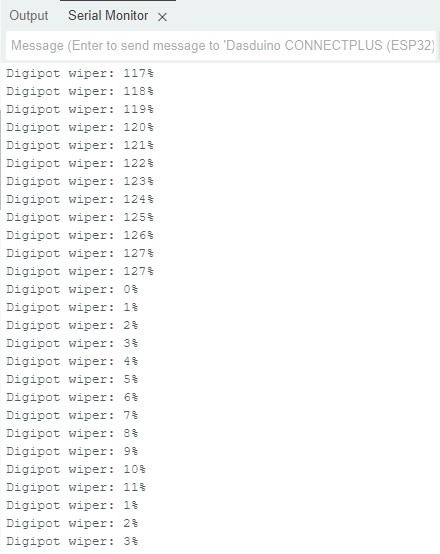
Full example
Try all of the above mentioned functions in full examples below:
digipot_serial.ino
Example file to show how to increment and decrement digipot value from Arduino Serial Monitor.
get_digipot.ino
Example file to show how to set the desired value to digipot and read thta value from it
set_digipot.ino
Example file to show how to set the desired value to digipot and read thta value from it