Gnss Gps - Advanced Example
This page provides a complete example of using the GNSS L86-M33 sensor with an Arduino, displaying detailed information such as latitude, longitude, altitude, course, speed, and other GNSS-related data.
Full Example
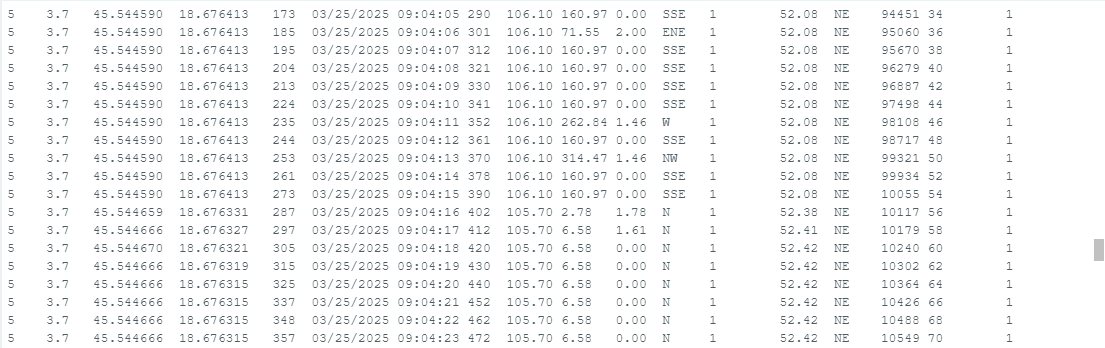
This example demonstrates how to initialize the GNSS L86-M33 sensor, retrieve GPS data, and display it in a formatted table on the Arduino Serial Monitor. The code includes information such as satellite count, HDOP (Horizontal Dilution of Precision), GPS location (latitude and longitude), fix status, date and time, altitude, speed, and the distance to a predefined location (Osijek, Croatia).
#include "GNSS-L86-M33-SOLDERED.h" // Include L86-M33 GNSS Library

// Define pins for the GNSS module
#define GNSS_RX 3
#define GNSS_TX 4

// Define the coordinates of Osijek, Croatia
#define CITY_LAT 45.5550
#define CITY_LON 18.6955

// Create an object for the library called gps
GNSS gps(GNSS_TX, GNSS_RX);

void setup()
{
    Serial.begin(9600);  // Initialize serial communication
    gps.begin();         // Initialize the GNSS module

    Serial.println("\n\n");

    // Display header for the data table
    Serial.println(F("Sats HDOP  Latitude   Longitude   Fix  Date       Time     Date Alt    Course Speed Card  Distance Course Card  Chars Sentences Checksum"));
    Serial.println(F("           (deg)      (deg)       Age                      Age  (m)    --- from GPS ----  ---- to Osijek  ----  RX    RX        Fail"));
    Serial.println(F("------------------------------------------------------------------------------------------------- ---------------------------------------"));
}

void loop()
{
    static const double cityLat = CITY_LAT, cityLon = CITY_LON;

    // Print GNSS data in a table format
    printInt(gps.satellites.value(), gps.satellites.isValid(), 5);
    printFloat(gps.hdop.hdop(), gps.hdop.isValid(), 6, 1);
    printFloat(gps.location.lat(), gps.location.isValid(), 11, 6);
    printFloat(gps.location.lng(), gps.location.isValid(), 12, 6);
    printInt(gps.location.age(), gps.location.isValid(), 5);
    printDateTime(gps.date, gps.time);
    printFloat(gps.altitude.meters(), gps.altitude.isValid(), 7, 2);
    printFloat(gps.course.deg(), gps.course.isValid(), 7, 2);
    printFloat(gps.speed.kmph(), gps.speed.isValid(), 6, 2);
    printStr(gps.course.isValid() ? GNSS::cardinal(gps.course.deg()) : "*** ", 6);

    unsigned long distanceKmToOsijek =
        (unsigned long)GNSS::distanceBetween(gps.location.lat(), gps.location.lng(), cityLat, cityLon) / 1000;
    printInt(distanceKmToOsijek, gps.location.isValid(), 9);

    double courseToOsijek = GNSS::courseTo(gps.location.lat(), gps.location.lng(), cityLat, cityLon);
    printFloat(courseToOsijek, gps.location.isValid(), 7, 2);

    const char *cardinalToOsijek = GNSS::cardinal(courseToOsijek);
    printStr(gps.location.isValid() ? cardinalToOsijek : "*** ", 6);

    printInt(gps.charsProcessed(), true, 6);
    printInt(gps.sentencesWithFix(), true, 10);
    printInt(gps.failedChecksum(), true, 9);
    Serial.println();

    smartDelay(1000);  // Use smartDelay instead of delay to prevent data loss

    if (millis() > 5000 && gps.charsProcessed() < 10)
        Serial.println(F("No GPS data received: Check wiring"));
}

// Smart delay to ensure that the GNSS module is "fed" with data
static void smartDelay(unsigned long ms)
{
    unsigned long start = millis();
    do
    {
        while (gps.gnssSerial->available())
            gps.encode(gps.gnssSerial->read());
    } while (millis() - start < ms);
}

// Function used for printing floating-point numbers more easily
static void printFloat(float val, bool valid, int len, int prec)
{
    if (!valid)
    {
        while (len-- > 1)
            Serial.print('*');
        Serial.print(' ');
    }
    else
    {
        Serial.print(val, prec);
        int vi = abs((int)val);
        int flen = prec + (val < 0.0 ? 2 : 1); // . and -
        flen += vi >= 1000 ? 4 : vi >= 100 ? 3 : vi >= 10 ? 2 : 1;
        for (int i = flen; i < len; ++i)
            Serial.print(' ');
    }
    smartDelay(0);
}

// Function to print integers (with unsigned long data type)
static void printInt(unsigned long val, bool valid, int len)
{
    char sz[32] = "*****************";
    if (valid)
        sprintf(sz, "%ld", val);
    sz[len] = 0;
    for (int i = strlen(sz); i < len; ++i)
        sz[i] = ' ';
    if (len > 0)
        sz[len - 1] = ' ';
    Serial.print(sz);
    smartDelay(0);
}

// Function to print date and time from the TinyGPS library date format
static void printDateTime(TinyGPSDate &d, TinyGPSTime &t)
{
    if (!d.isValid())
    {
        Serial.print(F("********** "));
    }
    else
    {
        char sz[32];
        sprintf(sz, "%02d/%02d/%02d ", d.month(), d.day(), d.year());
        Serial.print(sz);
    }

    if (!t.isValid())
    {
        Serial.print(F("******** "));
    }
    else
    {
        char sz[32];
        sprintf(sz, "%02d:%02d:%02d ", t.hour(), t.minute(), t.second());
        Serial.print(sz);
    }

    printInt(d.age(), d.isValid(), 5);
    smartDelay(0);
}

// Function used to print strings more easily
static void printStr(const char *str, int len)
{
    int slen = strlen(str);
    for (int i = 0; i < len; ++i)
        Serial.print(i < slen ? str[i] : ' ');
    smartDelay(0);
}
gps.begin()
Initializes the GNSS L86-M33 module, setting up communication over the defined serial pins and configuring the module for operation.
Returns value: Void
GNSS::distanceBetween
Calculates the distance in meters between two geographic coordinates using the great-circle distance formula, assuming a spherical Earth with a radius of 6,372,795 meters. Rounding errors may introduce up to 0.5% deviation.
Returns value: double - The distance in meters between the two locations.
Function parameters:
| Type | Name | Description |
|---|---|---|
double | lat1 | Latitude of the first location in decimal degrees. |
double | long1 | Longitude of the first location in decimal degrees. |
double | lat2 | Latitude of the second location in decimal degrees. |
double | long2 | Longitude of the second location in decimal degrees. |
GNSS::courseTo
Computes the initial course (bearing) in degrees from one geographic coordinate to another. The course is measured relative to true north, with 0° representing north, 90° east, 180° south, and 270° west.
Returns value: double - The initial heading in degrees from the first location to the second.
Function parameters:
| Type | Name | Description |
|---|---|---|
double | lat1 | Latitude of the starting location in decimal degrees. |
double | long1 | Longitude of the starting location in decimal degrees. |
double | lat2 | Latitude of the destination in decimal degrees. |
double | long2 | Longitude of the destination in decimal degrees. |
GNSS::cardinal
Determines the cardinal direction (e.g., N, NE, E, etc.) corresponding to a given course in degrees. The function divides the 360-degree compass into 16 segments for more precise directional output.
Returns value: const char* - A string representing the cardinal direction closest to the given course.
Function parameters:
| Type | Name | Description |
|---|---|---|
double | course | The course in degrees, measured clockwise from true north. |
GNSS Function Overview
| Function | Return Type | Description |
|---|---|---|
gps.satellites.value() | int | Retrieves the number of satellites used in the fix. |
gps.hdop.hdop() | float | Retrieves the Horizontal Dilution of Precision (HDOP). |
gps.location.lat() | double | Retrieves the latitude of the GNSS location. |
gps.location.lng() | double | Retrieves the longitude of the GNSS location. |
gps.location.age() | unsigned | Retrieves the age of the location fix in milliseconds. |
gps.date.month() | int | Retrieves the month of the date from the GNSS data. |
gps.date.day() | int | Retrieves the day of the date from the GNSS data. |
gps.date.year() | int | Retrieves the year of the date from the GNSS data. |
gps.time.hour() | int | Retrieves the hour of the time from the GNSS data. |
gps.time.minute() | int | Retrieves the minute of the time from the GNSS data. |
gps.time.second() | int | Retrieves the second of the time from the GNSS data. |
gps.time.centisecond() | int | Retrieves the centisecond of the time from the GNSS data. |
L86_M33_Full_Example.ino
Example file for using the GNSS-GPS L86-M33
L86_M33_easyC_A_Example.ino
Example file for using the GNSS-GPS L86-M33 easyC