2.4" TFT LCD Breakout with Touch - Touch Paint
This advanced example demonstrates how to build a basic touchscreen paint app using the TFT LCD Breakout 2.4" with Touch. It includes color selection, pressure detection, and drawing circles as a brush.
Touchscreen Paint
This sketch enables full interaction via touch: select a color by tapping a color box and draw on the screen by dragging your finger.
Core Setup and Logic
#include "Adafruit_GFX.h"
#include "SPI.h"
#include "TFT-LCD-Breakout-2.4-With-Touch-SOLDERED.h"

#define TFT_CSL 6
#define TFT_DC  9
#define TFT_RST -1
#define CST_PIN 10

TFTDisplay tft(TFT_CSL, TFT_DC, TFT_RST);
TFTTouch ts(CST_PIN);

#define BOXSIZE   40
#define PENRADIUS 3
int oldcolor, currentcolor;

struct point {
    int x, y;
} p;

void setup() {
    Serial.begin(115200);
    tft.begin();
    ts.begin();
    ts.calibrate(540, 1000, 34, 460);
    tft.fillScreen(ILI9341_BLACK);

    tft.fillRect(0, 0, BOXSIZE, BOXSIZE, ILI9341_RED);
    tft.fillRect(BOXSIZE, 0, BOXSIZE, BOXSIZE, ILI9341_YELLOW);
    tft.fillRect(BOXSIZE * 2, 0, BOXSIZE, BOXSIZE, ILI9341_GREEN);
    tft.fillRect(BOXSIZE * 3, 0, BOXSIZE, BOXSIZE, ILI9341_CYAN);
    tft.fillRect(BOXSIZE * 4, 0, BOXSIZE, BOXSIZE, ILI9341_BLUE);
    tft.fillRect(BOXSIZE * 5, 0, BOXSIZE, BOXSIZE, ILI9341_MAGENTA);

    tft.drawRect(0, 0, BOXSIZE, BOXSIZE, ILI9341_WHITE);
    currentcolor = ILI9341_RED;
}
ts.calibrate()
Calibrates the touchscreen by mapping raw analog input values to screen coordinates. Essential for accurate touch point detection.
Returns value: None
Function parameters:
| Type | Name | Description |
|---|---|---|
int | xMin | Raw minimum value for X |
int | xMax | Raw maximum value for X |
int | yMin | Raw minimum value for Y |
int | yMax | Raw maximum value for Y |
Drawing Logic
The loop() function handles reading touch points, determining brush position, and rendering colored circles.
void loop() {
    ts.service();
    if (!ts.getPressure()) return;

    p.x = ts.getX();
    p.y = ts.getY();
    Serial.print("X = "); Serial.print(p.x); Serial.print("	Y = "); Serial.println(p.y);

    if (p.y < BOXSIZE) {
        oldcolor = currentcolor;
        int colorIndex = p.x / BOXSIZE;
        switch (colorIndex) {
            case 0: currentcolor = ILI9341_RED; break;
            case 1: currentcolor = ILI9341_YELLOW; break;
            case 2: currentcolor = ILI9341_GREEN; break;
            case 3: currentcolor = ILI9341_CYAN; break;
            case 4: currentcolor = ILI9341_BLUE; break;
            case 5: currentcolor = ILI9341_MAGENTA; break;
        }
        tft.drawRect(colorIndex * BOXSIZE, 0, BOXSIZE, BOXSIZE, ILI9341_WHITE);
        if (oldcolor != currentcolor)
            tft.fillRect(oldcolor / BOXSIZE * BOXSIZE, 0, BOXSIZE, BOXSIZE, oldcolor);
    }
    if ((p.y > BOXSIZE) && (p.y < tft.height()))
        tft.fillCircle(p.x, p.y, PENRADIUS, currentcolor);
}
ts.getX() / ts.getY()
Returns the last X or Y coordinate from the touchscreen input after mapping and calibration.
Returns value: int — Coordinate value in screen pixels.
tft.fillCircle()
Draws a filled circle on the screen at the given coordinates with the specified radius and color.
Returns value: None
Function parameters:
| Type | Name | Description |
|---|---|---|
int | x | X coordinate |
int | y | Y coordinate |
int | r | Radius of the circle |
uint16_t | color | Color of the filled circle |
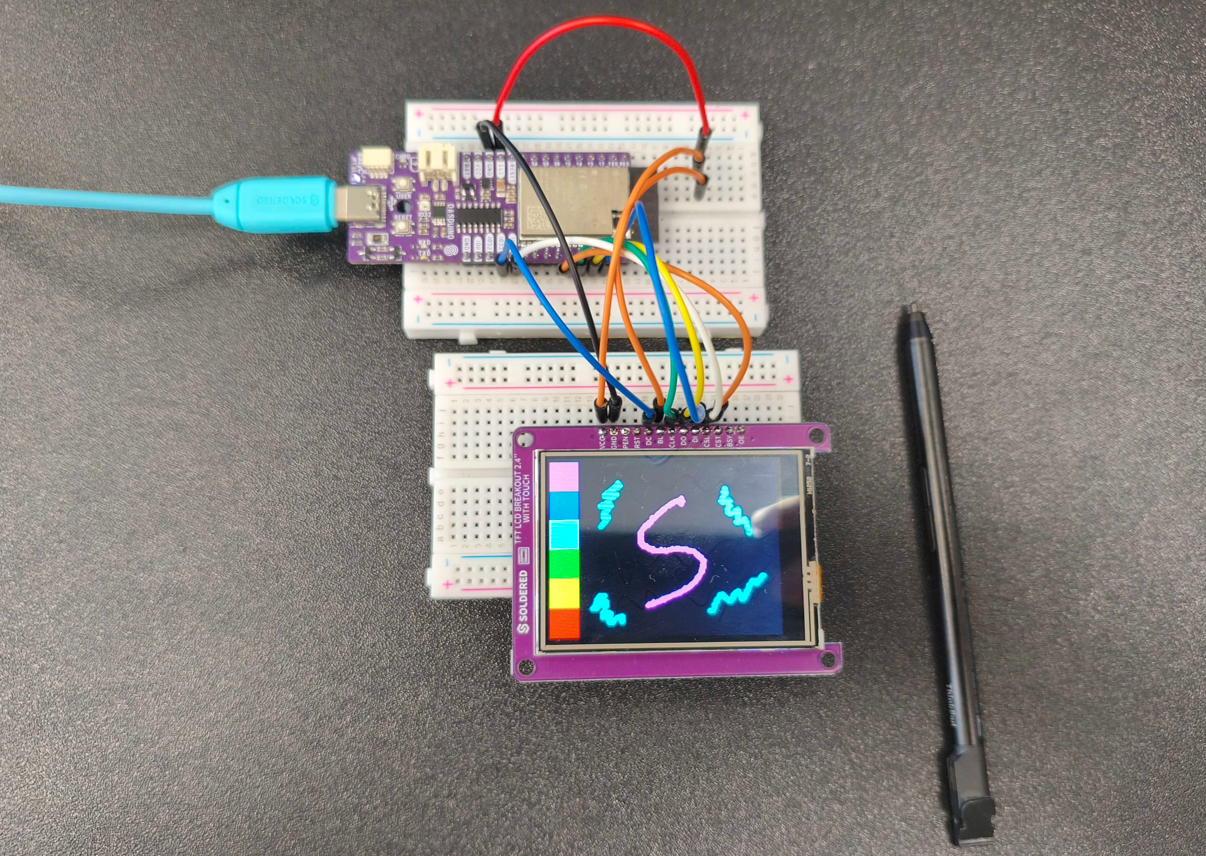
TouchPaint.ino
Paint on the screen using your finger with full color selection and circle brush.