Adc - Asynchronous and Continuous Readings
This page provides various examples of using the ADS1015/ADS1115 analog-to-digital converters (ADC) with Arduino, covering asynchronous and continuous readings.
Asynchronous ADC Read
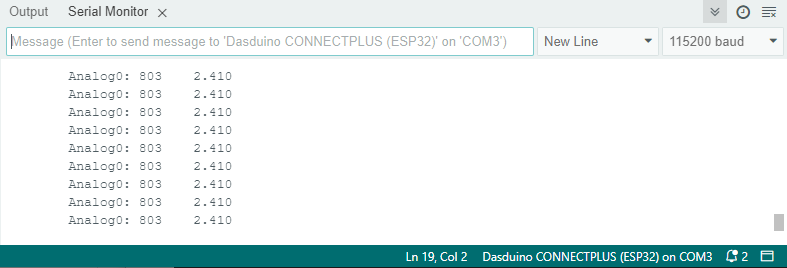
This example demonstrates how to asynchronously read ADC values without blocking the program flow. The ADS1115 allows you to request ADC values and read them later once they are ready.
#include "ADS1115-SOLDERED.h"

// Declare your ADS1115 instance:
ADS1115 ADS;
float f = 0;

void setup()
{
    // Initialize the Serial communication
    Serial.begin(115200);
    Serial.println(__FILE__);
    Serial.print("ADS1X15_LIB_VERSION: ");
    Serial.println(ADS1X15_LIB_VERSION);

    // Set up the ADS1115
    ADS.begin();
    ADS.setGain(0);
    f = ADS.toVoltage(); // Voltage factor
    ADS.requestADC(0);
}

void loop()
{
    // Read the ADC value if available
    if (ADS.isBusy() == false)
    {
        int16_t val_0 = ADS.getValue();
        ADS.requestADC(0); // Request a new reading
        Serial.print("\tAnalog0: ");
        Serial.print(val_0);
        Serial.print('\t');
        Serial.println(val_0 * f, 3);
    }
    // Simulate other tasks...
    delay(2000);
}
ADC_read_async.ino
Example files for using the ADC ADS1x15 sensors.
Continuous ADS Read
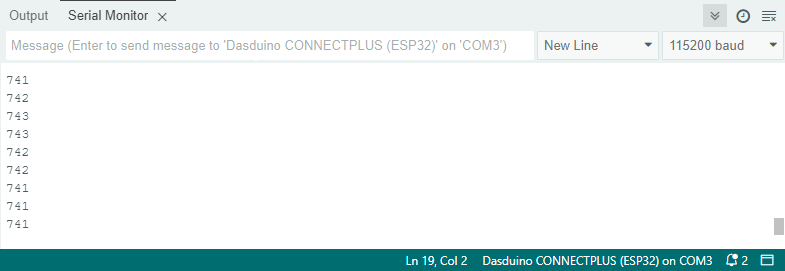
This example demonstrates how to continuously read ADC values from the ADS1015 without needing to manually trigger each read. In continuous mode, the ADS1015 automatically samples the analog input at the specified data rate, allowing for real-time monitoring of the signal as long as the system is powered on.
#include "ADS1015-SOLDERED.h"

// Declare an ADS1015 class instance.
ADS1015 ADS;

void setup()
{
    // Set up Serial
    Serial.begin(115200);
    Serial.println(__FILE__);
    Serial.print("ADS1X15_LIB_VERSION: ");
    Serial.println(ADS1X15_LIB_VERSION);

    // Set up the ADS1015
    ADS.begin();
    ADS.setGain(0);     // 6.144 volt
    ADS.setDataRate(7); // fast
    ADS.setMode(0);     // continuous mode
    ADS.readADC(0);     // first read to trigger
}

void loop()
{
    // Read ADC
    Serial.println(ADS.getValue());
}
ADS.setMode()
Sets the operating mode of the ADS1015/ADS1115. In continuous mode, the ADC continuously converts data, while in single-shot mode, it only converts once per request.
Returns value: None
Function parameters:
| Type | Name | Description |
|---|---|---|
int | mode | The mode to set: 0 for continuous mode, 1 for single-shot mode. |
ADC_continuous.ino
Example files for using the ADC ADS1x15 sensors.