Adc - Using the Comparator
This page provides an example of using the ADS1015/ADS1115 analog-to-digital converters (ADC) with Arduino, with a focus on using the comparator.
ADC Comparator
This example demonstrates how to use the built-in comparator of the ADS1115 to trigger an alert when the input voltage crosses certain thresholds. You can connect an LED to the ALERT pin to visually indicate when the threshold is crossed.
#include "ADS1115-SOLDERED.h"

// Declare your ADS1115 instance
ADS1115 ADS;

void setup()
{
    // Initialize the Serial Port
    Serial.begin(115200);
    Serial.println(__FILE__);
    Serial.print("ADS1X15_LIB_VERSION: ");
    Serial.println(ADS1X15_LIB_VERSION);

    // Initialize the ADS1115
    ADS.begin();

    // Set up the comparator mode
    ADS.setComparatorMode(1); // 0 = Traditional, 1 = Window
    ADS.setComparatorPolarity(0); // 0 = Low (default), 1 = High
    ADS.setComparatorLatch(1); // 0 = Non-latch, 1 = Latch
    ADS.setComparatorQueConvert(0); // 0 = trigger after 1 conversion

    // Set comparator thresholds
    float f = ADS.toVoltage(1);                // Voltage factor
    ADS.setComparatorThresholdLow(1.234 / f);  // Convert volts to number
    ADS.setComparatorThresholdHigh(3.142 / f); // Convert volts to number

    Serial.println(ADS.getComparatorThresholdLow());
    Serial.println(ADS.getComparatorThresholdHigh());
}

void loop()
{
    // Set gain of the ADC
    ADS.setGain(0);

    // Read the value from AIN0
    int16_t val_0 = ADS.readADC(0);

    float f = ADS.toVoltage(1); // Voltage factor

    Serial.print("\tAnalog0: ");
    Serial.print(val_0);
    Serial.print('\t');
    Serial.print(val_0 * f, 3);
    Serial.print('\t');
    Serial.print(ADS.getComparatorThresholdLow() * f, 3);
    Serial.print('\t');
    Serial.print(ADS.getComparatorThresholdHigh() * f, 3);
    Serial.println();

    delay(100);
}
ADS.toVoltage()
Converts the raw ADC value to a voltage using the specified conversion factor.
Returns value: The voltage equivalent of the raw ADC value.
Function parameters:
| Type | Name | Description |
|---|---|---|
float | factor | The conversion factor to scale the raw ADC value to voltage. |
| Function | Return Type | Description |
|---|---|---|
ADS.setComparatorMode(1) | void | Sets the comparator mode for the ADS1115. Mode 0 is traditional, 1 is window. |
ADS.setComparatorPolarity(0) | void | Sets the comparator polarity. Mode 0 is low (default), 1 is high. |
ADS.setComparatorLatch(1) | void | Sets the comparator latch. Mode 0 is non-latch, 1 is latch. |
ADS.setComparatorQueConvert(0) | void | Sets the comparator to trigger after one conversion. |
ADS.setComparatorThresholdLow(1.234 / f) | void | Sets the low threshold for the comparator. The value is provided in volts and converted to a number. |
ADS.setComparatorThresholdHigh(3.142 / f) | void | Sets the high threshold for the comparator. The value is provided in volts and converted to a number. |
ADS.getComparatorThresholdLow() | float | Retrieves the low comparator threshold value in raw ADC counts. |
ADS.getComparatorThresholdHigh() | float | Retrieves the high comparator threshold value in raw ADC counts. |
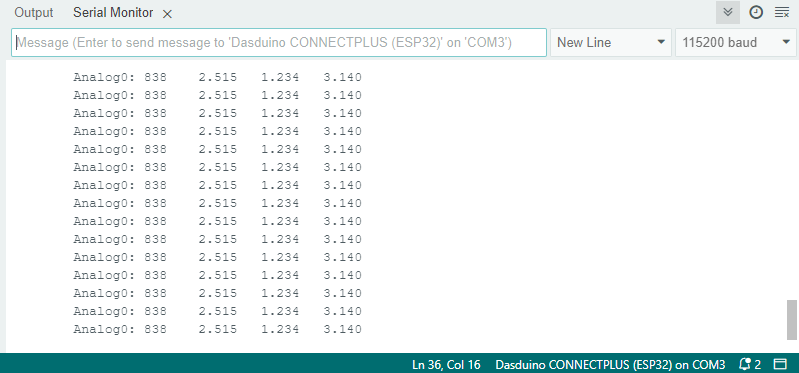
ADC Serial Monitor output
ADC_read_comparator_1.ino
Example files for using the ADC ADS1x15 sensors.