Hx711 - Deep Sleep
This page contains a simple example of shutting down the HX711 between readings (deep sleep).
In this code snippet, the loop() function wakes up the HX711 from deep sleep, takes a raw reading, prints the result to the Serial Monitor, and then puts the HX711 back into deep sleep mode. The program waits for 15 seconds before repeating the process.
⚠️
Ensure that the correct pins for
DAT and SCK are defined before initialization. // Include the library
#include "HX711-SOLDERED.h"
// Define pins used for DAT and SCK here
#define PIN_DAT 4
#define PIN_SCK 3
// Create the HX711 object on the right pins
HX711 hx711(PIN_DAT, PIN_SCK);
void setup()
{
Serial.begin(115200); // for debugging
// Initialize HX711
hx711.begin();
// Wait a bit until it fully initializes
delay(200);
}
void loop()
{
// Wake up the HX711 from deep sleep
hx711.setDeepSleep(false);
// Wait a bit until it fully initializes
delay(200);
// Make a raw reading and store it in a variable
long reading = hx711.getRawReading();
// Print the reading
Serial.print("HX711 Reading: ");
Serial.println(reading);
// Place the HX711 in deep sleep
hx711.setDeepSleep(true);
// Wait a long while until the next reading
delay(15000);
}
hx711.begin()
Initializes the HX711 load-cell amplifier, setting up communication and verifying its presence.
Returns value: None.
hx711.setDeepSleep()
Puts the HX711 load-cell amplifier into deep sleep mode or wakes it up, depending on the input parameter.
Returns value: None.
Function parameters:
| Type | Name | Description |
|---|---|---|
bool | sleep | True to enable deep sleep mode, false to wake the HX711 from sleep. |
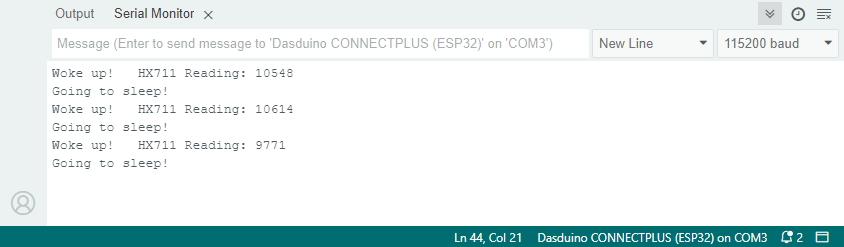
HX711 Sensor Serial Monitor output
deepSleep.ino
Example file for utilizing deep sleep while using the HX711