PCF85063A - Setting up an alarm
With the RTC, it is possible to set an alarm that sends an interrupt signal when triggered from the INT pin. First, we need to define on which pin we want to listen for an interrupt; for this example, we pick GPIO4. We also need to decide which function will be called when an interrupt occurs:
Connections for this example
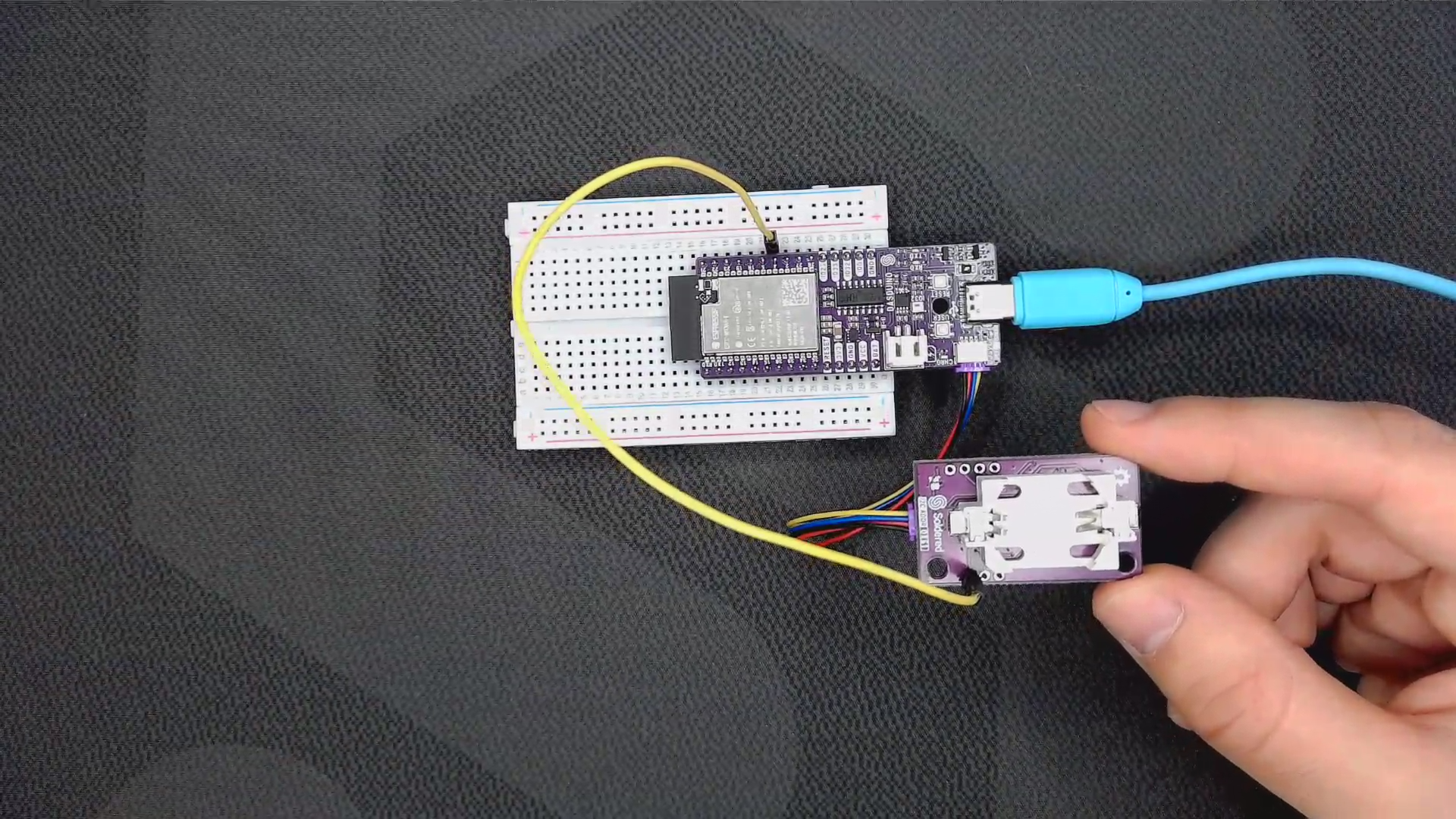
Setting up the alarm
//...

// Pin on the Dasduino that is connected to the INT pin on the RTC
const uint8_t InterruptPin = 4;

// Function that will be called when an interrupt occurs
void IRAM_ATTR alarm() {
 Serial.println("ALARM TRIGGERED");
}

//...
Next, in the setup() function, we must attach the interrupt to the pin and specify the time when we want the alarm to be triggered. For this example, we set the alarm to go off at the 59th minute of every hour:
void setup()
{
  Serial.begin(115200);
  rtc.begin();

  pinMode(InterruptPin, INPUT_PULLUP);

  // Attach interrupt to the specified pin and have it call the alarm() function when a falling edge is detected
  attachInterrupt(InterruptPin, alarm, FALLING);;

  // setTime(hour, minute, sec);
  rtc.setTime(12, 57, 00); // 24H mode, ex. 12:57:00
  // setDate(weekday, day, month, yr);
  rtc.setDate(1, 31, 3, 2025); // 0 for Sunday, ex. Monday, 31.3.2025.
  // Enter when the alarm should go off, format is: seconds, minutes, hours, day, weekday, month;
  rtc.setAlarm(00, 59, 99, 99, 99); // use 99 if no alarm

}
rtc.setAlarm(uint8_t alarm_second, uint8_t alarm_minute, uint8_t alarm_hour, uint8_t alarm_day, uint8_t alarm_weekday)
Sets an alarm interrupt
Returns value: None
Function parameters:
| Type | Name | Description |
|---|---|---|
uint8_t | alarm_second | What second the alarm will go off |
uint8_t | alarm_minute | What minute the alarm will go off |
uint8_t | alarm_hour | What hour the alarm will go off |
uint8_t | alarm_day | What day the alarm will go off |
uint8_t | alarm_weekday | What weekday the alarm will go off |
In the loop() function, we display the current time and date every second, just as we did in the previous example:
void loop()
{
    // Function that works as in the previous example we covered
    printCurrentTime();
    delay(1000);
}
When the alarm is triggered, an interrupt occurs and we print the message "ALARM TRIGGERED" to the serial monitor:
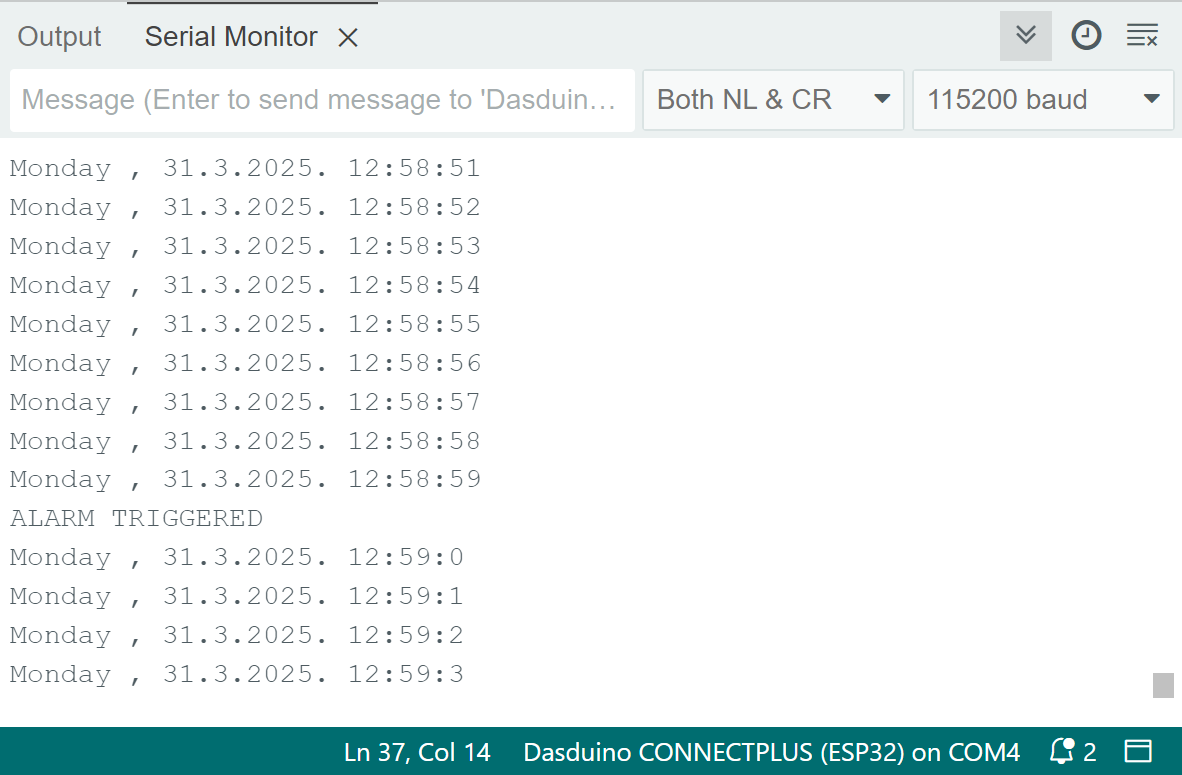
Full example
The full example is listed below:
#include "PCF85063A-SOLDERED.h"

// Create an instance of the RTC object
PCF85063A rtc;

// Pin on the Dasduino that is connected to the INT pin on the RTC
const uint8_t InterruptPin = 4;

// Function that will be called when an interrupt occurs
void IRAM_ATTR alarm() {
 Serial.println("ALARM TRIGGERED");
}

void setup()
{
  Serial.begin(115200);
  rtc.begin();

  pinMode(InterruptPin, INPUT_PULLUP);
  attachInterrupt(InterruptPin, alarm, FALLING);;

  //  setTime(hour, minute, sec);
  rtc.setTime(12, 57, 00); // 24H mode, ex. 12:57:00
  //  setDate(weekday, day, month, yr);
  rtc.setDate(1, 31, 3, 2025); // 0 for Sunday, ex. Saturday, 16.5.2020.
  //  setAlarm(alarm_second, alarm_minute, alarm_hour, alarm_day, alarm_weekday);
  rtc.setAlarm(00, 59, 99, 99, 99); // use 99 if no alarm

}

void loop()
{
    // Function that works as in the previous example we covered
    printCurrentTime();
    delay(1000);
}

void printCurrentTime()
{
    switch (rtc.getWeekday()) // Get weekday, 0 is Sunday and decode to string
    {
    case 0:
        Serial.print("Sunday, ");
        break;
    case 1:
        Serial.print("Monday, ");
        break;
    case 2:
        Serial.print("Tuesday, ");
        break;
    case 3:
        Serial.print("Wednesday, ");
        break;
    case 4:
        Serial.print("Thursday, ");
        break;
    case 5:
        Serial.print("Friday, ");
        break;
    case 6:
        Serial.print("Saturday, ");
        break;
    }

    Serial.print(rtc.getDay());    // Function for getting day in month
    Serial.print(".");
    Serial.print(rtc.getMonth());  // Function for getting month
    Serial.print(".");
    Serial.print(rtc.getYear());   // Function for getting year
    Serial.print(". ");
    Serial.print(rtc.getHour());   // Function for getting hours
    Serial.print(":");
    Serial.print(rtc.getMinute()); // Function for getting minutes
    Serial.print(":");
    Serial.println(rtc.getSecond()); // Function for getting seconds
}