Rfid - 125kHz RFID tag reader board (Qwiic) - reading example
This page contains some simple examples with function documentation on how to use the 125kHz RFID Tag Reader Board (I2C).
Initialization
To start working with the 125kHz RFID Tag Reader Board, you need to set up your Arduino environment. Firstly, include the required library, configure the pins, and initialize the RFID reader in the setup() function. The checkHW() function can be used to verify that the hardware is properly connected:
// Include breakout-specific library
#include "RFID-SOLDERED.h"

// RFID library constructor (easyC mode)
Rfid rfid;

// RFID INT pin is connected to D2 of Dasduino Core
#define INT_PIN 2

// Flag for interrupt event
volatile bool rfidIntFlag = false;

// Interrupt function to set the flag
void isr()
{
    rfidIntFlag = true;
}

void setup()
{
    // Initialize serial communication// Include breakout-specific library
#include "RFID-SOLDERED.h"

// RFID library constructor (easyC mode)
Rfid rfid;
}

void setup()
{
    // Initialize serial communication
    Serial.begin(115200);

    // Initialize RFID library in easyC mode (default I2C address is 0x30)
    // You can specify a different I2C address if needed, e.g., rfid.begin(0x32);
    rfid.begin();

    // Check hardware connections to the module
    if (!rfid.checkHW())
    {
        Serial.println("No module detected, check wiring and I2C address!");
        while (1)
        {
            delay(1); // Stop execution if hardware is not detected
        }
    }

    Serial.println("Place your tag near RFID antenna");
}
//...
rfid.checkHW()
Checks whether the RFID module is properly connected and operational. This function verifies hardware connections and communication settings.
Returns value: Returns true: If hardware is detected and communication is successful. Returns false: If hardware is not detected or there is a communication issue.
Reading RFID Tags
To read an RFID tag, continuously check for new data in the loop() function. If a valid tag is detected, retrieve and display its ID and raw data as shown below:
void loop()
{
    // Check if valid tag data is available
    if (rfid.available())
    {
        // Read and print tag ID and raw data
        Serial.print("Tag available! Tag ID: ");
        Serial.print(rfid.getId());
        Serial.print(" RAW RFID Data: ");
        rfid.printHex64(rfid.getRaw()); // Print raw data as hexadecimal
        Serial.println();

        // Optionally clear RFID data from the breakout
        // rfid.clear();
    }
}
rfid.getId()
Retrieves the unique ID of the detected RFID tag.
Returns value: Returns an integer representing the unique ID of the tag.
rfid.printHex64()
Prints the full raw RFID data in hexadecimal format, including header, data, and parity bits.
Returns value: Outputs raw 64-bit RFID data to the serial monitor.
Function parameters:
| Type | Name | Description |
|---|---|---|
uint64_t | data | Raw RFID data to be printed |
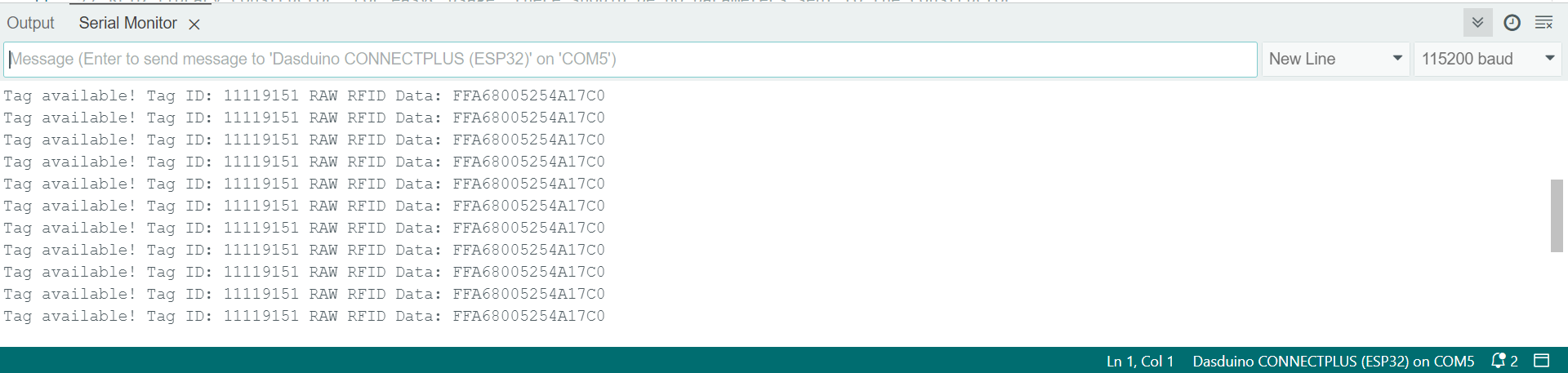
Full example
Here’s a full example that initializes the RFID reader, waits for tags to be scanned, and prints their ID and raw data over Serial at 115200 baud:
// Include breakout-specific library
#include "RFID-SOLDERED.h"

// Create an RFID object in easyC mode
Rfid rfid;

void setup()
{
    Serial.begin(115200); // Initialize serial communication

    rfid.begin(); // Initialize RFID reader (default I2C address is 0x30)

    if (!rfid.checkHW()) // Verify hardware connection
    {
        Serial.println("No module detected, check wiring!");
        while (1)
        {
            delay(1); // Stop execution on error
        }
    }

    Serial.println("Place your tag near RFID antenna");
}

void loop()
{
    if (rfid.available()) // Check if valid tag data is available
    {
        Serial.print("Tag available! Tag ID: ");
        Serial.print(rfid.getId());
        Serial.print(" RAW RFID Data: ");
        rfid.printHex64(rfid.getRaw());
        Serial.println();

        // Optionally clear RFID data from breakout
        // rfid.clear();
    }
}
readTagIDWithEasyC.ino
Example code for reading tags with the 125kHz RFID Tag Reader Board using I2C communication.