Tca9548A - Arduino example
This page contains an example for setting up 2 APDS-9960 sensors with the I2C multiplexer TCA9548A.
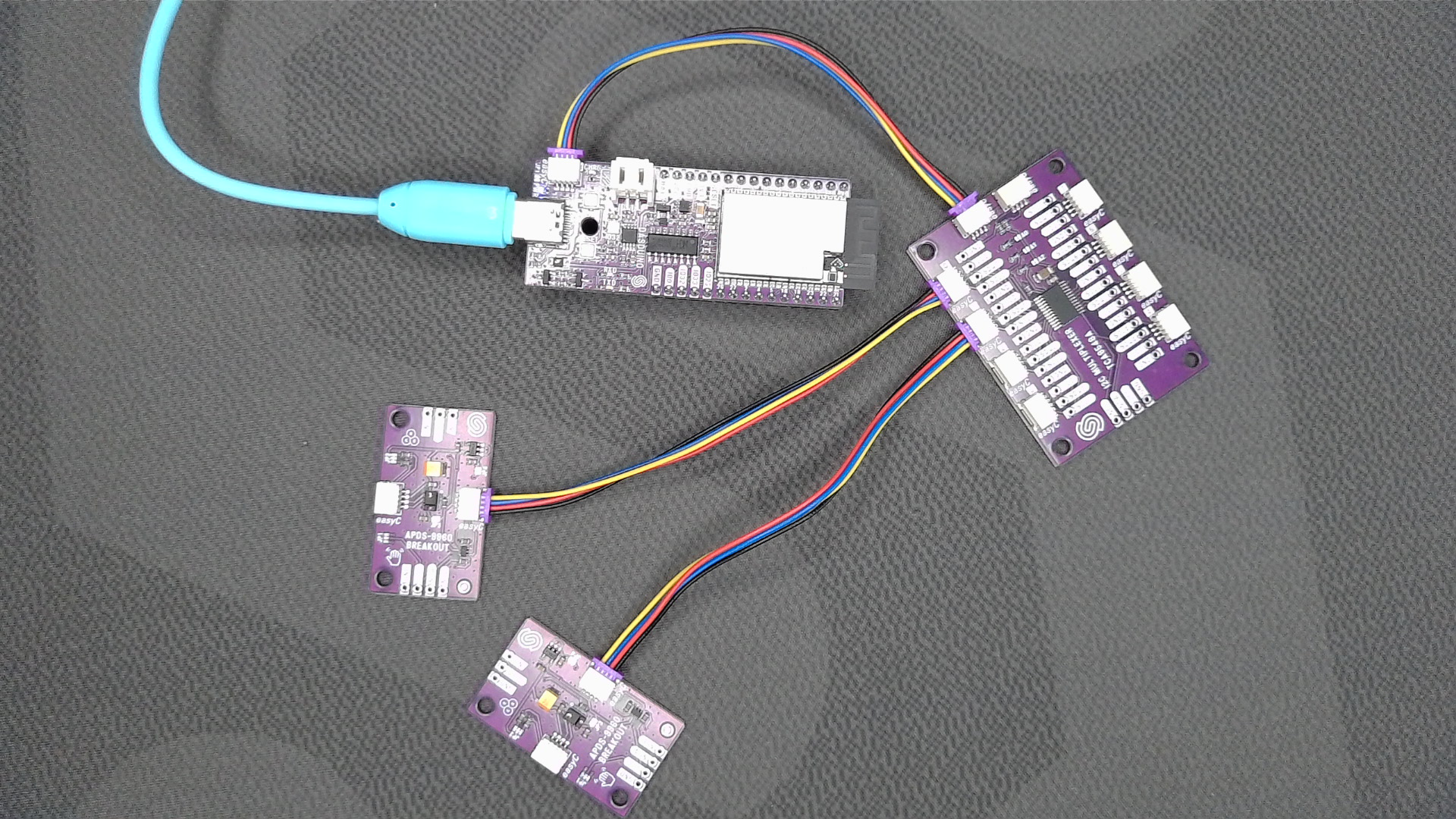
Connections for this example
Simply connect the sensors via Qwiic to the multiplexer board. They have the same I2C address, so they usually couldn't be used from the same microcontroller board.
Full example
In this example, we first include the necessary libraries for the TCA9548A I2C multiplexer and APDS-9960 sensors. We then create instances of the multiplexer and sensors. In the setup() function, we initialize the I2C communication with the multiplexer and configure each sensor on its respective channel. The multiplexer ensures that each sensor operates independently without address conflicts.
#include "TCA9548A-SOLDERED.h"
#include "APDS9960-SOLDERED.h"
#include <Arduino.h>

// Create objects for the multiplexer and APDS-9960 sensors
TCA9548A I2CMux; // Default address is 0x70
APDS_9960 APDS1; // APDS-9960 on Channel 0
APDS_9960 APDS2; // APDS-9960 on Channel 1

// Variables for sensor data
int proximity1 = 0, proximity2 = 0;
int r1 = 0, g1 = 0, b1 = 0;
int r2 = 0, g2 = 0, b2 = 0;
unsigned long lastUpdate = 0;

void setup()
{
    Serial.begin(115200); // Start serial communication with PC
    delay(1000);          // Relax...

    // Initialize the I2C multiplexer
    I2CMux.begin();       // Initialize multiplexer
    I2CMux.closeAll();    // Ensure all channels are closed initially

    // Initialize APDS-9960 sensor on Channel 0
    I2CMux.openChannel(0);
    if (!APDS1.begin())
    {
        Serial.println("Error initializing APDS-9960 sensor on Channel 0.");
        while (true)
            ; // Stop forever
    }
    else
    {
        Serial.println("APDS-9960 sensor initialized successfully on Channel 0.");
    }
    I2CMux.closeChannel(0);

    // Initialize APDS-9960 sensor on Channel 1
    I2CMux.openChannel(1);
    if (!APDS2.begin())
    {
        Serial.println("Error initializing APDS-9960 sensor on Channel 1.");
        while (true)
            ; // Stop forever
    }
    else
    {
        Serial.println("APDS-9960 sensor initialized successfully on Channel 1.");
    }
    I2CMux.closeChannel(1);
}

void loop()
{
    // Read data from APDS-9960 sensor on Channel 0
    I2CMux.openChannel(0);

    if (APDS1.proximityAvailable())
    {
        proximity1 = APDS1.readProximity(); // Read proximity from Sensor 1
    }

    if (APDS1.colorAvailable())
    {
        APDS1.readColor(r1, g1, b1); // Read color from Sensor 1
    }

    I2CMux.closeChannel(0);

    delay(100); // Wait before switching to the next channel

    // Read data from APDS-9960 sensor on Channel 1
    I2CMux.openChannel(1);

    if (APDS2.proximityAvailable())
    {
        proximity2 = APDS2.readProximity(); // Read proximity from Sensor 2
    }

    if (APDS2.colorAvailable())
    {
        APDS2.readColor(r2, g2, b2); // Read color from Sensor 2
    }

    I2CMux.closeChannel(1);

    // Print updates every 1000 ms
    if (millis() - lastUpdate > 1000)
    {
        lastUpdate = millis();

        Serial.print("Sensor 1 - PR=");
        Serial.print(proximity1);
        Serial.print(" RGB=");
        Serial.print(r1);
        Serial.print(",");
        Serial.print(g1);
        Serial.print(",");
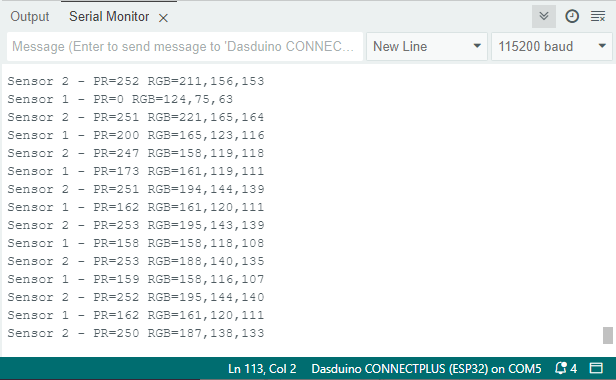
        Serial.println(b1);

        Serial.print("Sensor 2 - PR=");
        Serial.print(proximity2);
        Serial.print(" RGB=");
        Serial.print(r2);
        Serial.print(",");
        Serial.print(g2);
        Serial.print(",");
        Serial.println(b2);
    }

    delay(100); // Small delay before repeating the loop
}
I2CMux.begin()
Initializes the TCA9548A I2C multiplexer and sets up communication.
Returns value: None
I2CMux.openChannel(uint8_t channel)
Opens a specific channel on the I2C multiplexer to enable communication with devices on that channel.
Returns value: None
Function parameters:
| Type | Name | Description |
|---|---|---|
uint8_t | channel | Channel number to open (0-7). |
I2CMux.closeChannel(uint8_t channel)
Closes a specific channel on the I2C multiplexer, isolating devices on that channel.
Returns value: None
Function parameters:
| Type | Name | Description |
|---|---|---|
uint8_t | channel | Channel number to open (0-7). |
I2CMux.closeAll()
Closes all channels on the I2C multiplexer, ensuring no devices are connected to the main bus.
Returns value: None