W5500 - NTP example
This page contains a simple example and function documentation demonstrating how to implement the Network Time Protocol (NTP):
ℹ️
This example is a modification of a tutorial from
docs.arduino.cc. A link to the specific example, as well as many others, can be found at the bottom of the page!#include <SPI.h>
#include <Ethernet.h>
#include <EthernetUdp.h>
// Enter a MAC address for your controller below.
byte mac[] = {
0xDE, 0xAD, 0xBE, 0xEF, 0xFE, 0xED
};
unsigned int localPort = 8888; // local port to listen for UDP packets
const char timeServer[] = "time.nist.gov"; // time.nist.gov NTP server
const int NTP_PACKET_SIZE = 48; // NTP time stamp is in the first 48 bytes of the message
byte packetBuffer[NTP_PACKET_SIZE]; // buffer to hold incoming and outgoing packets
// A UDP instance to let us send and receive packets over UDP
EthernetUDP Udp;
void setup() {
Ethernet.init(5); // You can use Ethernet.init(pin) to configure the CS pin
// Open serial communications and wait for the port to open:
Serial.begin(115200);
while (!Serial) {
; // wait for serial port to connect. Needed for native USB port only
}
// start Ethernet and UDP
if (Ethernet.begin(mac) == 0) {
Serial.println("Failed to configure Ethernet using DHCP");
// Check for Ethernet hardware present
if (Ethernet.hardwareStatus() == EthernetNoHardware) {
Serial.println("Ethernet shield was not found. Sorry, can't run without hardware. :(");
} else if (Ethernet.linkStatus() == LinkOFF) {
Serial.println("Ethernet cable is not connected.");
}
// no point in carrying on, so do nothing forevermore:
while (true) {
delay(1);
}
}
Udp.begin(localPort);
}
void loop() {
sendNTPpacket(timeServer); // send an NTP packet to a time server
// wait to see if a reply is available
delay(1000);
if (Udp.parsePacket()) {
// We've received a packet, read the data from it
Udp.read(packetBuffer, NTP_PACKET_SIZE); // read the packet into the buffer
// the timestamp starts at byte 40 of the received packet and is four bytes,
// or two words, long. First, extract the two words:
unsigned long highWord = word(packetBuffer[40], packetBuffer[41]);
unsigned long lowWord = word(packetBuffer[42], packetBuffer[43]);
// combine the four bytes (two words) into a long integer
// this is NTP time (seconds since Jan 1 1900):
unsigned long secsSince1900 = highWord << 16 | lowWord;
Serial.print("Seconds since Jan 1 1900 = ");
Serial.println(secsSince1900);
// now convert NTP time into everyday time:
Serial.print("Unix time = ");
// Unix time starts on Jan 1 1970. In seconds, that's 2208988800:
const unsigned long seventyYears = 2208988800UL;
// subtract seventy years:
unsigned long epoch = secsSince1900 - seventyYears;
// print Unix time:
Serial.println(epoch);
// print the hour, minute and second:
Serial.print("The UTC time is "); // UTC is the time at Greenwich Meridian (GMT)
Serial.print((epoch % 86400L) / 3600); // print the hour (86400 equals secs per day)
Serial.print(':');
if (((epoch % 3600) / 60) < 10) {
// In the first 10 minutes of each hour, we'll want a leading '0'
Serial.print('0');
}
Serial.print((epoch % 3600) / 60); // print the minute (3600 equals secs per minute)
Serial.print(':');
if ((epoch % 60) < 10) {
// In the first 10 seconds of each minute, we'll want a leading '0'
Serial.print('0');
}
Serial.println(epoch % 60); // print the second
}
// wait ten seconds before asking for the time again
delay(10000);
Ethernet.maintain();
}
// send an NTP request to the time server at the given address
void sendNTPpacket(const char * address) {
// set all bytes in the buffer to 0
memset(packetBuffer, 0, NTP_PACKET_SIZE);
// Initialize values needed to form an NTP request
// (see URL above for details on the packets)
packetBuffer[0] = 0b11100011; // LI, Version, Mode
packetBuffer[1] = 0; // Stratum, or type of clock
packetBuffer[2] = 6; // Polling Interval
packetBuffer[3] = 0xEC; // Peer Clock Precision
// 8 bytes of zero for Root Delay & Root Dispersion
packetBuffer[12] = 49;
packetBuffer[13] = 0x4E;
packetBuffer[14] = 49;
packetBuffer[15] = 52;
// all NTP fields have been given values, now
// you can send a packet requesting a timestamp:
Udp.beginPacket(address, 123); // NTP requests are to port 123
Udp.write(packetBuffer, NTP_PACKET_SIZE);
Udp.endPacket();
}
Serial Monitor output
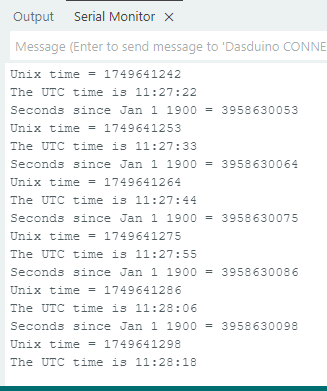
Output from Serial Monitor
Full example
Check out the original example from docs.arduino.cc below: