W5500 - WebClient example
This example shows you how to make an HTTP request using the W5500 module. It returns a GET request from a simple httpbin websote. The results are viewable as HTML in the Serial Monitor.
docs.arduino.cc. A link to the specific example and many more can be found at the bottom of the page!
#include <SPI.h>
#include <Ethernet.h>

// Define the chip select pin for your Ethernet shield (adjust if needed)
#define CS_PIN 5

// MAC address for Ethernet shield
byte mac[] = { 0xDE, 0xAD, 0xBE, 0xEF, 0xFE, 0xED };

// Fallback static IP if DHCP fails
IPAddress ip(192, 168, 0, 177);
IPAddress myDns(192, 168, 0, 1);

// Host (no protocol!)
char server[] = "httpbin.org";  // Must be HTTP only
EthernetClient client;

// Speed test variables
unsigned long beginMicros, endMicros;
unsigned long byteCount = 0;
bool printWebData = true;

void setup() {
  Ethernet.init(CS_PIN);
  Serial.begin(115200);
  while (!Serial) { delay(1); }

  Serial.println("Initializing Ethernet with DHCP...");
  if (Ethernet.begin(mac) == 0) {
    Serial.println("DHCP failed. Using static IP.");
    if (Ethernet.hardwareStatus() == EthernetNoHardware) {
      Serial.println("No Ethernet hardware found.");
      while (true) delay(1);
    }
    if (Ethernet.linkStatus() == LinkOFF) {
      Serial.println("Ethernet cable is not connected.");
    }
    Ethernet.begin(mac, ip, myDns);
  } else {
    Serial.print("DHCP assigned IP: ");
    Serial.println(Ethernet.localIP());
  }

  delay(1000);

  Serial.print("Connecting to ");
  Serial.println(server);

  if (client.connect(server, 80)) {
    Serial.println("Connected! Sending HTTP GET request...");

    // Send proper HTTP GET request to httpbin.org
    client.println("GET /get HTTP/1.1");
    client.println("Host: httpbin.org");
    client.println("Connection: close");
    client.println();

    beginMicros = micros(); // Start timing
  } else {
    Serial.println("Connection failed.");
  }
}

void loop() {
  int len = client.available();
  if (len > 0) {
    byte buffer[80];
    if (len > 80) len = 80;
    client.read(buffer, len);
    if (printWebData) {
      Serial.write(buffer, len);  // Print received data to Serial
    }
    byteCount += len;
  }

  if (!client.connected()) {
    endMicros = micros();
    Serial.println("\nDisconnected.");

    float seconds = (endMicros - beginMicros) / 1000000.0;
    float rate = (float)byteCount / seconds / 1000.0;

    Serial.print("Received ");
    Serial.print(byteCount);
    Serial.print(" bytes in ");
    Serial.print(seconds, 4);
    Serial.print(" seconds, rate = ");
    Serial.print(rate, 2);
    Serial.println(" kbytes/second");

    client.stop();
    while (true) delay(1);  // Stop execution
  }
}
Ethernet.begin()
Initializes the Ethernet library and network settings.
Returns value: version Ethernet.begin(mac) returns true on success, false on error. Other versions don't return anything.
Function parameters:
| Type | Name | Description |
|---|---|---|
6 byte array | mac | MAC address for the device. |
4 byte array | ip | Optional, IP address of the device. |
4 byte array | dns | Optional, IP address of the DNS server. |
4 byte array | gateway | Optional, IP address of the network gateway. |
4 byte array | subnet | Optional, subnet mask of the network. |
Ethernet.hardwareStatus()
Tells which WIZnet Ethernet controller chip was detected during Ethernet.begin(), if any.
Returns type: None
Ethernet.linkStatus()
Tells whether the link is active, only available when using the W5200 and W5500 chips.
Returns value: Returns link status; Unknown, LinkON, or LinkOFF.
client.connect()
Connects to a specified IP address and port.
Returns value: Returns true if the connection succeeds, false if not.
Function parameters:
| Type | Name | Description |
|---|---|---|
4 byte array | ip | The IP address that the client will connect to. |
String | servername | The domain name the client will connect to. |
int | port | The port that the client will connect to. |
client.write()
Write data to the server the client is connected to.
Returns type: int
Returns value: Number
Function parameters:
| Type | Name | Description |
|---|---|---|
byte or char | val | A value to send as a single byte or char. |
byte or char | buf | An array to send as a series of bytes or chars. |
int | len | The length of the buffer. |
client.stop()
Disconnect from the server.
Returns type: None
Serial Monitor output
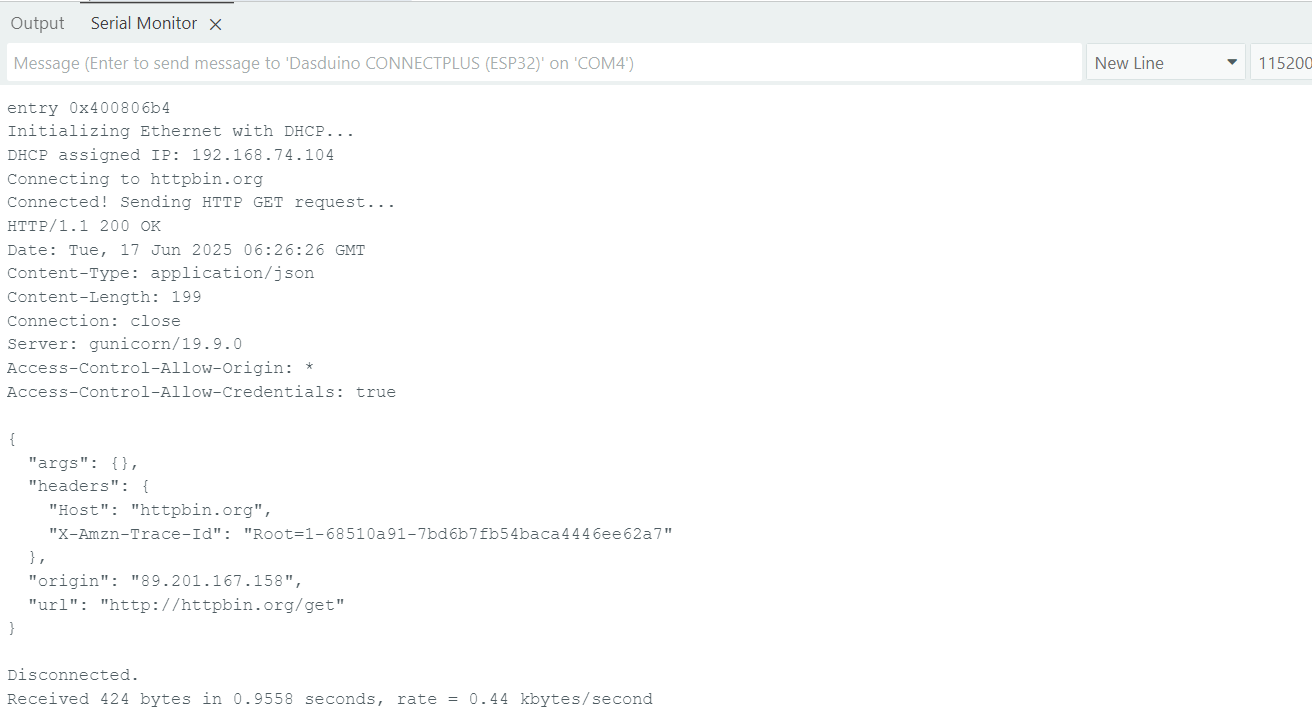
Full example
Check out the original example from docs.arduino.cc below: