Thermocouple sensor AD8495 - Measuring temperature (Arduino)
This page contains some simple examples with function documentation on how to take measurements using the AD8495 Thermocouple sensor.
Initialization
To use the AD8495 sensor, first include the required library and create the sensor object.
// Include the library
#include <AD8495-SOLDERED.hpp>

int analogPin = A1;
int resolution = 10;

// Create an instance of the sensor
// The reference voltage indicates what voltage the breakout board is connected to; we recommend 3.3V
AD8495 sensor(analogPin, resolution, 3.3);
Measuring temperature
To get temperature values, call getTemperatureC() to obtain the temperature in Celsius or getTemperatureF() to obtain the temperature in Fahrenheit.
float tempC = sensor.getTemperatureC(10);
float tempF = sensor.getTemperatureF(10);
sensor.getTemperatureC(uint16_t samples)
Returns a calculated temperature value in Celsius.
Returns value: uint16_t value.
Function parameters:
| Type | Name | Description |
|---|---|---|
uint16_t | sample | Number of samples from which an average will be taken. |
sensor.getTemperatureF(uint16_t samples)
Returns a calculated temperature value in Fahrenheit.
Returns value: uint16_t value.
Function parameters:
| Type | Name | Description |
|---|---|---|
uint16_t | sample | Number of samples from which an average will be taken. |
Full example
Try all of the above-mentioned functions in this full example, which prints the measured data over Serial at 115200 baud:
/**
 **************************************************
 *
 * @file        MeasureTemperatureAndVoltage.ino
 *
 * @brief       Example showing how to initialize the AD8495 Thermocouple sensor
 *              and use it to measure the output voltage as well as the temperature
 *              in Celsius and Fahrenheit
 *
 * @link        solde.red/333053
 *
 * @authors     Josip Šimun Kuči @ soldered.com
 ***************************************************/
#include "AD8495-SOLDERED.hpp"

#ifdef __AVR__
int analogPin = A1;
int resolution = 10;
#elif ESP32 || ESP8266
int analogPin = 32;
int resolution = 12;
#else // If you're using alternative boards, enter pin and resolution here
int analogPin = 1;
int resolution = 12;
#endif
// Create an AD8495 instance on the analog pin
// The reference voltage indicates what voltage the breakout board is connected to; we recommend 3.3V
AD8495 sensor(analogPin, resolution, 3.3);  // 3.3V reference

void setup() {
  // Initialize serial communication
  Serial.begin(115200);
  // Wait for serial connection
  while (!Serial);

  // Optional: apply a temperature offset for calibration
  // sensor.setTemperatureOffset(4.0);  // Shift temperature readings by 4°C

  Serial.println("AD8495 Thermocouple Reader");
  Serial.println("Sampling every 2 seconds...");
}

void loop() {
  // Read averaged values using 10 samples
  float tempC = sensor.getTemperatureC(10);
  float tempF = sensor.getTemperatureF(10);
  float voltage = sensor.readVoltage(10);

  // Print results
  Serial.print("Voltage: ");
  Serial.print(voltage, 4);
  Serial.println(" V");

  Serial.print("Temperature: ");
  Serial.print(tempC, 2);
  Serial.print(" °C / ");
  Serial.print(tempF, 2);
  Serial.println(" °F");

  Serial.println("------------------------------");

  delay(2000);  // Wait 2 seconds before the next reading
}
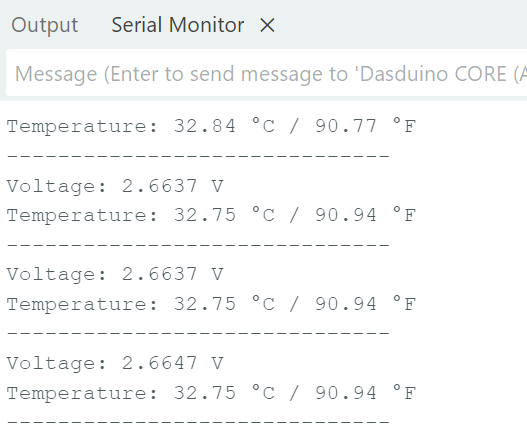
MeasureTemperatureAndVoltage.ino
Example showing how to initialize the AD8495 Thermocouple sensor and use it to measure the output voltage as well as the temperature in Celsius and Fahrenheit