MicroPython - Measuring temperature
This page contains some simple examples with function documentation on how to take measurements using the AD8495 Thermocouple sensor.
Initialization
To use the AD8459 sensor, first include the required module and create the sensor object.
from ad8495 import AD8495

# Initialize the sensor on GPIO 32
# ESP32 ADCs typically default to 12-bit (0-4095)
# Reference voltage is usually 3.3V

sensor=AD8495(pin=32, resolution_bits=12, reference_voltege=3.3)
Measuring temperature
To get tempperature values, call getTemperatureC() to obtain the temperature in Celsius or getTemperatureF() to obtain the temperature in Fahrenheit.
tempC = sensor.getTemperatureC(samples=10)
tempF = sensor.getTemperatureF(samples=10)
sensor.getTemperatureC(samples)
Returns a calculated temperature values in Celsius.
Returns value: Float value.
Function parameters:
| Type | Name | Description |
|---|---|---|
number | sample | Number of samples from which an average will be taken. |
sensor.getTemperatureF(samples)
Returns a calculated temperature values in Fahrenheit.
Returns value: Float value.
Function parameters:
| Type | Name | Description |
|---|---|---|
number | sample | Number of samples from which an average will be taken. |
Full example
In the full example we will add the time module so we can use the sleep() function. Try all the above-mentioned functions in this full example, which prints the measured data over Serial every 2 seconds:
# FILE: ad8495-measureTemperature&Voltage.py
# AUTHOR: Josip Šimun Kuči @ Soldered
# BRIEF:
# LAST UPDATED: 2025-07-02

from ad8495 import AD8495
from time import sleep

# Initialize the sensor on GPIO 32
# ESP32 ADCs typically default to 12-bit (0–4095)
# Reference voltage is usually 3.3V
sensor = AD8495(pin=32, resolution_bits=12, reference_voltage=3.3)

# Optional: apply a temperature offset for calibration
# sensor.setTemperatureOffset(4.0)  # uncomment to shift temperature readings by 4°C

print("AD8495 Thermocouple Reader (ESP32)")
print("Sampling every 2 seconds...")

# Infinite loop
while True:
    # Get temperature readings in celsius and fahrenheit as well as the raw voltage reading
    tempC = sensor.getTemperatureC(samples=10)
    tempF = sensor.getTemperatureF(samples=10)
    voltage = sensor.readVoltage(samples=10)

    # Print out all the values
    print("Voltage: {:.4f} V".format(voltage))
    print("Temperature: {:.2f} °C / {:.2f} °F".format(tempC, tempF))
    print("-" * 30)

    sleep(2)
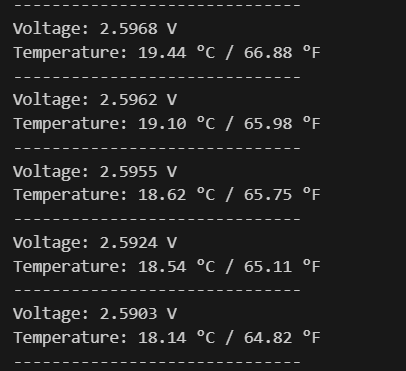
AD8495.py
Example showing how to initialize the AD8495 Thermocouple sensor and use it to measure the output voltage as well as the temperature in Celsius and Fahrenheit