BMP388 Pressure & Temperature Sensor - Forced measurement
In this example we will take forced measurements with the BMP388 sensor. Unlike a continous measuremnt, a forced measurements wakes up the sensor, takes a measurement and then puts it back to sleep.
Setting up
Setting up is done in the same way as it was done for taking a continous measurement:
from machine import Pin, I2C
from bmp388 import BMP388
import time

# If you aren't using the Qwiic connector, manually enter your I2C pins
# i2c = I2C(0, scl=Pin(22), sda=Pin(21))
# bmp388 = BMP388(i2c)

# Initialize sensor over Qwiic
bmp388 = BMP388()

# Set sea level pressure for accurate altitude readings
bmp388.setSeaLevelPressure(1025.0)
Taking measurements
When taking a forced measurement, we first ask the sensor for data and then we print it out to the REPL:
while True:
    # Request a new measurement
    bmp388.startForcedConversion()

    # Wait until data is ready
    while True:
        temperature, pressure, altitude = bmp388.getMeasurements()
        if temperature is not None:
            print(
                "{:.2f}*C   {:.2f}hPa   {:.2f}m".format(temperature, pressure, altitude)
            )
            break
        time.sleep(0.02)

    # Wait a little bit before next measurement
    time.sleep(1)
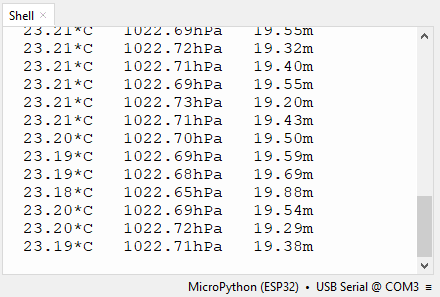
REPL output
Full Example
You can find the full example below:
from machine import Pin, I2C
from bmp388 import BMP388
import time

# If you aren't using the Qwiic connector, manually enter your I2C pins
# i2c = I2C(0, scl=Pin(22), sda=Pin(21))
# bmp388 = BMP388(i2c)

# Initialize sensor over Qwiic
bmp388 = BMP388()

# Set sea level pressure for accurate altitude readings
bmp388.setSeaLevelPressure(1025.0)

while True:
    # Request a new measurement
    bmp388.startForcedConversion()

    # Wait until data is ready
    while True:
        temperature, pressure, altitude = bmp388.getMeasurements()
        if temperature is not None:
            print(
                "{:.2f}*C   {:.2f}hPa   {:.2f}m".format(temperature, pressure, altitude)
            )
            break
        time.sleep(0.02)

    # Wait a little bit before next measurement
    time.sleep(1)