BQ27441 – Measuring battery information (example)
This page contains an example with function documentation on how to get battery readings (state of charge, voltage and current).
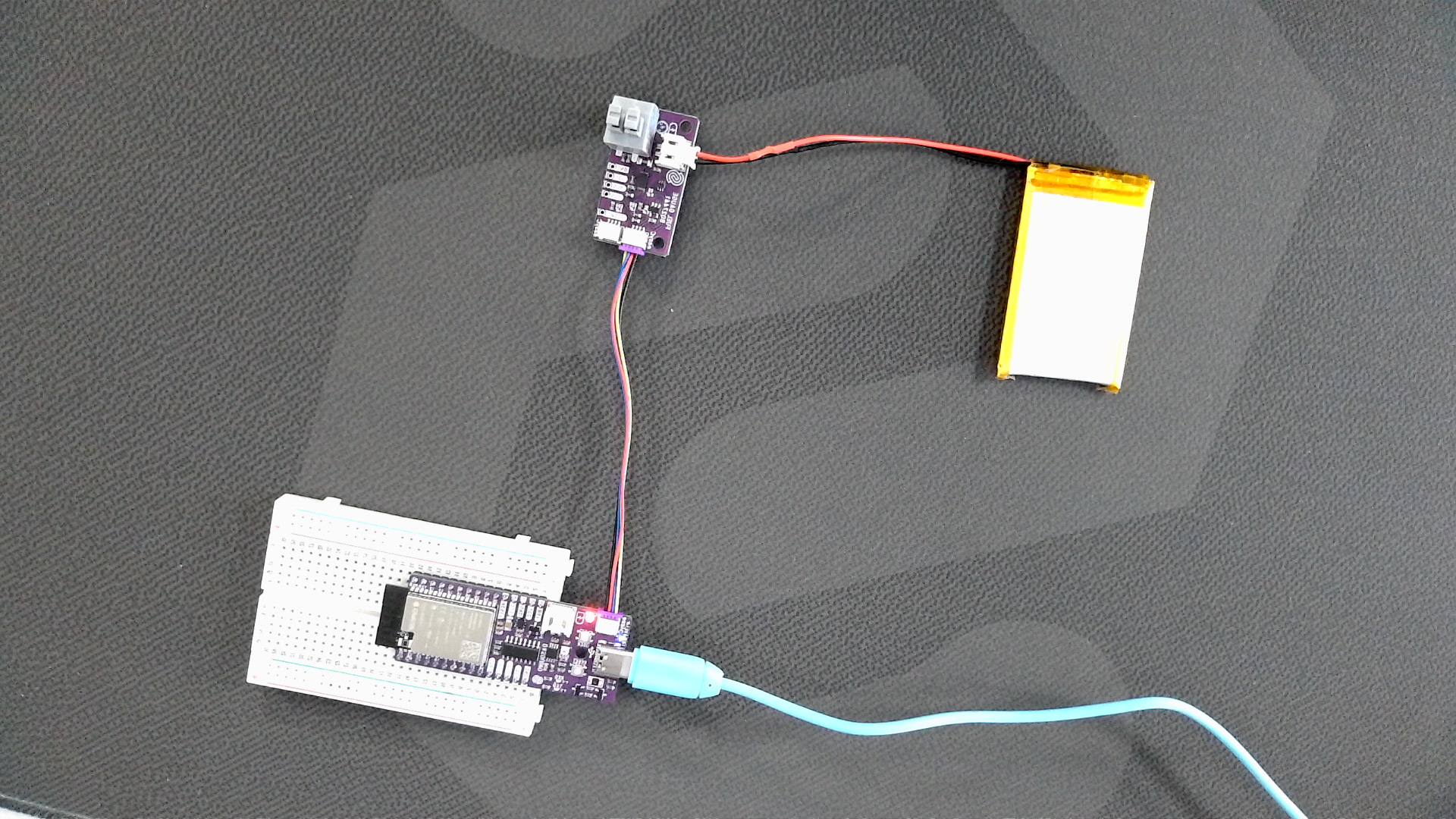
Connections for this example
Initialization
To use the BQ27441 sensor, first, include the required library, create the sensor object and initialize the sensor in the setup() function. You can use the return of begin() to check if everything is connected correctly:
//Include the library
#include <BQ27441-G1-SOLDERED.h>

BQ27441 battery;

const unsigned int BATTERY_CAPACITY = 1200; //Put the value of your battery

void setup(){
    Serial.begin(115200);
    //Initialize sensor
    if (!battery.begin()) // begin() will return true if communication is successful
    {
        // If communication fails, print an error message and loop forever.
        Serial.println("Error: Unable to communicate with BQ27441.");
        Serial.println("  Check wiring and try again.");
        while (1)
            delay(1);
    }

}
//...
battery.begin()
Initializes the BQ27441 sensor, setting up communication over I2C and verifying its presence.
Returns value: Returns true if initialization is successful, false otherwise.
Taking measurements
Before taking measurements, call soc()˝ for state of charge, voltage() for battery voltage, current() for average current, capacity() to read battery capacity, power() for average power draw and soh() for state of health.
#include <BQ27441-G1-SOLDERED.h>

BQ27441 battery;

// Set BATTERY_CAPACITY to the design capacity of your battery in mAh.
const unsigned int BATTERY_CAPACITY = 1200;

void setup()
{
    // Begin serial communication
    Serial.begin(115200);

    // Use battery.begin() to initialize the BQ27441-G1A and confirm that it's
    // connected and communicating.
    if (!battery.begin()) // begin() will return true if communication is successful
    {
        // If communication fails, print an error message and loop forever.
        Serial.println("Error: Unable to communicate with BQ27441.");
        Serial.println("  Check wiring and try again.");
        while (1)
            delay(1);
    }
    Serial.println("Connected to BQ27441!");

    // Uset battery.setCapacity(BATTERY_CAPACITY) to set the design capacity
    // of your battery.
    battery.setCapacity(BATTERY_CAPACITY);
}

void loop()
{
    // Read battery stats from the BQ27441-G1A
    unsigned int soc = battery.soc();                   // Read state-of-charge (%)
    unsigned int volts = battery.voltage();             // Read battery voltage (mV)
    int current = battery.current(AVG);                 // Read average current (mA)
    unsigned int fullCapacity = battery.capacity(FULL); // Read full capacity (mAh)
    unsigned int capacity = battery.capacity(REMAIN);   // Read remaining capacity (mAh)
    int power = battery.power();                        // Read average power draw (mW)
    int health = battery.soh();                         // Read state-of-health (%)

    // Now print out those values:
    String toPrint = String(soc) + "% | ";
    toPrint += String(volts) + " mV | ";
    toPrint += String(current) + " mA | ";
    toPrint += String(capacity) + " / ";
    toPrint += String(fullCapacity) + " mAh | ";
    toPrint += String(power) + " mW | ";
    toPrint += String(health) + "%";

    Serial.println(toPrint);

    // Wait a bit
    delay(2000);
}
battery.soc()
Reads and returns specified state of charge measurement.
Returns value: Returns integer representation of charge measurement in %.
battery.voltage()
Reads and returns the battery voltage.
Returns value: Returns integer representation of voltage measurement in %.
battery.current()
Reads and returns the specified current measurement.
Returns value: Returns integer representation of voltage measurement in %.
Function parameters:
| Type | Name | Description |
|---|---|---|
current_measure | type | Optional, default is AVG. Command specifying the type of measurement to be performed. |
battery.capacity()
Reads and returns the specified current measurement.
Returns value: Returns integer representation of voltage measurement in %.
Function parameters:
| Type | Name | Description |
|---|---|---|
capacity_measure | type | Optional, default is FULL. Reads and returns the specified capacity measurement. |
battery.power()
Reads and returns measured average power.
Returns value: Returns integer representation of power measurement in mAh.
battery.soh()
Reads and returns specified state of health measurement.
Returns value: Returns specified state of health measurement in %, or status bits.
Function parameters:
| Type | Name | Description |
|---|---|---|
soh_measure | type | Optional, default is PERCENT. Reads and returns the specified state of health measurement. |
Full example
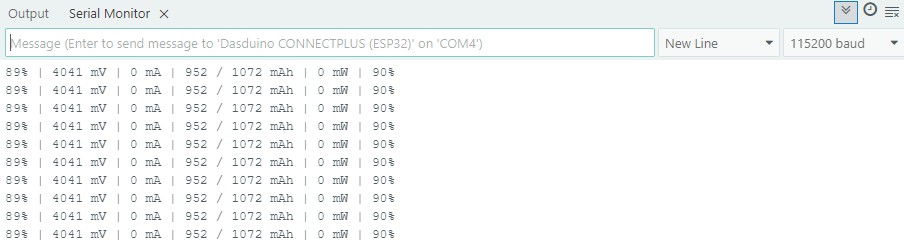
Try all of the above mentioned functions in this full example which prints out the measured temperature and humidity over Serial at 115200 baud:
BasicBatteryReading.ino
This example is to show how BQ27441-G1 can be used for basic battery readings.