MQ Gas Sensors – Debugging help example
You might want to check the raw voltage, method constants, the Rs/Ro ratio, and more. This can be achieved by using the serialDebug() function of the library.
When you have initialized the sensor (either Qwiic or Native), you can read the sensor measurements in the loop() function:
void loop()
{
  mq131.update();      // Update data; read voltage level from sensor
  mq131.readSensor();
  /*
  Prints all values from and about the sensor, used for calibration and debugging purposes. The format is:
  |ADC_In | Equation_V_ADC | Voltage_ADC | Equation_RS  | Resistance_RS | EQ_Ratio | Ratio (RS/R0) | Equation_PPM | PPM |
  */
  mq131.serialDebug();
  delay(500);        // Sampling frequency
}
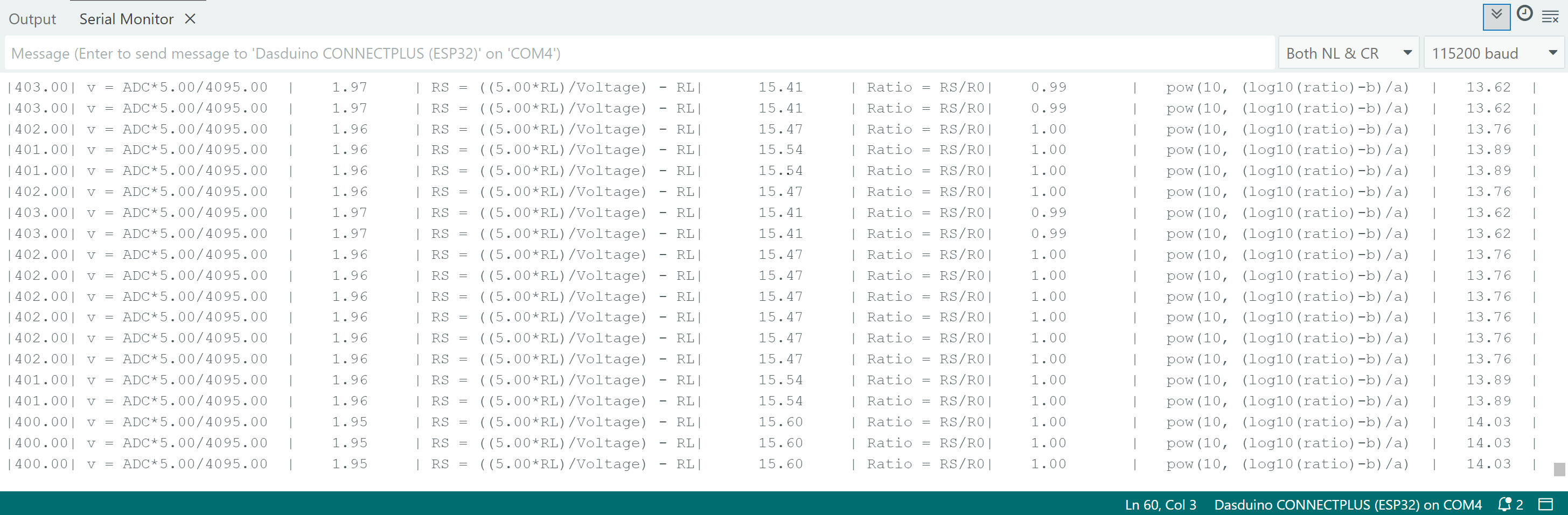
Debug print on serial monitor
mq131.serialDebug()
Prints all values from and about the sensor, used for calibration and debugging purposes
Returns value: None
Full example
See the full example below:
Debug-Print-Qwiic.ino
Debug print function example for Qwiic MQ sensors
Also check out the Native version of the example:
Debug-Print.ino
Debug print function example for Native MQ sensors
ℹ️
While this example covers the MQ131, the process is practically identical for every sensor. We encourage you to check out all the examples here