Rotary Encoder - Using the encoder (example)
This page contains some simple examples with function documentation on how to take readings unsing the rotary encoder.
Initialization
To use the rotary encoder, fist include the required library, create the sensor object and initialize the sensor in the setup() function. You can use the return of begin() to check if everything is connected correctly:
#include "Rotary-encoder-easyC-SOLDERED.h"

Rotary rotary;

void setup()
{
    // Initialize serial communication
    Serial.begin(115200);

    // Start I2C communication on default address (0x30)
    rotary.begin();

    // If you want another I2C address, enter it in the bracket
    // You can set another I2C address (0x31 - 0x37) by changing address switches on the breakout
    // NOTE: You have to restart breakout to apply the address change by unplugging and plugging
    // the easyC or USB-C from the Dasduino
    // rotary.begin(0x31);
}
//...
Rotary rotary
Creates rotary object
Returns value: none
rotary.begin()
Initializes the rotary encoder, setting up communication over I2C and verifying its presence.
Returns value: Returns true if initialization is successful, false otherwise.
Detecting rotation
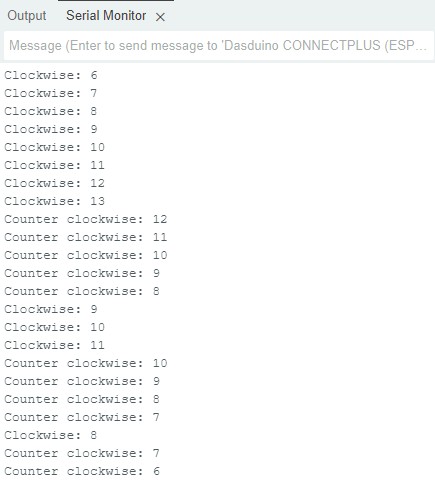
To get a reading, call getState(). Function returns the current state of the rotary encoder. It mst be in the loop() and run constanty to get proper readings.
int state = rotary.getState();

// If the state is zero or ROTARY_IDLE constant, the rotary encoder is not moving
if (state != ROTARY_IDLE)
{
    if (state == ROTARY_CW)
    {
        // If the state variable is equal to ROTARY_CW constant (6), the encoder is rotated clockwise
        // Print the message and internal counter variable
        Serial.print("Clockwise: ");

        // getCount function returns a counter variable. Counter add 1 if the encoder is rotated clockwise or
        // subtract 1 if the encoder is rotated counterclockwise.
        Serial.println(rotary.getCount());
    }

    if (state == ROTARY_CCW)
    {
        // If the state variable is equal to ROTARY_CCW constant (5), the encoder is rotated counterclockwise
        // Print the message and counter variable
        Serial.print("Counter clockwise: ");
        Serial.println(rotary.getCount());
    }
}
//...
rotary.getState()
Returns the curent state of the rotary encoder
Returns value: Returns true if initialization is successful, false otherwise.
Serial monitor output
Detecting button press
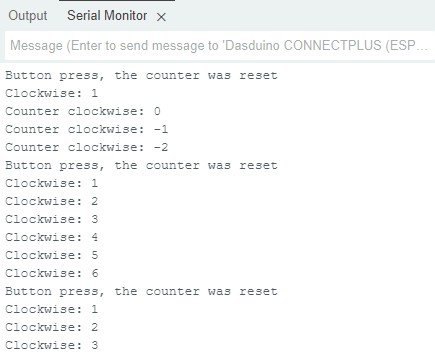
the rothary encoder contains an addintional button, to use it, press the shaft.
//...
    if (state == BTN_CLICK)
        {
            // If the state variable is equal to BTN_CLICK constant (1), the push button on the rotary encoder is
            // pressed

            // Reset the internal counter and print a message
            rotary.resetCounter();
            Serial.println("Button press, the counter was reset");
        }
//...
rotary.resetCounter()
resets the internal counter
Returns value: none
Serial monitor output
Full example
Try all of the above mentioned functions in this full example.
RotaryCounter.ino
Example file to show basic rotary encoder functionality