Apds 9960 - Gesture Detection
This page contains simple examples demonstrating sensor initialization and gesture detection using the APDS-9960 sensor.
Gesture Detection
In this code snippet, the loop() function continuously checks whether a gesture has been detected by the APDS-9960 sensor. The gestureAvailable() function is used to determine if a gesture is ready to be read. If a gesture is detected, the readGesture() function is called to retrieve it.
void loop()
{
    if (APDS.gestureAvailable())
    {
        // A gesture was detected; read it and print to the Serial Monitor
        int gesture = APDS.readGesture();

        switch (gesture)  // Determine which gesture was captured
        {
        case GESTURE_UP:
            Serial.println("Detected UP gesture");
            break;

        case GESTURE_DOWN:
            Serial.println("Detected DOWN gesture");
            break;

        case GESTURE_LEFT:
            Serial.println("Detected LEFT gesture");
            break;

        case GESTURE_RIGHT:
            Serial.println("Detected RIGHT gesture");
            break;

        default:
            // Ignore
            break;
        }
    }
}
APDS.gestureAvailable()
Enables the gesture sensor and checks if a gesture is available for reading.
Returns value: An integer: 1 if a gesture was detected, 0 otherwise.
APDS.readGesture()
Reads the detected gesture.
Returns value: An integer corresponding to a detected gesture (check table below).
| Integer | Gesture |
|---|---|
| -1 | GESTURE_NONE |
| 0 | GESTURE_UP |
| 1 | GESTURE_DOWN |
| 2 | GESTURE_LEFT |
| 3 | GESTURE_RIGHT |
Full example
Open the Serial Monitor at 115200 baud to observe detected gestures.
// Include the library
#include "APDS9960-SOLDERED.h"

// Create an APDS-9960 object
APDS_9960 APDS;

// Setup function, runs once
void setup()
{
    Serial.begin(115200); // Begin serial communication with the PC
    while (!Serial) // Wait until the serial becomes active
        ;

    if (!APDS.begin())  // Begin communication with the sensor
    {
        Serial.println("Error initializing the APDS-9960 sensor!");
        while(1); // Loop forever if the sensor is not available
    }

    Serial.println("Sensor initialized.");
}

void loop()
{
    if (APDS.gestureAvailable())
    {
        // A gesture was detected; read it and print to the Serial Monitor
        int gesture = APDS.readGesture();

        switch (gesture)  // Determine which gesture was captured
        {
        case GESTURE_UP:
            Serial.println("Detected UP gesture");
            break;

        case GESTURE_DOWN:
            Serial.println("Detected DOWN gesture");
            break;

        case GESTURE_LEFT:
            Serial.println("Detected LEFT gesture");
            break;

        case GESTURE_RIGHT:
            Serial.println("Detected RIGHT gesture");
            break;

        default:
            // Ignore
            break;
        }
    }
}
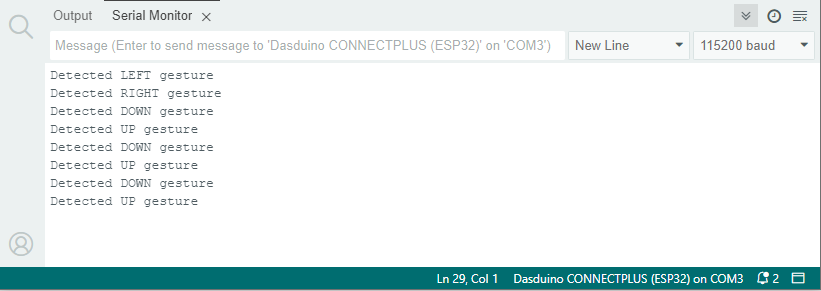
GestureSensor.ino
Example file for using the APDS-9960 sensor with easyC/Qwiic/I2C