Inkplate 10 – GET & POST requests
Now that Inkplate is connected to the internet, you will likely want to send and recieve data on it form sensors, messages, from your custom API's etc. This page contains examples on how to send and recieve data on Inkplate via the internet:
GET request
Using client.GET() will enable you to easily download and handle data on Inkplate however you want. Here is an example on how to GET a .html flie and print it on Inkplate:
#include "Inkplate.h"   //Include Inkplate library to the sketch
#include <HTTPClient.h> //Include HTTP library to this sketch
#include <WiFi.h>       //Include ESP32 WiFi library to our sketch

#define ssid "yourssid" // Name of the WiFi network (SSID) that you want to connect Inkplate to
#define pass "yourpassword" // Password of that WiFi network

Inkplate inkplate(INKPLATE_1BIT); // Create an object on Inkplate library and also set library into 1 Bit mode (BW)

void setup()
{
    inkplate.begin();                                  // Init Inkplate library (you should call this function ONLY ONCE)
    inkplate.clearDisplay();                           // Clear frame buffer of display
    inkplate.display();                                // Put clear image on inkplate
    inkplate.setTextSize(2);                           // Set text scaling to two (text will be two times bigger)
    inkplate.setCursor(0, 0);                          // Set print position
    inkplate.setTextColor(BLACK, WHITE);               // Set text color to black and background color to white
    inkplate.println("Scanning for WiFi networks..."); // Write text
    inkplate.display();                                // Send everything to inkplate (refresh inkplate)

    int n = WiFi.scanNetworks(); // Start searching WiFi networks and put the nubmer of found WiFi networks in variable
                                 // n
    if (n == 0)
    { // If you did not find any network, show the message and stop the program.
        inkplate.print("No WiFi networks found!");
        inkplate.partialUpdate();
        while (true)
            ;
    }
    else
    {
        if (n > 10)
            n = 10; // If you did find, print name (SSID), encryption and signal strength of first 10 networks
        for (int i = 0; i < n; i++)
        {
            inkplate.print(WiFi.SSID(i));
            inkplate.print((WiFi.encryptionType(i) == WIFI_AUTH_OPEN) ? 'O' : '*');
            inkplate.print('\n');
            inkplate.print(WiFi.RSSI(i), DEC);
        }
        inkplate.partialUpdate(); //(Partial) refresh thescreen
    }

    inkplate.clearDisplay();          // Clear everything in frame buffer
    inkplate.setCursor(0, 0);         // Set print cursor to new position
    inkplate.print("Connecting to "); // Print the name of WiFi network
    inkplate.print(ssid);
    WiFi.begin(ssid, pass); // Try to connect to WiFi network
    while (WiFi.status() != WL_CONNECTED)
    {
        delay(1000); // While it is connecting to network, inkplate dot every second, just to know that Inkplate is
                     // alive.
        inkplate.print('.');
        inkplate.partialUpdate();
    }
    inkplate.print("connected"); // If it's connected, notify user
    inkplate.partialUpdate();

    HTTPClient http;
    if (http.begin("http://example.com/index.html"))
    { // Now try to connect to some web page (in this example www.example.com. And yes, this is a valid Web page :))
        if (http.GET() > 0)
        { // If connection was successful, try to read content of the Web page and inkplate it on screen
            String htmlText;
            htmlText = http.getString();
            inkplate.setTextSize(1); // Set smaller text size, so everything can fit on screen
            inkplate.clearDisplay();
            inkplate.setCursor(0, 0);
            inkplate.print(htmlText);
            inkplate.display();
        }
    }
    else{

    }
}

void loop()
{
    // Nothing
}
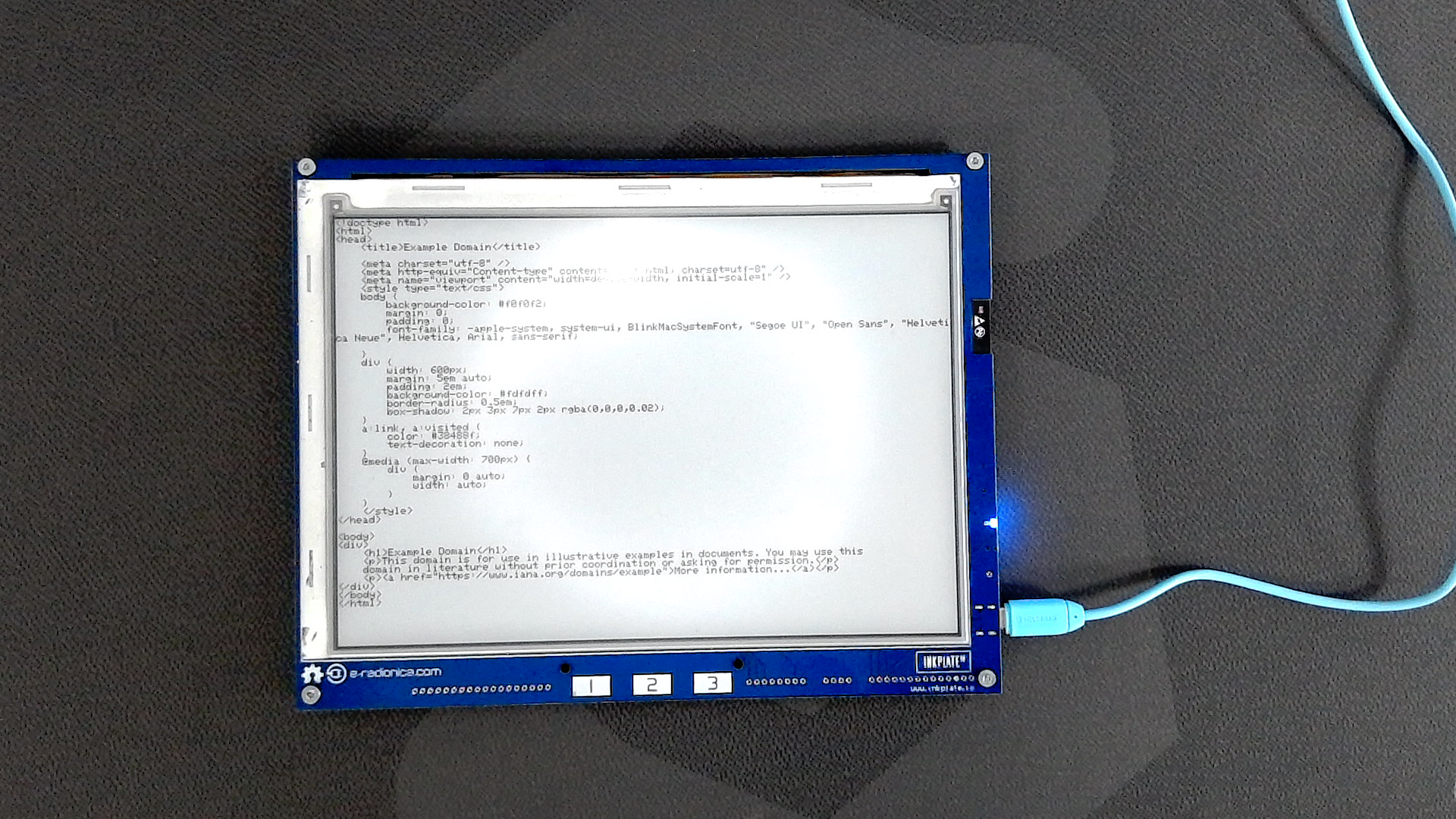
WiFi.begin()
This function attemps to connect to WiFi
Returns type: wl_status_t
Returns value: Returns wl_status_t enum value
Function parameters:
| Type | Name | Description |
|---|---|---|
const char* | ssid | Network SSID. |
const char* | passphrase | Optional, depends on WiFi network security certificate |
http.begin()
This function attempts to open a HTTP communication to given url
Returns type: bool
Returns value: Returns true if communication is succesfull, otherwise returns false.
Function parameters:
| Type | Name | Description |
|---|---|---|
String | url | Url if the specified website |
http.GET()
This function handles GET requests.
Returns type: int
Returns value: Returns the size of available data
POST request
To send data from Inkplate to a web server, you can use the same built-in WiFiClient class. Let's use ThingSpeak.com, which is a great resource for testing POST and GET requests. By visiting the site, you get a unique URL which can then be sent a POST request to from Inkplate which will then be visible on the site:
/*
   This example will show you how to connect to a WiFi network and send a POST request via HTTP.
   We will use ThingSpeak API to see post requests. It's a free API that allows you to store and retrieve data using HTTP.
   1. Go to the ThingSpeak.com and create a free account
   2. Open the Channels tab
   3. Create a new channel
   4. Create fields you want to use (this example uses 1 field called field1 and this name must be used when sending data)
   5. Open the channel, go to the API Keys tab and copy your Write API Key
   6. Enter your API key in the code below

   When you send a POST request, open your channel and you will see the graph where is your sent data.
*/

// Include needed libraries
#include "Inkplate.h"
#include "WiFi.h"

// Create objects from included libraries
Inkplate display(INKPLATE_1BIT);
WiFiClient client;

// Here you can change the interval of sending POST requests (minimum 15 seconds with a free license)
#define POSTING_INTERVAL_IN_SESCS 20

// Enter your WiFi credentials
const char *ssid = "";
const char *pass = "";

// ThingSpeak settings
char *server = "api.thingspeak.com";
String writeAPIKey = ""; // Enter your Write API Key

// Variable that holds last connection time
unsigned long lastConnectionTime = 0;


void setup()
{
    // Init serial communication
    Serial.begin(115200);

    // Init Inkplate library (you should call this function ONLY ONCE)
    display.begin();

    // Clear frame buffer of display
    display.clearDisplay();

    // Set text color and size
    display.setTextColor(BLACK, WHITE);
    display.setTextSize(6);

    // Display a message
    display.printf("HTTP POST request example\n\n");
    display.printf("Open Serial Monitor at \n115200 baud rate to see \nwhat's happening");
    display.display();

    // Connect to the WiFi network
    WiFi.mode(WIFI_MODE_STA);
    WiFi.begin(ssid, pass);
    Serial.print("Connecting to Wifi ");
    while (WiFi.status() != WL_CONNECTED)
    {
        delay(500);
        Serial.print(".");
    }
    Serial.println();
    Serial.print("Connected to WiFi network with IP Address: ");
    Serial.println(WiFi.localIP());
}


void loop()
{
    // Every POSTING_INTERVAL_IN_SESCS seconds make the POST request
    if ((unsigned long)(millis() - lastConnectionTime) > POSTING_INTERVAL_IN_SESCS * 1000LL)
    {
        // Clear frame buffer of display
        display.clearDisplay();

        // Connect the WiFi client to the server via port 80
        if (!client.connect(server, 80))
        {
            // If it fails, print a message, remember time, stop the client and reset the loop
            Serial.println("Connection failed");
            lastConnectionTime = millis();
            client.stop();
            return;
        }
        else
        {
            // If you have any sensor or something else, here you have to put data to send instead of a random number
            int field1Data = random(40);

            // Create data string to send to ThingSpeak
            String data = "field1=" + String(field1Data); // shows how to include additional field data in http post

            // POST data to ThingSpeak
            if (client.connect(server, 80))
            {
                client.println("POST /update HTTP/1.1");
                client.println("Host: api.thingspeak.com");
                client.println("Connection: close");
                client.println("User-Agent: ESP32WiFi/1.1");
                client.println("X-THINGSPEAKAPIKEY: " + writeAPIKey);
                client.println("Content-Type: application/x-www-form-urlencoded");
                client.print("Content-Length: ");
                client.print(data.length());
                client.print("\n\n");
                client.print(data);

                Serial.print("The POST request is done: ");
                Serial.println(data);
                lastConnectionTime = millis();
                delay(250);
            }
        }
        client.stop();
    }
}
WiFi.mode()
This function sets the MCU WiFi chip as STA or AP.
Returns type: bool
Function parameters:
| Type | Name | Description |
|---|---|---|
wifi_mode_t | mode | WiFi mode value, can be either WIFI_MODE_STA or WIFI_MODE_AP |
WiFi.begin()
This function attemps to connect to WiFi
Returns type: wl_status_t
Returns value: Returns wl_status_t enum value
Function parameters:
| Type | Name | Description |
|---|---|---|
const char* | ssid | Network SSID. |
const char* | passphrase | Optional, depends on WiFi network security certificate |
http.begin()
This function attempts to open a HTTP communication to given url
Returns type: bool
Returns value: Returns true if communication is succesfull, otherwise returns false.
Function parameters:
| Type | Name | Description |
|---|---|---|
String | url | Url if the specified website |