BMP388 Pressure & Temperature Sensor - Continuous measurement via Interrupt
In this example we will be configuring the sensor to take continous measurements every time set by the interval, and notify the Microcontroller that data is available via the sensors onboard INT pin
Setting up
Firstly, we include the library and initialize it (as was done in the previous example). Next, we set up the Interrupt handler function which will notify us when the data is ready via a boolean variable:
// Include Soldered BMP388 library.
#include <BMP388-SOLDERED.h>

// Flag for interrupt event.
volatile boolean dataReady = false;

// Create BMP388 sensor object.
Soldered_BMP388 bmp388;

// Interrupt handler function - It's called on interrput event.
// NOTE: ESP32 and ESP8266 use IRAM for ISR so it needs to be specified.
#if defined(ARDUINO_ESP32_DEV) || defined(ARDUINO_ESP8266_GENERIC)
IRAM_ATTR void interruptHandler()
{
    // Set interrupt event flag.
    dataReady = true;
}
#else
void interruptHandler()
{
    // Set interrupt event flag.
    dataReady = true;
}
#endif
Next, in the setup() function, we initialize the sensor, set up its configuration, attach the interrupt function to a rising impulse on GPIO2 and enable the interrupt functionalities of the BMP388 sensor:
void setup()
{
    // Initialize serial communication at 115200 bauds.
    Serial.begin(115200);

    // Initialize sensor (check for sensor). Notify if init failed.
    // Also, this will set BMP388 sensor into sleep mode.
    if (!bmp388.begin())
    {
        // Print error message.
        Serial.println("Sensor not found! Check your wiring!");

        // Stop the code!
        while (1)
        {
            // Delay for ESP8266.
            delay(10);
        }
    }

    // Set current pressure at sea level to get accurate altitude readings.
    bmp388.setSeaLevelPressure(1025.0);

    // Enable sensor interrupts.
    bmp388.enableInterrupt();

    // Set D2 pin to input wuth pullup enabled.
    pinMode(2, INPUT_PULLUP);

    // Connect sensor INT pin to the D2. Call interruptHandler function in case of interrupt event.
    attachInterrupt(digitalPinToInterrupt(2), interruptHandler, RISING);

    // Set the standby time to roughly 1.3 seconds.
    bmp388.setTimeStandby(TIME_STANDBY_1280MS);

    // Start BMP388 continuous conversion in normal mode.
    bmp388.startNormalConversion();
}
bmp388.enableInterrupt()
Enables the interrupt functionalities of the sensor
Returns value: None
Reading Measurements
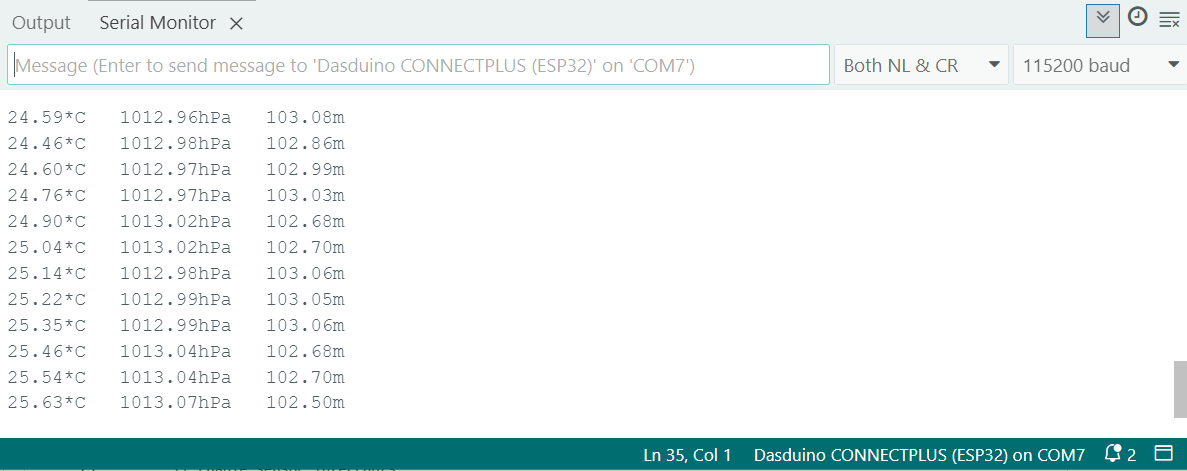
Next, in the loop() function, we are checking the global dataReady variable, whihc is set to true when an interrupt is triggered. If the interrupt was triggered, then a measurement is taken and printed to the serial monitor:
void loop()
{
    // Variables for storing measurement data.
    float temperature, pressure, altitude;

    // Check if the interrupt event has occured (meaning the new data is ready).
    if (dataReady)
    {
        // Read the sensor data.
        bmp388.getMeasurements(temperature, pressure, altitude);

        // Printout measured data.
        Serial.print(temperature);
        Serial.print(F("*C   "));
        Serial.print(pressure);
        Serial.print(F("hPa   "));
        Serial.print(altitude);
        Serial.println(F("m"));

        // Clear the interrupt event flag (to be ready for next measurement).
        dataReady = false;
    }
}
Full Example
You can find the full example below:
// Include Soldered BMP388 library.
#include <BMP388-SOLDERED.h>

// Flag for interrupt event.
volatile boolean dataReady = false;

// Create BMP388 sensor object.
Soldered_BMP388 bmp388;

// Interrupt handler function - It's called on interrput event.
// NOTE: ESP32 and ESP8266 use IRAM for ISR so it needs to be specified.
#if defined(ARDUINO_ESP32_DEV) || defined(ARDUINO_ESP8266_GENERIC)
IRAM_ATTR void interruptHandler()
{
    // Set interrupt event flag.
    dataReady = true;
}
#else
void interruptHandler()
{
    // Set interrupt event flag.
    dataReady = true;
}
#endif

void setup()
{
    // Initialize serial communication at 115200 bauds.
    Serial.begin(115200);

    // Initialize sensor (check for sensor). Notify if init failed.
    // Also, this will set BMP388 sensor into sleep mode.
    if (!bmp388.begin())
    {
        // Print error message.
        Serial.println("Sensor not found! Check your wiring!");

        // Stop the code!
        while (1)
        {
            // Delay for ESP8266.
            delay(10);
        }
    }

    // Set current pressure at sea level to get accurate altitude readings.
    bmp388.setSeaLevelPressure(1025.0);

    // Enable sensor interrupts.
    bmp388.enableInterrupt();

    // Set D2 pin to input wuth pullup enabled.
    pinMode(2, INPUT_PULLUP);

    // Connect sensor INT pin to the D2. Call interruptHandler function in case of interrupt event.
    attachInterrupt(digitalPinToInterrupt(2), interruptHandler, RISING);

    // Set the standby time to roughly 1.3 seconds.
    bmp388.setTimeStandby(TIME_STANDBY_1280MS);

    // Start BMP388 continuous conversion in normal mode.
    bmp388.startNormalConversion();
}

void loop()
{
    // Variables for storing measurement data.
    float temperature, pressure, altitude;

    // Check if the interrupt event has occured (meaning the new data is ready).
    if (dataReady)
    {
        // Read the sensor data.
        bmp388.getMeasurements(temperature, pressure, altitude);

        // Printout measured data.
        Serial.print(temperature);
        Serial.print(F("*C   "));
        Serial.print(pressure);
        Serial.print(F("hPa   "));
        Serial.print(altitude);
        Serial.println(F("m"));

        // Clear the interrupt event flag (to be ready for next measurement).
        dataReady = false;
    }
}