BMP388 Pressure & Temperature Sensor - Basic continuous measurements
This page contains a simple example showing how to take continuous measurements with the BMP388 and print them to the Serial monitor.
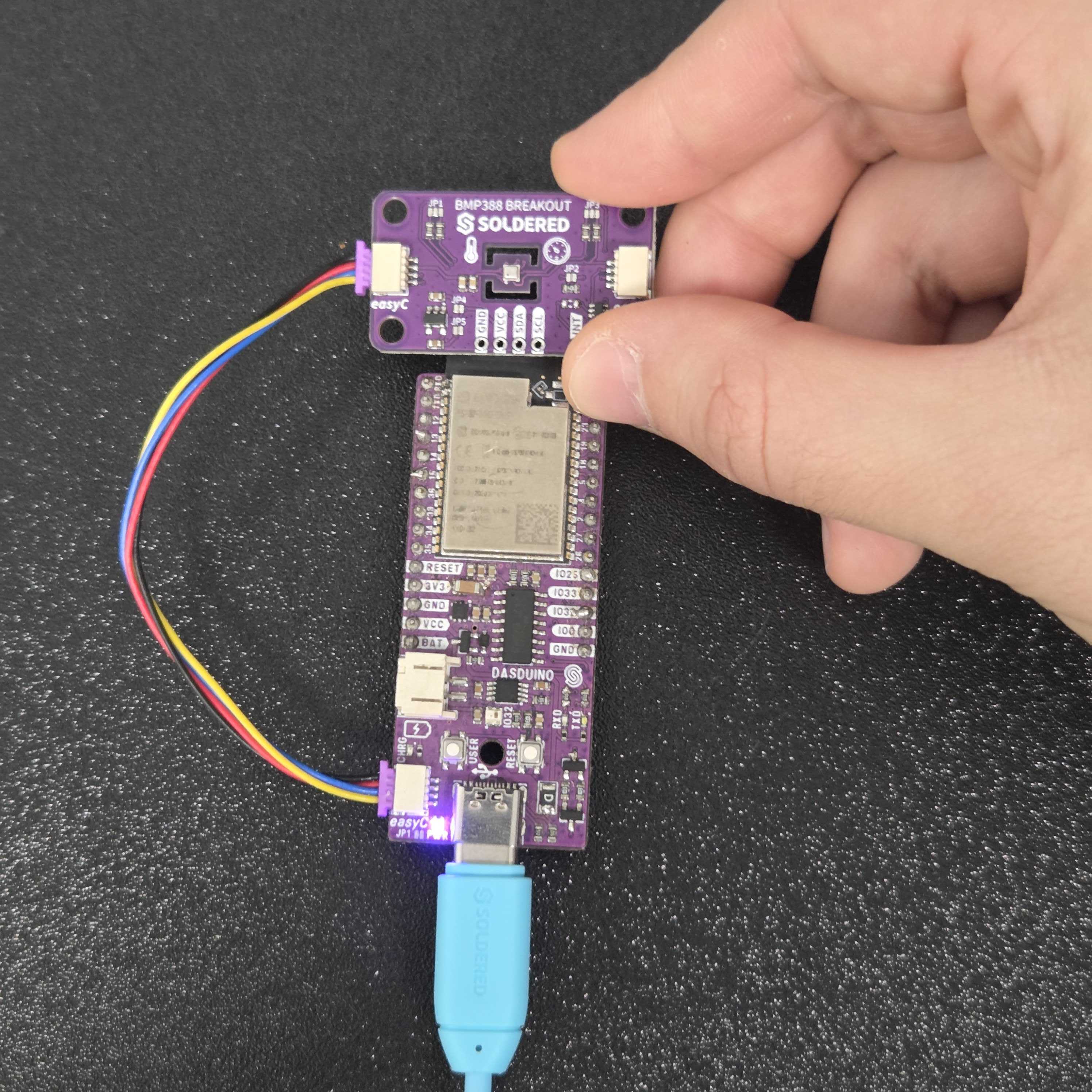
Connections for this example
Initialization
To use the BMP388 sensor, first include the required library, create the sensor object, and initialize the sensor in the setup() function, along with setting its calibration parameters
// Include Soldered BMP388 library.
#include <BMP388-SOLDERED.h>

// Create BMP388 sensor object.
Soldered_BMP388 bmp388;

// Initialize serial communication at 115200 bauds.
    Serial.begin(115200);

    // Initialize sensor (check for sensor). Notify if init failed.
    // Also, this will set BMP388 sensor into sleep mode.
    if (!bmp388.begin())
    {
        // Print error message.
        Serial.println("Sensor not found! Check your wiring!");

        // Stop the code!
        while (1)
        {
            // Delay for ESP8266.
            delay(10);
        }
    }

    // Set current pressure at sea level to get accurate altitude readings.
    bmp388.setSeaLevelPressure(1025.0);

    // Set the standby time of each sample to be roughly 1.3 seconds.
    bmp388.setTimeStandby(TIME_STANDBY_1280MS);

    // Start BMP388 continuous conversion in normal mode.
    bmp388.startNormalConversion();
bmp388.begin()
Initializes the BMP388 sensor, setting up communication over I2C
Returns value: uint8_t value, 1 if initialization was successfull, 0 if not
bmp388.setSeaLevelPressure(float pressure)
Sets the sea level value of pressure, used in calculating altitude
Returns value: None
Function parameters:
| Type | Name | Description |
|---|---|---|
float | pressure | Pressure value in hPa |
bmp388.setTimeStandby(enum TimeStandby standby)
Set the standby time of each sample
Returns value: None
Function parameters:
| Type | Name | Description |
|---|---|---|
enum TimeStandby | standby | Time the sensor will be asleep between each measurement |
bmp388.startNormalConversion()
Start BMP388 continuous conversion in normal mode.
Returns value: None
Getting all readings
In the loop() function, we forward the variables in which we want to store the calculated measurements and print them to the serial monitor:
void loop()
{
    // Variables for storing measurement data.
    float temperature, pressure, altitude;

    // Check if the data is ready.
    if (bmp388.getMeasurements(temperature, pressure, altitude))
    {
        // Print the results.
        Serial.print(temperature);
        Serial.print(F("*C   "));
        Serial.print(pressure);
        Serial.print(F("hPa   "));
        Serial.print(altitude);
        Serial.println(F("m"));
    }
}
bmp388.getMeasurements(volatile float &temperature, volatile float &pressure, volatile float &altitude);
Gets measurements from the sensor if the sensor is ready to do so
Returns value: uint8_t value, 1 if the data is ready to be read, 0 if not
Function parameters:
| Type | Name | Description |
|---|---|---|
volatile float& | temperature | Variable in which the temperature value will be stored |
volatile float& | pressure | Variable in which the pressure value will be stored |
volatile float& | altitude | Variable in which the altitude value will be stored |
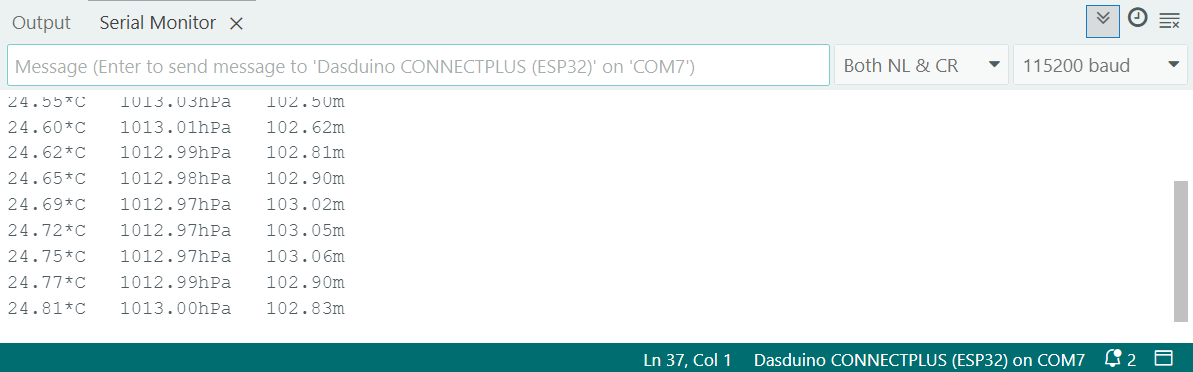
Full Example
You can find the full example below:
// Include Soldered BMP388 library.
#include <BMP388-SOLDERED.h>

// Create BMP388 sensor object.
Soldered_BMP388 bmp388;

void setup()
{
    // Initialize serial communication at 115200 bauds.
    Serial.begin(115200);

    // Initialize sensor (check for sensor). Notify if init failed.
    // Also, this will set BMP388 sensor into sleep mode.
    if (!bmp388.begin())
    {
        // Print error message.
        Serial.println("Sensor not found! Check your wiring!");

        // Stop the code!
        while (1)
        {
            // Delay for ESP8266.
            delay(10);
        }
    }

    // Set current pressure at sea level to get accurate altitude readings.
    bmp388.setSeaLevelPressure(1025.0);

    // Set the standby time of each sample to be roughly 1.3 seconds.
    bmp388.setTimeStandby(TIME_STANDBY_1280MS);

    // Start BMP388 continuous conversion in normal mode.
    bmp388.startNormalConversion();
}

void loop()
{
    // Variables for storing measurement data.
    float temperature, pressure, altitude;

    // Check if the data is ready.
    if (bmp388.getMeasurements(temperature, pressure, altitude))
    {
        // Print the results.
        Serial.print(temperature);
        Serial.print(F("*C   "));
        Serial.print(pressure);
        Serial.print(F("hPa   "));
        Serial.print(altitude);
        Serial.println(F("m"));
    }
}