BMP388 Pressure & Temperature Sensor - Continuous measurement using FIFO
In this example we will be showing how to use the built-in FIFO buffer on the BMP388 sensor to store measurements and print them out when needed.
Setting Up
Initialization is done in a similar way as in the previous examples, with the main difference being that we initialize the FIFO with a set number of measurements which will be saved into the FIFO:
// Include Soldered BMP388 library.
#include <BMP388-SOLDERED.h>

// Number of measurements to be stored in the FIFO.
#define NO_OF_MEASUREMENTS 10

// Create BMP388 sensor object.
Soldered_BMP388 bmp388;

void setup()
{
    // Initialize serial communication at 115200 bauds.
    Serial.begin(115200);

    // Initialize sensor (check for sensor). Notify if init failed.
    // Also, this will set BMP388 sensor into sleep mode.
    if (!bmp388.begin())
    {
        // Print error message.
        Serial.println("Sensor not found! Check your wiring!");

        // Stop the code!
        while (1)
        {
            // Delay for ESP8266.
            delay(10);
        }
    }

    // Set current pressure at sea level to get accurate altitude readings.
    bmp388.setSeaLevelPressure(1025.0);

    // Enable the BMP388's FIFO.
    bmp388.enableFIFO();

    // Store 10 measurements in the FIFO before reading. Can be changed by modifing NO_OF_MEASUREMENTS define macro.
    bmp388.setFIFONoOfMeasurements(NO_OF_MEASUREMENTS);

    // Set the standby time of each sample to be roughly 1.3 seconds.
    bmp388.setTimeStandby(TIME_STANDBY_1280MS);

    // Start BMP388 continuous conversion in normal mode.
    bmp388.startNormalConversion();

    // Print message for the user.
    Serial.println(F("Please wait for 13 seconds..."));
}
bmp388.enableFIFO()
Enables the FIFO functionalities of the sensor
Returns value: None
bmp388.setFIFONoOfMeasurements(uint16_t noOfMeasurements)
Sets how many measurements will be saved into the FIFO buffer
Returns value: None
Function parameters:
| Type | Name | Description |
|---|---|---|
uint16_t | noOfMeasurements | Number if measurement samples which will be saved into the FIFO buffer |
Taking measurements
Next, in the loop() function, we wait until the FIFO buffer is full, then we print out the measured values:
void loop()
{
    // Arrays to store measured data (array for temperature, pressure and altitude).
    float temperature[NO_OF_MEASUREMENTS];
    float pressure[NO_OF_MEASUREMENTS];
    float altitude[NO_OF_MEASUREMENTS];
    uint32_t sensorTime;

    // Check if the FIFO data is ready.
    // If the data is ready, get the 10 measurement readings.
    if (bmp388.getFIFOData(temperature, pressure, altitude, sensorTime))
    {
        // Print the results.
        for (uint16_t i = 0; i < NO_OF_MEASUREMENTS; i++)
        {
            Serial.print(i + 1);
            Serial.print(F(": "));
            Serial.print(temperature[i]);
            Serial.print(F("*C   "));
            Serial.print(pressure[i]);
            Serial.print(F("hPa   "));
            Serial.print(altitude[i]);
            Serial.println(F("m"));
        }

        // Print how long did it take to sample the measurement data into FIFO buffer.
        Serial.print(F("Sensor Time: "));
        Serial.println(sensorTime);
        Serial.println();

        // Print message for the user.
        Serial.println(F("Please wait for 13 seconds...")); // Wait message
    }
}
bmp388.getFIFOData(volatile float *temperature, volatile float *pressure, volatile float *altitude, volatile uint32_t &sensorTime)
Sets how many measurements will be saved into the FIFO buffer
Returns value: None
Function parameters:
| Type | Name | Description |
|---|---|---|
volatile float* | temperature | Variable in which the temperature value will be stored |
volatile float* | pressure | Variable in which the pressure value will be stored |
volatile float* | altitude | Variable in which the altitude value will be stored |
volatile uint32_t* | sensorTime | Variable in which the time the sensor has been active value will be stored |
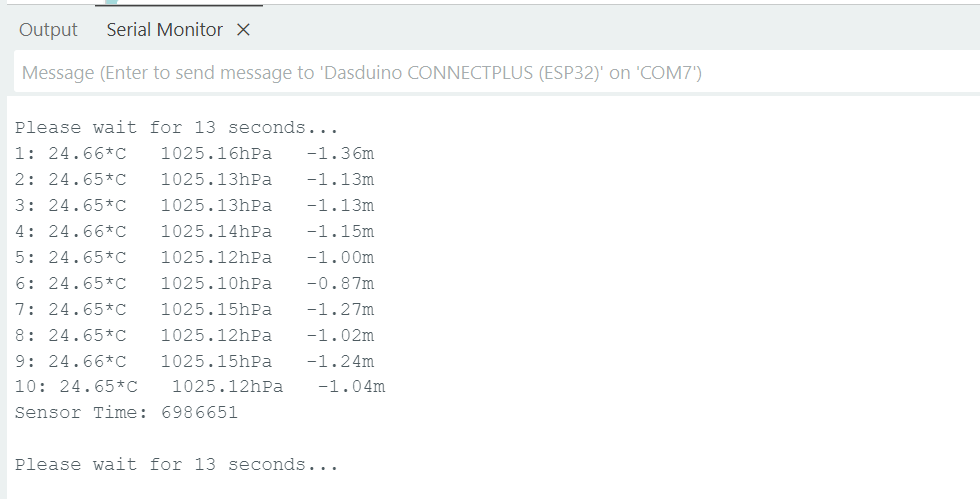
Serial monitor
Full example
You can find the full example below:
// Include Soldered BMP388 library.
#include <BMP388-SOLDERED.h>

// Number of measurements to be stored in the FIFO.
#define NO_OF_MEASUREMENTS 10

// Create BMP388 sensor object.
Soldered_BMP388 bmp388;

void setup()
{
    // Initialize serial communication at 115200 bauds.
    Serial.begin(115200);

    // Initialize sensor (check for sensor). Notify if init failed.
    // Also, this will set BMP388 sensor into sleep mode.
    if (!bmp388.begin())
    {
        // Print error message.
        Serial.println("Sensor not found! Check your wiring!");

        // Stop the code!
        while (1)
        {
            // Delay for ESP8266.
            delay(10);
        }
    }

    // Set current pressure at sea level to get accurate altitude readings.
    bmp388.setSeaLevelPressure(1025.0);

    // Enable the BMP388's FIFO.
    bmp388.enableFIFO();

    // Store 10 measurements in the FIFO before reading. Can be changed by modifing NO_OF_MEASUREMENTS define macro.
    bmp388.setFIFONoOfMeasurements(NO_OF_MEASUREMENTS);

    // Set the standby time of each sample to be roughly 1.3 seconds.
    bmp388.setTimeStandby(TIME_STANDBY_1280MS);

    // Start BMP388 continuous conversion in normal mode.
    bmp388.startNormalConversion();

    // Print message for the user.
    Serial.println(F("Please wait for 13 seconds..."));
}

void loop()
{
    // Arrays to store measured data (array for temperature, pressure and altitude).
    float temperature[NO_OF_MEASUREMENTS];
    float pressure[NO_OF_MEASUREMENTS];
    float altitude[NO_OF_MEASUREMENTS];
    uint32_t sensorTime;

    // Check if the FIFO data is ready.
    // If the data is ready, get the 10 measurement readings.
    if (bmp388.getFIFOData(temperature, pressure, altitude, sensorTime))
    {
        // Print the results.
        for (uint16_t i = 0; i < NO_OF_MEASUREMENTS; i++)
        {
            Serial.print(i + 1);
            Serial.print(F(": "));
            Serial.print(temperature[i]);
            Serial.print(F("*C   "));
            Serial.print(pressure[i]);
            Serial.print(F("hPa   "));
            Serial.print(altitude[i]);
            Serial.println(F("m"));
        }

        // Print how long did it take to sample the measurement data into FIFO buffer.
        Serial.print(F("Sensor Time: "));
        Serial.println(sensorTime);
        Serial.println();

        // Print message for the user.
        Serial.println(F("Please wait for 13 seconds...")); // Wait message
    }
}