Displaying Web Images
You can download and display images directly from the internet on your Inkplate 2 using its built-in WiFi and ESP32 processor. Supported formats include .bmp, .jpg, and .png, with a maximum resolution of 212×104 pixels.
Supported formats
- BMP – 1-bit, 4-bit, 8-bit, and 24-bit depth BMP images (uncompressed)
- JPG – Must be Baseline DCT, Huffman encoded
- PNG – Common formats supported; dithering is applied automatically if needed
ℹ️
Images must be equal to or smaller than 212x104 pixels. For best performance and compatibility, convert images using common tools like GIMP or Photoshop and re-save them if issues occur.
Basic example
Below is a working example of how to:
- Connect to WiFi
- Load images from the web (via URL)
- Display them using Inkplate’s
drawImage()ordrawBitmapFromWeb()functions
#include "HTTPClient.h" // Include library for HTTPClient
#include "Inkplate.h"   // Include Inkplate library in the sketch
#include "WiFi.h"       // Include library for WiFi
Inkplate display;

const char ssid[] = "";     // Your WiFi SSID
const char password[] = ""; // Your WiFi password

void setup()
{
    Serial.begin(115200);   // Initialize Serial communication.
    display.begin();        // Initialize Inkplate library (you should call this function ONLY ONCE)
    display.clearDisplay(); // Clear frame buffer of display

    // Set settings for error printing
    display.setCursor(10, 10);
    display.setTextSize(2);
    display.setTextColor(BLACK);

    // Connect to the WiFi network.
    WiFi.mode(WIFI_MODE_STA);
    WiFi.begin(ssid, password);
    Serial.print("Connecting to WiFi...");
    while (WiFi.status() != WL_CONNECTED)
    {
        Serial.print(".");
        delay(1000);
    }
    Serial.println("Connected!");

    // Draw the first image from the web.
    // Make sure the link is complete and correct (contains https:// or http://).
    // The example image is a monochromatic bitmap with 1-bit depth. Images like this load the fastest.
    // NOTE: Both drawImage methods allow for an optional fifth "invert" parameter. Setting this parameter to true
    // will flip all colors on the image, making black white and white black. This may be necessary when exporting
    // bitmaps from certain software.
    // The fourth parameter dithers the image, but this image is already dithered,
    // so it is not needed to dither it again while drawing.
    display.clearDisplay();

    if (!display.drawImage("https://raw.githubusercontent.com/SolderedElectronics/Inkplate-Arduino-library/"
                           "master/examples/Inkplate2/Advanced/WEB_WiFi/"
                           "Inkplate2_Show_Pictures_From_Web/cat_dithered.jpg",
                           0, 0, false, false))
    {
        // If something fails (e.g., wrong URL or unsupported format), write an error message on the screen.
        // REMEMBER! You can only use Windows Bitmap files with color depths of 1, 4, 8, or 24 bits with no compression!
        display.println("Image open error");
    }
    display.display(); // Refresh the display
    delay(8000);       // Wait a little bit

    // Draw the second image from the web, this time using an HTTPClient to fetch the response manually.
    // Full-color 24-bit images are large and take a long time to load; it will take around 20 seconds.
    HTTPClient http;
    // Set parameters to speed up the download process.
    http.getStream().setNoDelay(true);
    http.getStream().setTimeout(1);

    http.begin("https://raw.githubusercontent.com/SolderedElectronics/Inkplate-Arduino-library/"
               "master/examples/Inkplate2/Advanced/WEB_WiFi/"
               "Inkplate2_Show_Pictures_From_Web/car.bmp");

    // Check response code.
    int httpCode = http.GET();
    if (httpCode == 200)
    {
        // Get the response length and make sure it is not 0.
        int32_t len = http.getSize();
        if (len > 0)
        {
            if (!display.drawBitmapFromWeb(http.getStreamPtr(), 0, 0, len, true, false))
            {
                // If something fails (e.g., wrong filename or unsupported bitmap format), write an error message on the screen.
                // REMEMBER! You can only use Windows Bitmap files with color depths of 1, 4, 8, or 24 bits with no
                // compression!
                display.println("Image open error");
            }
            display.display(); // Refresh the display.
        }
        else
        {
            // If something goes wrong, print out the error message and refresh the display.
            display.println("Invalid response length");
            display.display();
        }
    }
    else
    {
        // Print out the error message and refresh the display.
        display.println("HTTP error");
        display.display();
    }

    display.clearDisplay(); // Clear the frame buffer
    delay(8000);            // Wait a little bit

    // Try to load an image and display it on the e-paper at position X=0, Y=0
    // NOTE: Both drawImage methods allow for an optional fifth "invert" parameter. Setting this parameter to
    // true will flip all colors on the image, making black white and white black. The fourth parameter dithers the
    // image.
    if (!display.drawImage("https://raw.githubusercontent.com/SolderedElectronics/Inkplate-Arduino-library/"
                           "master/examples/Inkplate2/Advanced/WEB_WiFi/"
                           "Inkplate2_Show_Pictures_From_Web/mountain.png",
                           0, 0, true, false))
    {
        // If something fails (e.g., wrong filename or format), write an error message on the screen.
        display.clearDisplay();
        display.println("Image open error");
    }
    display.display(); // Refresh the display
    http.end();        // Close HTTP connection.

    WiFi.mode(WIFI_OFF); // Turn off the WiFi

    // Go to deep sleep
    Serial.println("Going to sleep..");
    esp_deep_sleep_start(); // Put ESP32 into deep sleep. Program stops here
}

void loop()
{
    // Nothing...
}
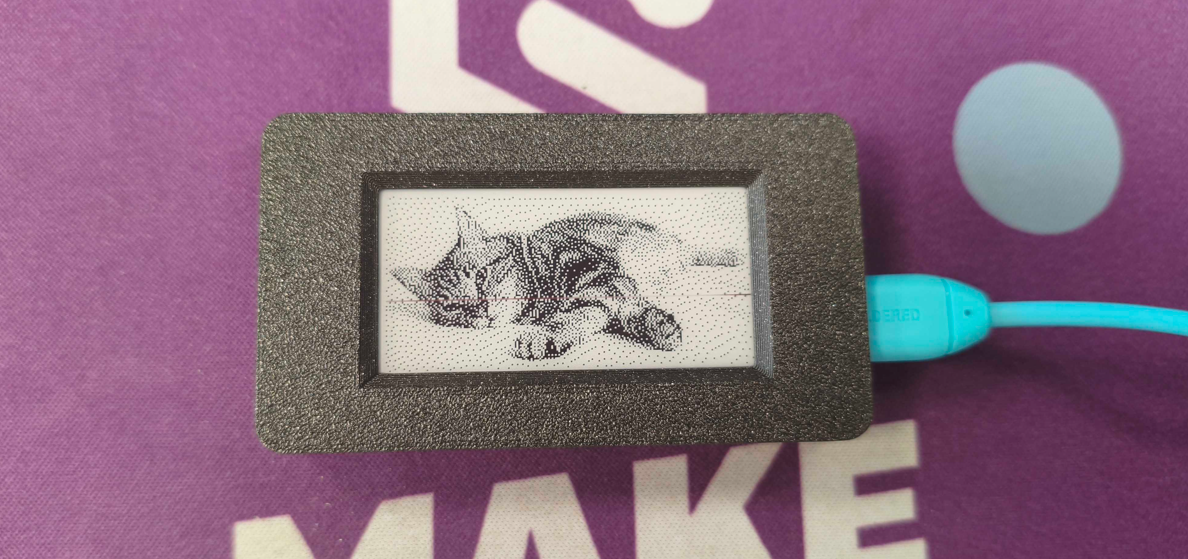
Expected output on Inkplate display.
Key functions
inkplate.drawImage()
Downloads and displays an image from the web (JPG, BMP, PNG).
Returns value: Returns true if the image was successfully drawn, false otherwise.
Function parameters:
| Type | Name | Description |
|---|---|---|
const char* | url | URL of the image. |
int | x | X-coordinate on screen. |
int | y | Y-coordinate on screen. |
bool | dither | Enable dithering for the image. |
bool | invert | Invert colors (black to white and vice versa). |
inkplate.drawBitmapFromWeb()
Displays a bitmap image streamed from an HTTPClient stream.
Returns value: Returns true if successful, false if an error occurs.
Function parameters:
| Type | Name | Description |
|---|---|---|
WiFiClient* | client | Pointer to the WiFiClient object (stream). |
int | x | X-coordinate on screen. |
int | y | Y-coordinate on screen. |
int32_t | len | Length of data to read. |
bool | dither | Enable dithering. |
bool | invert | Invert colors. |
Full Example
Inkplate2_Show_Pictures_From_Web.ino
Full example that downloads and displays .jpg, .png, and .bmp files over WiFi.