Microsd Reader - Writing files (example)
This page contains an example of writing data to an SD card in the form of a text file
Defining the CS pin and instances
To write data to the SD card, we must first define the CS pin used for SPI communication (GPIO 5 in our case):
//...
// SDCARD_SS_PIN is defined for the built-in SD on some boards.
#ifndef SDCARD_SS_PIN
const uint8_t SD_CS_PIN = SS;
#else  // SDCARD_SS_PIN
const uint8_t SD_CS_PIN = 5; //SET THIS PIN
#endif // SDCARD_SS_PIN
//...
We also have to create instances of objects for the SD card and the file we will create:
//Create an instance of the SD card
SdFs sd;

//Create an instance of the file system file object
FsFile file;
Writing to the file
Since we want to create the file only once, the entire program is located in the setup() function. First, we initialize the Serial communication; next, we initialize the SD card and its volume so that we can write and read data from it. Finally, we write data to the SD card using the FsFile object:
void setup()
{
  //Initialize the serial communication
  Serial.begin(115200);

  // Wait for USB Serial
  while (!Serial)
  {
    yield();
  }
  Serial.println("Type any character to start");
  while (!Serial.available())
  {
    yield();
  }
  // Initialize the SD.
  if (!sd.cardBegin(SD_CONFIG))
  {
    sd.initErrorHalt(&Serial);
    return;
  }
  if(!sd.volumeBegin())
  {
    Serial.println("Failed to initialize volume!");
    return;
  }

  // Create the file.
  if (!file.open("hello.txt", FILE_WRITE))
  {
    Serial.println("Failed to open file!");
    return;
  }
  // Write test data.
  file.print(F("Hello from Soldered!"));
  // Close the file we were writing to.
  file.close();

  Serial.println("Writing to file done!");
}
If the file creation and writing are successful, when connected to a computer, we can see and open the created file:
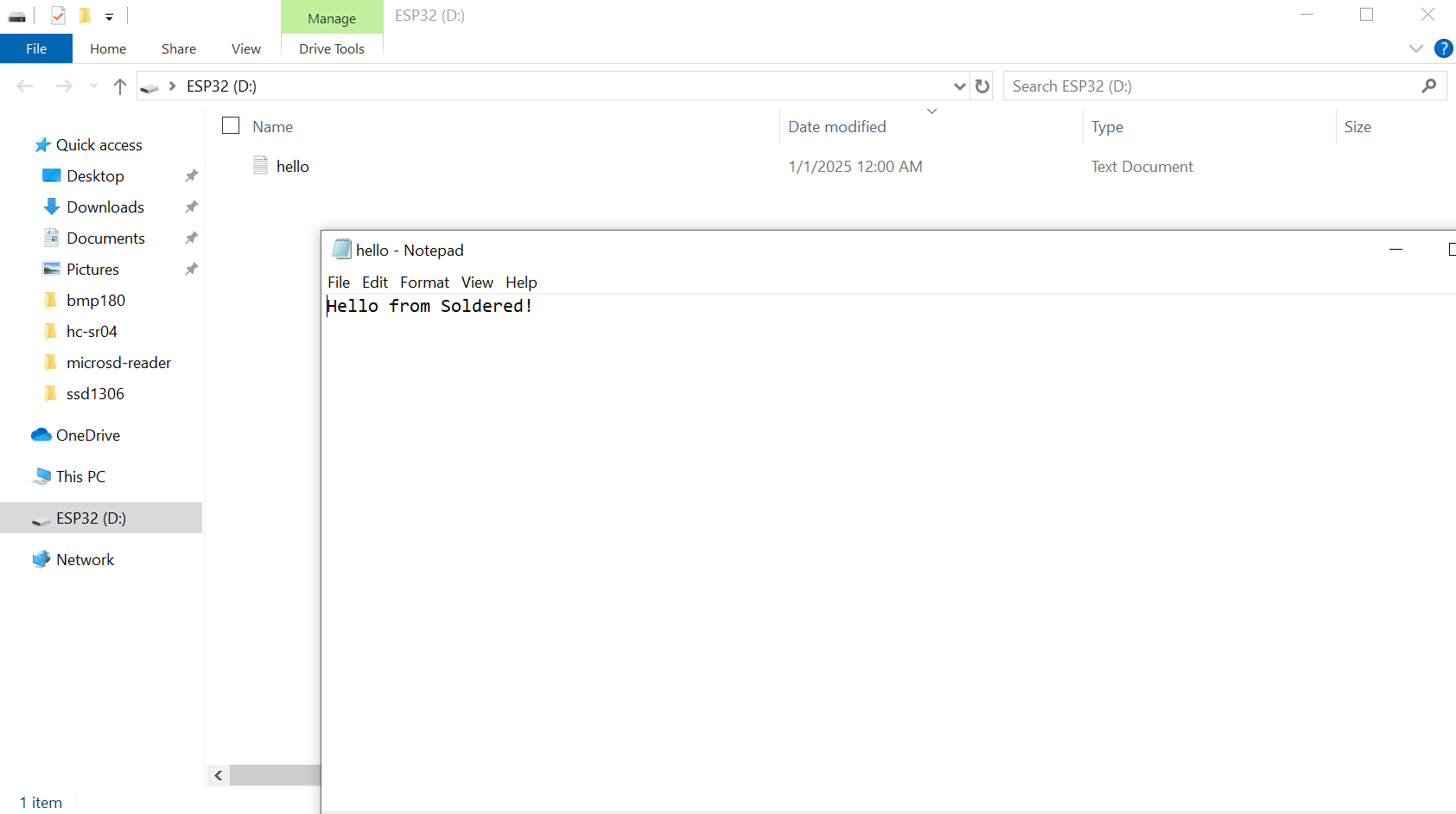
sd.volumeBegin()
Initialize the file system after a call to cardBegin
Returns value: Boolean value, true for success and false for failure
file.open(const char *path. oflag_t oflag)
Open a file by path
Returns value: Boolean value, true for success and false for failure
Function parameters:
| Type | Name | Description |
|---|---|---|
const char* | path | Path and filename from working directory to specified file |
oflag_t (enumerator) | oflag | A flag that specifies what we intend to do with the file (read it, write to it etc.) |
file.close()
Close a file and force cached data and directory information to be written to the storage device.
Returns value: None
Full example
Below you can find the full example:
#include "SdFat.h"

//Set to one if there are more SPI devices connected to the bus
const int8_t DISABLE_CS_PIN = -1;

// SDCARD_SS_PIN is defined for the built-in SD on some boards.
#ifndef SDCARD_SS_PIN
const uint8_t SD_CS_PIN = 5;
#else  // SDCARD_SS_PIN
const uint8_t SD_CS_PIN = SDCARD_SS_PIN;
#endif // SDCARD_SS_PIN

// Try to select the best SD card configuration.
#if HAS_SDIO_CLASS
#define SD_CONFIG SdioConfig(FIFO_SDIO)
#elif ENABLE_DEDICATED_SPI
#define SD_CONFIG SdSpiConfig(SD_CS_PIN, DEDICATED_SPI, SD_SCK_MHZ(16))
#else // HAS_SDIO_CLASS
#define SD_CONFIG SdSpiConfig(SD_CS_PIN, SHARED_SPI, SD_SCK_MHZ(16))
#endif // HAS_SDIO_CLASS

//Create an instance of the SD card
SdFs sd;

//Create an instance of the file system file object
FsFile file;
//------------------------------------------------------------------------------
void setup()
{
  //Initialize the serial communication
  Serial.begin(115200);

  // Wait for USB Serial
  while (!Serial)
  {
    yield();
  }
  Serial.println("Type any character to start");
  while (!Serial.available())
  {
    yield();
  }
  // Initialize the SD.
  if (!sd.cardBegin(SD_CONFIG))
  {
    sd.initErrorHalt(&Serial);
    return;
  }
  if(!sd.volumeBegin())
  {
    Serial.println("Failed to initialize volume!");
    return;
  }

  // Create the file.
  if (!file.open("hello.txt", FILE_WRITE))
  {
    Serial.println("Failed to open file!");
    return;
  }
  // Write test data.
  file.print(F("Hello from Soldered!"));
  // Close the file we were writing to.
  file.close();

  Serial.println("Writing to file done!");
}

void loop()
{
}