Drawing Graphics
Inkplate 2 features a 2.13″ three-color e-paper display capable of rendering black, white, and red pixels. You can draw geometric shapes using the built-in Adafruit GFX functions, which are compatible with the Inkplate library.
Inkplate 2 supports the Adafruit GFX graphics library for drawing.
Adafruit GFX Library
The core graphics library for Inkplate library, created by Adafruit.
Drawing Geometric Shapes
Below is an example demonstrating functions used for drawing graphics on the Inkplate 2:
Use these functions to draw pixels, lines, rectangles, circles, and more. Inkplate 2 supports three colors:
INKPLATE2_BLACKINKPLATE2_REDINKPLATE2_WHITE(background/erase)
#include "Inkplate.h"
Inkplate inkplate;

void setup() {
  inkplate.begin();
  inkplate.clearDisplay();
  inkplate.display();

  // Pixel replacements with small filled rectangles for visibility
  inkplate.fillRect(30, 5, 5, 5, INKPLATE2_BLACK);
  inkplate.fillRect(50, 5, 5, 5, INKPLATE2_RED);

  // Lines
  inkplate.drawLine(10, 15, 100, 15, INKPLATE2_BLACK);
  inkplate.drawLine(10, 25, 100, 25, INKPLATE2_RED);

  // Rectangles
  inkplate.drawRect(10, 35, 40, 20, INKPLATE2_BLACK);
  inkplate.fillRect(60, 35, 40, 20, INKPLATE2_RED);

  // Circles
  inkplate.drawCircle(30, 65, 10, INKPLATE2_BLACK);
  inkplate.fillCircle(70, 65, 10, INKPLATE2_RED);

  // Rounded rectangles
  inkplate.drawRoundRect(10, 85, 40, 20, 5, INKPLATE2_BLACK);
  inkplate.fillRoundRect(60, 85, 40, 20, 5, INKPLATE2_RED);

  // Triangles
  inkplate.drawTriangle(10, 125, 40, 125, 25, 105, INKPLATE2_BLACK);
  inkplate.fillTriangle(60, 125, 90, 125, 75, 105, INKPLATE2_RED);

  inkplate.display();
}

void loop() {}
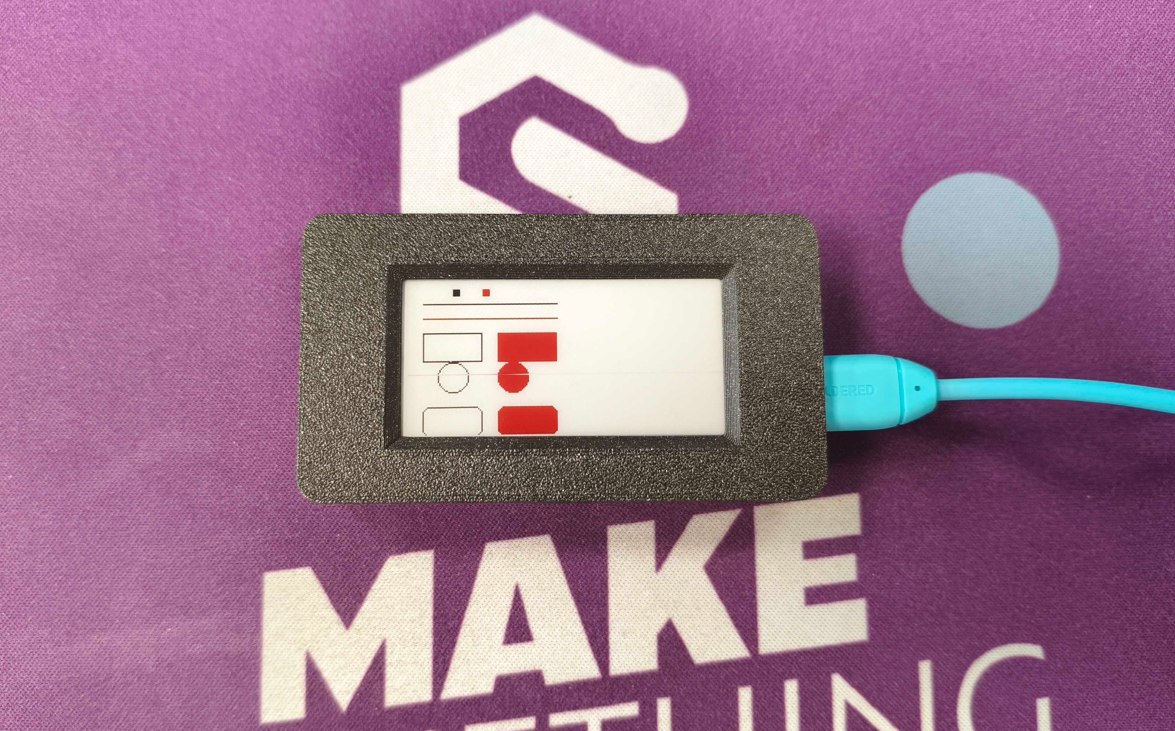
Below are the detailed references for these functions:
inkplate.drawPixel()
Draws a single pixel on the display at the specified coordinates.
Returns value: none
Function parameters:
| Type | Name | Description |
|---|---|---|
int | x | The x-coordinate of the pixel. |
int | y | The y-coordinate of the pixel. |
uint8_t | color | The color of the pixel. |
inkplate.drawLine()
Draws a straight line between two points on the display.
Returns value: none
Function parameters:
| Type | Name | Description |
|---|---|---|
int | x0 | The x-coordinate of the starting point. |
int | y0 | The y-coordinate of the starting point. |
int | x1 | The x-coordinate of the ending point. |
int | y1 | The y-coordinate of the ending point. |
uint8_t | color | The color of the line. |
inkplate.drawRect()
Draws a rectangle outline on the display.
Returns value: none
Function parameters:
| Type | Name | Description |
|---|---|---|
int | x | The x-coordinate of the top-left corner. |
int | y | The y-coordinate of the top-left corner. |
int | width | The width of the rectangle. |
int | height | The height of the rectangle. |
uint8_t | color | The color of the rectangle outline. |
inkplate.fillRect()
Draws a filled rectangle on the display.
Returns value: none
Function parameters:
| Type | Name | Description |
|---|---|---|
int | x | The x-coordinate of the top-left corner. |
int | y | The y-coordinate of the top-left corner. |
int | width | The width of the rectangle. |
int | height | The height of the rectangle. |
uint8_t | color | The fill color. |
inkplate.drawCircle()
Draws a circle outline on the display.
Returns value: none
Function parameters:
| Type | Name | Description |
|---|---|---|
int | x | The x-coordinate of the circle center. |
int | y | The y-coordinate of the circle center. |
int | radius | The radius of the circle. |
uint8_t | color | The color of the circle outline. |
inkplate.fillCircle()
Draws a filled circle on the display.
Returns value: none
Function parameters:
| Type | Name | Description |
|---|---|---|
int | x | The x-coordinate of the circle center. |
int | y | The y-coordinate of the circle center. |
int | radius | The radius of the circle. |
uint8_t | color | The fill color. |
inkplate.drawRoundRect()
Draws a rounded rectangle outline on the display.
Returns value: none
Function parameters:
| Type | Name | Description |
|---|---|---|
int | x | The x-coordinate of the top-left corner. |
int | y | The y-coordinate of the top-left corner. |
int | width | The width of the rectangle. |
int | height | The height of the rectangle. |
int | radius | The radius of the rounded corners. |
uint8_t | color | The color of the rectangle outline. |
inkplate.fillRoundRect()
Draws a filled rounded rectangle on the display.
Returns value: none
Function parameters:
| Type | Name | Description |
|---|---|---|
int | x | The x-coordinate of the top-left corner. |
int | y | The y-coordinate of the top-left corner. |
int | width | The width of the rectangle. |
int | height | The height of the rectangle. |
int | radius | The radius of the rounded corners. |
uint8_t | color | The fill color. |
inkplate.drawTriangle()
Draws a triangle outline on the display.
Returns value: none
Function parameters:
| Type | Name | Description |
|---|---|---|
int | x0 | The x-coordinate of the first vertex. |
int | y0 | The y-coordinate of the first vertex. |
int | x1 | The x-coordinate of the second vertex. |
int | y1 | The y-coordinate of the second vertex. |
int | x2 | The x-coordinate of the third vertex. |
int | y2 | The y-coordinate of the third vertex. |
uint8_t | color | The color of the triangle outline. |
inkplate.fillTriangle()
Draws a filled triangle on the display.
Returns value: none
Function parameters:
| Type | Name | Description |
|---|---|---|
int | x0 | The x-coordinate of the first vertex. |
int | y0 | The y-coordinate of the first vertex. |
int | x1 | The x-coordinate of the second vertex. |
int | y1 | The y-coordinate of the second vertex. |
int | x2 | The x-coordinate of the third vertex. |
int | y2 | The y-coordinate of the third vertex. |
uint8_t | color | The fill color. |
Full example
Inkplate2_Black_White_Red.ino
Example drawing graphics using all three Inkplate 2 colors.