PCAL6416A - Digital Read
This page covers reading a digital input pin on the PCAL6416A GPIO expander.
Initialization
To use the PCAL6416A GPIO expander, first include the required library, create an expander object, and initialize communication in the setup() function. The begin() function starts I2C communication with the device and doesn't need any manual Wire.begin() call before it.
expander.begin()
Initializes communication with the PCAL6416A GPIO expander over I2C. Uses the default address 0x20 unless a different address is passed in.
Returns value: None.
Function parameters:
| Type | Name | Description |
|---|---|---|
uint8_t | address | Optional I2C address of the PCAL6416A device. Defaults to 0x20. Pass 0x21 if JP3 has been cut and bridged to VDD. |
Reading a pin
Connect a pushbutton between A0 and GND. Since A0 is configured with an internal pull-up resistor, the pin reads LOW when the button is pressed and HIGH when released.
#include "PCAL6416A-SOLDERED.h"

PCAL6416A expander;

void setup()
{
    Serial.begin(115200);
    expander.begin();

    expander.pinModePCAL(PCAL6416A_A0, INPUT_PULLUP);
}

void loop()
{
    Serial.print("State of pin A0 is: ");
    expander.digitalReadPCAL(PCAL6416A_A0) ? Serial.println("HIGH.") : Serial.println("LOW.");
    delay(1000);
}
expander.pinModePCAL()
Configures a GPIO pin on the PCAL6416A expander as an input or output.
Returns value: None.
Function parameters:
| Type | Name | Description |
|---|---|---|
uint8_t | pin | The GPIO pin to configure. Use a constant such as PCAL6416A_A0-PCAL6416A_A7 or PCAL6416A_B0-PCAL6416A_B7. |
uint8_t | mode | Pin mode: INPUT, OUTPUT, INPUT_PULLUP, or INPUT_PULLDOWN. |
INPUT, OUTPUT, and INPUT_PULLUP, the library also defines INPUT_PULLDOWN, using the PCAL6416A's internal pull-down resistors instead of pull-up.expander.digitalReadPCAL()
Reads the current logic state of a selected GPIO pin on the PCAL6416A expander.
Returns value: Returns HIGH or LOW depending on the state of the selected input pin.
Function parameters:
| Type | Name | Description |
|---|---|---|
uint8_t | pin | The GPIO pin to read. Use a constant such as PCAL6416A_A0-PCAL6416A_A7 or PCAL6416A_B0-PCAL6416A_B7. |
Open the Serial Monitor at 115200 baud and press the button to see the pin state change.
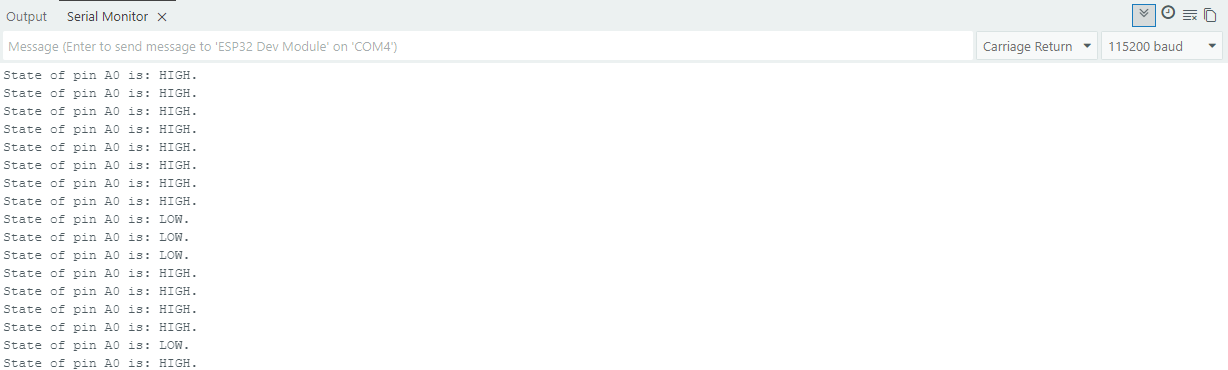
digitalRead.ino
Full digital read example for the PCAL6416A GPIO expander