ADS1219 24-bit ADC - Reading with Interrupt
This page contains an example of reading ADC values from the ADS1219 using the DRDY interrupt pin, where the microcontroller is notified by the sensor when a new conversion result is ready, instead of polling over I2C. This is especially useful at the ADS1219's higher data rates, like the 1000 SPS used in this example.
This example also runs the ADC in continuous mode: instead of triggering one conversion at a time, startSync() is called once and the chip then converts back-to-back on its own at the configured data rate. Pairing continuous mode with the DRDY interrupt is what actually makes 1000 SPS practical - polling over I2C that fast would waste most of the bus's time just asking "is it ready yet?".
Connections for this example
Connect the ADS1219 board via Qwiic, wire REFP/REFN to your chosen reference (see Single-Shot Reading for reference-voltage options), and connect a signal source to AIN0.
Connect the ADS1219's DRDY pin to pin IO4 on your development board.
Initialization
Include the library and create the ADC object:
#include <Wire.h>
#include "ADS1219-SOLDERED.h"

ADS1219_Soldered adc;

const int interruptPin = 4; // Change to match your wiring

volatile bool interruptSeen = false;

void dataReadyISR()
{
    interruptSeen = true;
}

void setup()
{
    Serial.begin(115200);
    Wire.begin();

    while (!adc.begin())
    {
        Serial.println("ADS1219 not found. Check wiring! Retrying...");
        delay(1000);
    }

    // Use REFP/REFN as the reference (tie them to VCC/GND, or a precision source)
    adc.setVoltageReference(ADS1219_VREF_EXTERNAL);

    // Single-ended input on channel 0
    adc.setMux(ADS1219_MUX_SINGLE_0);

    // Gain of 1 (full-scale range = the reference voltage)
    adc.setGain(ADS1219_GAIN_1);

    // 1000 SPS - the interrupt avoids wasting I2C bus time polling this fast
    adc.setDataRate(ADS1219_DR_1000SPS);

    adc.setConversionMode(ADS1219_MODE_CONTINUOUS);

    interruptSeen = false;
    attachInterrupt(digitalPinToInterrupt(interruptPin), dataReadyISR, FALLING);

    adc.startSync();
}
adc.setGain()
Sets the programmable gain amplifier (PGA). Gain 4 narrows the input range to the reference voltage divided by 4, increasing resolution for small signals.
Returns value: Boolean value, true on success.
Function parameters:
| Type | Name | Description |
|---|---|---|
ads1219_gain_t | gain | ADS1219_GAIN_1 (full-scale = the reference voltage) or ADS1219_GAIN_4 (full-scale = reference voltage / 4). |
adc.setDataRate()
Sets the output data rate (samples per second). Lower rates give less noise; higher rates give faster updates.
Returns value: Boolean value, true on success.
Function parameters:
| Type | Name | Description |
|---|---|---|
ads1219_data_rate_t | rate | ADS1219_DR_20SPS, ADS1219_DR_90SPS, ADS1219_DR_330SPS, or ADS1219_DR_1000SPS. |
adc.setConversionMode()
Sets the conversion mode. In continuous mode, the ADC converts back-to-back at the configured data rate without needing startSync() called again for each sample.
Returns value: Boolean value, true on success.
Function parameters:
| Type | Name | Description |
|---|---|---|
ads1219_conv_mode_t | mode | ADS1219_MODE_SINGLE_SHOT for one conversion per startSync() call, ADS1219_MODE_CONTINUOUS for back-to-back conversions. |
adc.startSync()
Starts or restarts conversions. In continuous mode, one call is enough to start the ongoing sequence - it doesn't need to be called again before each result.
Returns value: Boolean value, true on success.
Reading data
In the loop() function, wait for the interrupt flag and read the new result:
void loop()
{
    if (interruptSeen)
    {
        interruptSeen = false;

        adc.readConversion();

        // 3300.0f is the reference voltage in millivolts (3.3V here) - change this
        // to match whatever you actually wired to REFP/REFN
        float mV = adc.getConversionMillivolts(3300.0f);

        Serial.println(mV, 3);
    }
}
Open the Serial Plotter or Serial Monitor at 115200 baud to see the readings. The interrupt callback (dataReadyISR) just sets a flag, since interrupt service routines should stay as short as possible - the actual I2C read happens in loop().
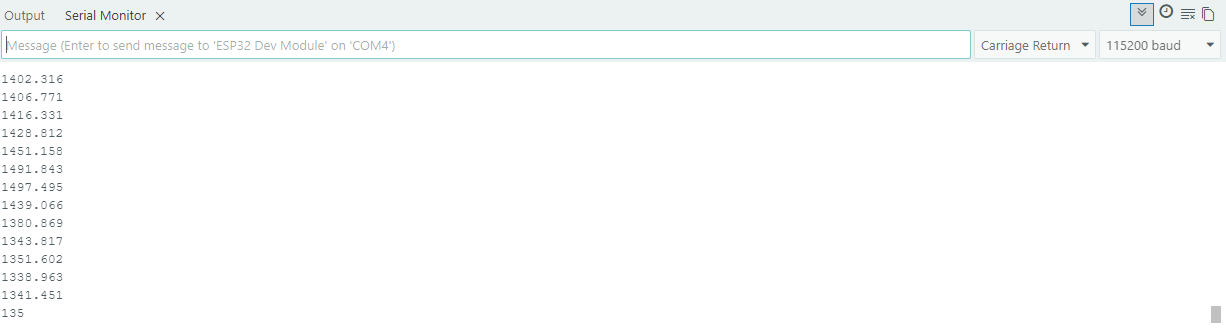
Interrupt.ino
An example of reading ADC values using the interrupt (DRDY) pin with the ADS1219