Read temperature
Inkplate 10 integrates TPS65186 power supply chip for e-paper display. The chip supports measurement of an external NTC (Negative Temperature Coefficient) thermistor allowing monitoring of display panel temperature in range from -10°C to 85°C. This in turn can be used to give an approximate room temperature measurements.
ℹ️
Note that the readings are intended for onboard temperature monitoring and are only an approximation of room temperature!
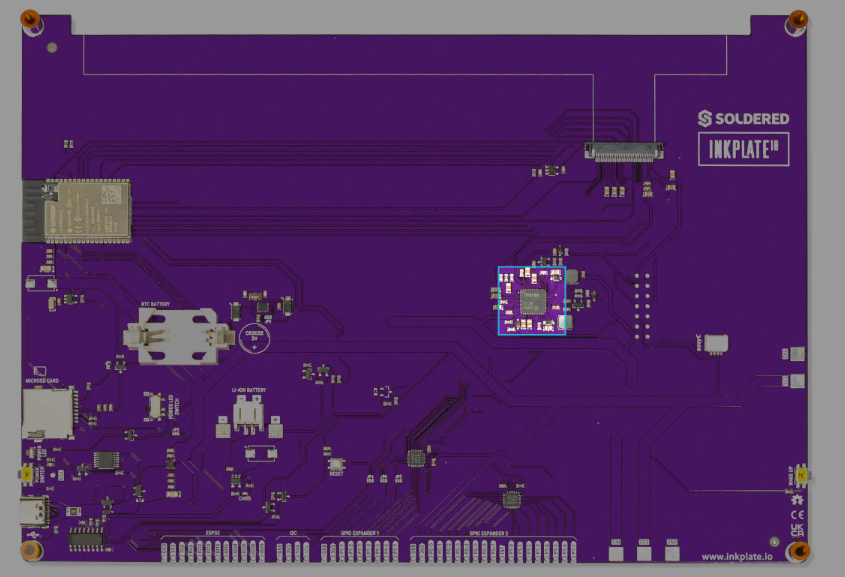
Onboard TPS chip
Read temperature code example
#include "Inkplate.h"   //Include Inkplate library to the sketch
#include "tempSymbol.h" //Include .h file that contains byte array for temperature symbol.
Inkplate display(INKPLATE_1BIT); // Create an object on Inkplate library and also set library into 1-bit mode (BW)

void setup()
{
    display.begin();                    // Init Inkplate library (you should call this function ONLY ONCE)
    display.clearDisplay();             // Clear frame buffer of display
    display.display();                  // Put clear image on display
    display.setTextSize(2);             // Scale text to be two times bigger then original (5x7 px)
    display.setTextColor(BLACK, WHITE); // Set text color to black and background color to white
}

void loop()
{
    int temperature = display.readTemperature();            // Read temperature from on-board temperature sensor
    display.clearDisplay();                                 // Clear frame buffer of display
    display.image.draw(tempSymbol, 100, 100, 38, 79, BLACK); // Draw temperature symbol at position X=100, Y=100
    display.setCursor(150, 125);
    display.print(temperature, DEC); // Print temperature
    display.print('C');
    display.display(); // Send everything to display (refresh the screen)
    delay(10000);      // Wait 10 seconds before new measurement
}
ℹ️
This example uses a temperature symbol bitmap (
tempSymbol.h) alongside the main .ino file. Get both files from the example folder on GitHub and keep them in the same sketch folder.display.readTemperature()
Reads the onboard temperature sensor
Returns type: int
Returns value: Returns the measured temperature in °C
Inkplate10_Read_Temperature
GitHub link with all files