Inkplate 10 MicroPython - Setting up Inkplate with MicroPython
To get started with MicroPython on your Inkplate 10, follow these next few steps. If you are new to MicroPython, check out our official MicroPython Guide for a full setup and overview on how it works.
Using MicroPython on your Inkplate board is very simple and straightforward, just plug in a USB cable, load the MicroPython firmware and the required libraries and run your script on Inkplate itself.
Setting up Inkplate with MicroPython
In order to get started with running your code on Inkplate, connect the device to your computer via USB and follow these steps:
-
Download the
Inkplate-firmware.binfile onto your computer -
Flash the .bin file onto the Inkplate device, this can be done via Soldered MicroPython Helper VS Code Extension or the Thonny IDE
Flashing with the MicroPython Helper extension
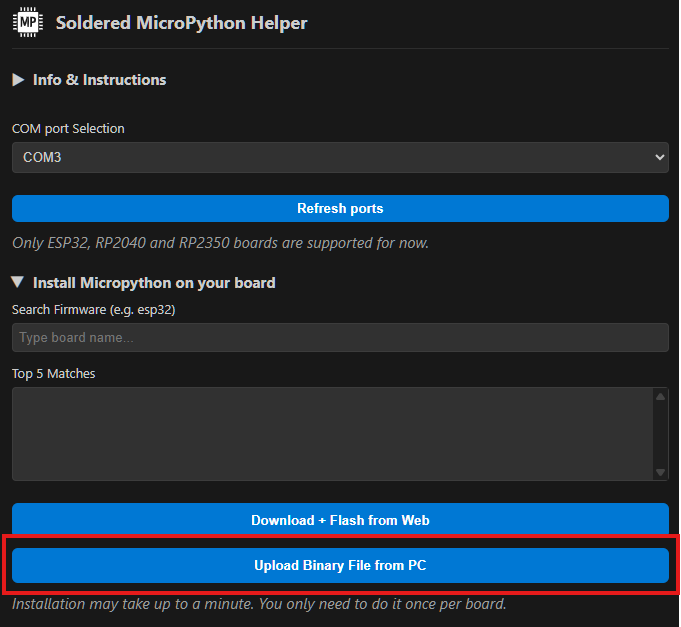
After setting up the MicroPython Helper extension, go to Install Micropython on your board and pick Upload Binary file from PC, choose the Inkplate-firmware.bin file and wait for it to flash on the device.
Flashing via Thonny IDE
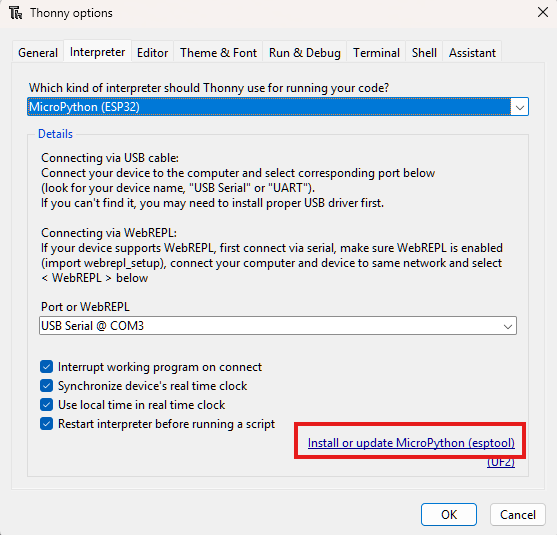
In the Thonny IDE, go to Run -> Configure interpreter and on the bottom of the window go to Install or update Micropython.
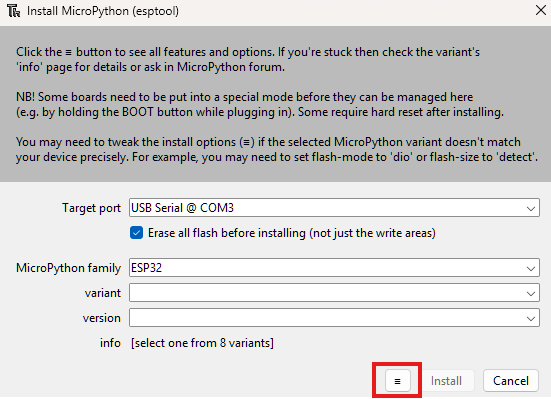
On the bottom of that window click on the ≡ button and pick Select local MicroPython image, choose the Inkplate-firmware.bin file on your computer and press Install.
-
With the mpremote package, we can upload the Inkplate modules onto the device with the following command:
mpremote mip install github:SolderedElectronics/Inkplate-micropython/boards/YOUR_DEVICE
or if you're running a Windows OS:
python -m mpremote mip install github:SolderedElectronics/Inkplate-micropython/boards/YOUR_DEVICE
Installing MicroPython on Inkplate
Guide that walks you through MicroPython setup on your Inkplate
Use the following command to install the MicroPython library for Inkplate 10:
mpremote mip install github:SolderedElectronics/Inkplate-micropython/boards/inkplate10
You only have to do steps 1-4 once when writing MicroPython firmware on your Inkplate!
Inkplate MicroPython Library
GitHub repo for Inkplate MicroPython library