Inputronic BRIDGE - Basic example
This page shows a basic example of how to poll and read standard USB events (like Keyboard and Mouse inputs) from the Inputronic BRIDGE using the I2C protocol.
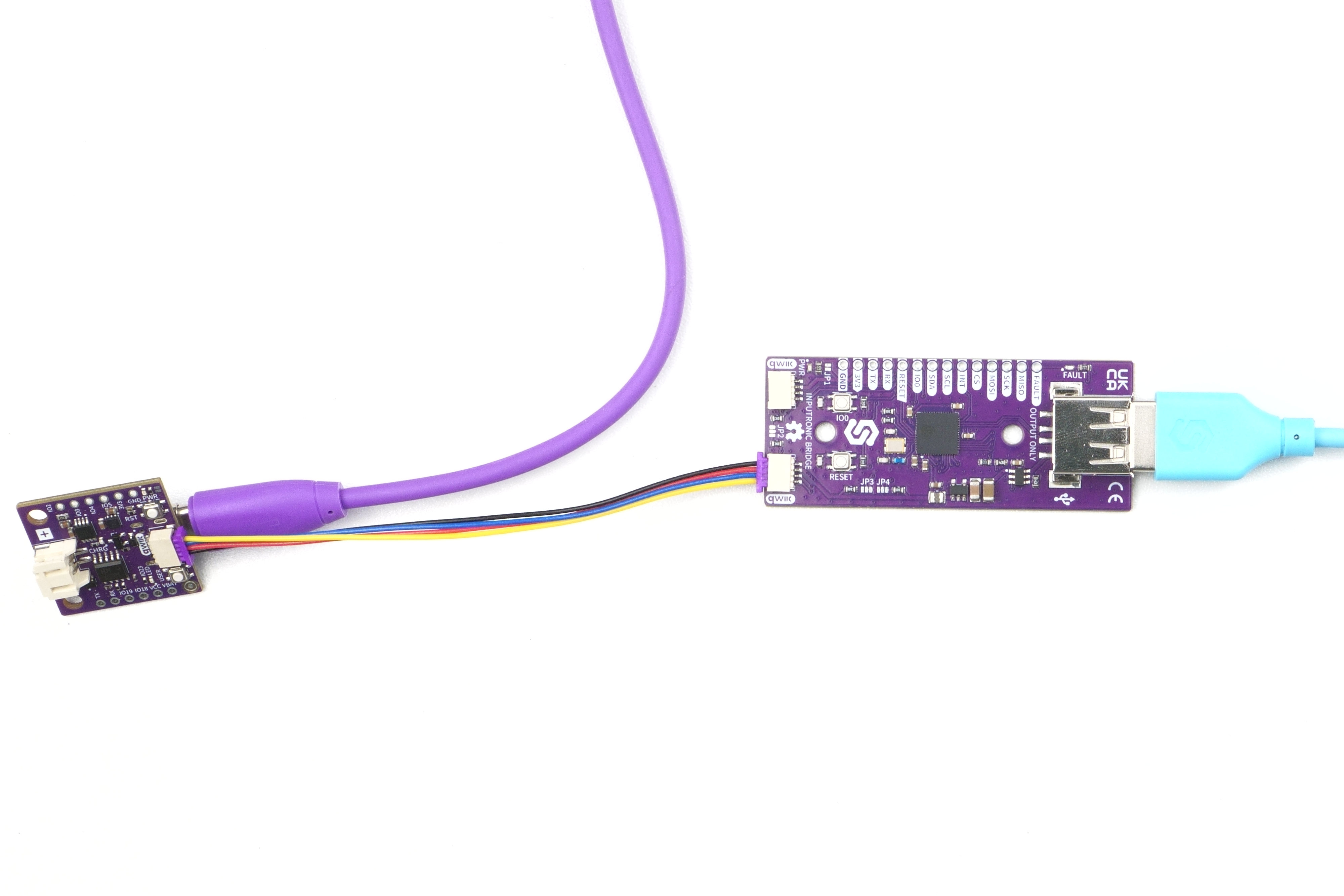
Connections for this example
For this example, we will use the easiest connection method: connecting the board via the Qwiic (formerly easyC) system to the Nula DeepSleep.
Initialization
To use the Inputronic BRIDGE with a microcontroller, you need to include the appropriate library, create an instance of the InputronicParser object, and initialize it within the setup() function. This ensures proper communication between the host and the BRIDGE module. The begin() function is used to establish the connection and select the active protocol.
Here is an example of how to initialize the Inputronic BRIDGE over I2C:
#include "Inputronic-BRIDGE.h"

InputronicParser parser;

void setup()
{
    Serial.begin(115200);

    Wire.begin();

    parser.configureI2c(0x50);

    if (!parser.begin(InputronicParser::PROTOCOL_I2C, Wire))
    {
        Serial.println("Could not connect to BRIDGE over I2C!");
        while (true);
    }

    Serial.println("BRIDGE connected. Waiting for inputs...");
}
Reading Data
Once initialized, you can use the pollEvents() method inside your loop() to continuously check for new data from connected USB devices. The library automatically parses standard Keyboard and Mouse HID reports.
void loop()
{
    auto events = parser.pollEvents();

    if (events.keyboard.valid)
    {
        Serial.print("Keyboard: ");
        for (uint8_t i = 0; i < events.keyboard.keyCount; i++)
        {
            Serial.print(events.keyboard.keys[i]);
        }
        Serial.println();
    }

    if (events.mouse.valid)
    {
        Serial.printf("Mouse X:%d Y:%d L:%d R:%d\n",
                      events.mouse.x, events.mouse.y,
                      events.mouse.btnLeft, events.mouse.btnRight);
    }

    delay(10);
}
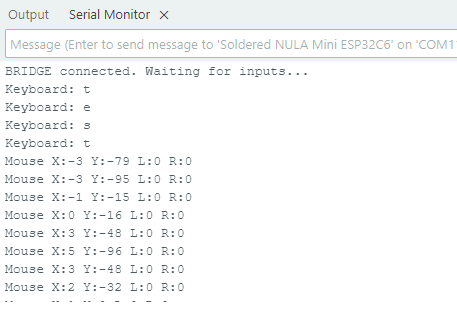
Handling Keyboard and Mouse Events
When you call parser.pollEvents(), the library returns an EventBundle structure containing all the parsed data from connected USB devices.
parser.pollEvents()
Polls the BRIDGE for new data and parses the incoming payload into standard HID structures.
Returns value: Returns an EventBundle struct containing the parsed data for keyboards, mice, MIDI, and raw descriptors.
Understanding the EventBundle struct
When you call parser.pollEvents(), it returns an EventBundle object. This bundle contains several nested sub-structures, each representing a specific type of parsed USB data. You can access them using dot notation:
events.keyboard- Containsvalid(bool),keyCount(uint8_t), andkeys(String array).events.mouse- Containsvalid(bool),x/ycoordinates (int16_t),scroll(int8_t), and button states (btnLeft,btnRight, etc.).events.midi- Containsvalid(bool) and raw MIDI bytes (b1,b2,b3).events.descriptor- Containsvalid(bool) and thehexstring of requested USB descriptors.events.hidRaw- Containsvalid(bool) and thehexstring of unparsed raw HID reports.
Always check the .valid flag of a specific event type before trying to read its data variables.
Keyboard Events
To check if a keyboard event occurred, verify the events.keyboard.valid flag. If true, you can iterate through the events.keyboard.keys array up to events.keyboard.keyCount to read the currently pressed keys.
Understanding the KeyboardEvent struct
The events.keyboard object contains the following variables to help you process typing and key combinations:
valid(bool) - Always check this first! It returnstrueif a new keyboard event has been registered.keyCount(uint8_t) - The total number of keys currently being pressed.keys(String array) - Contains the names or characters of the pressed keys (e.g., "A", "SHIFT", "ENTER"). You can iterate through this array up to thekeyCountlimit.key(char) - A single character representation of the primary pressed key.payload(String) - The raw text payload received directly from the BRIDGE.
Mouse Events
Similarly, check events.mouse.valid for mouse activity. The mouse structure provides relative movement data (events.mouse.x, events.mouse.y, events.mouse.scroll) and boolean flags for button states (e.g., events.mouse.btnLeft, events.mouse.btnRight).
Understanding the MouseEvent struct
The events.mouse object provides detailed movement and button state data:
valid(bool) - Returnstrueif new mouse data has been registered.x/y(int16_t) - The relative movement of the mouse along the X (horizontal) and Y (vertical) axes since the last event.scroll(int8_t) - The relative movement of the scroll wheel.- Button States (bool) - Standard buttons:
btnLeft,btnRight,btnMiddle. - Extra Button States (bool) - Additional buttons:
btnBackward,btnForward,btnScrollWheel. These returntrueif the button is currently held down.
Full example
In this example, we first include the necessary library and create an instance of the InputronicParser. Inside setup(), we initialize the I2C bus and attempt to connect to the BRIDGE. In the loop(), we continuously poll the module for new events and print the parsed keyboard characters and mouse movements to the Serial Monitor.
#include "Inputronic-BRIDGE.h"

InputronicParser parser;

void setup()
{
    Serial.begin(115200);

    Wire.begin();

    parser.configureI2c(0x50);

    if (!parser.begin(InputronicParser::PROTOCOL_I2C, Wire))
    {
        Serial.println("Could not connect to BRIDGE over I2C!");
        while (true);
    }

    Serial.println("BRIDGE connected. Waiting for inputs...");
}

void loop()
{
    auto events = parser.pollEvents();

    if (events.keyboard.valid)
    {
        Serial.print("Keyboard: ");
        for (uint8_t i = 0; i < events.keyboard.keyCount; i++)
        {
            Serial.print(events.keyboard.keys[i]);
        }
        Serial.println();
    }

    if (events.mouse.valid)
    {
        Serial.printf("Mouse X:%d Y:%d L:%d R:%d\n",
                      events.mouse.x, events.mouse.y,
                      events.mouse.btnLeft, events.mouse.btnRight);
    }

    delay(10);
}
parser.begin()
Initializes the Inputronic BRIDGE parser and establishes communication.
Returns value: Returns true if initialization is successful, false otherwise.
Function parameters:
| Type | Name | Description |
|---|---|---|
CommProtocol | p | The communication protocol to use (e.g., PROTOCOL_I2C, PROTOCOL_UART, PROTOCOL_SPI). |
TwoWire & | wire | Reference to the communication bus object (e.g., Wire, Serial1, SPI). |
parser.configureI2c()
Sets the I2C address for the BRIDGE module. Should be called before begin().
Returns value: None
Function parameters:
| Type | Name | Description |
|---|---|---|
uint8_t | address | The I2C address of the board (default is 0x50). |