Inputronic BRIDGE - Interrupt-driven reading
The basic example calls pollEvents() on every loop() iteration, which runs a bus transaction even when no new input has arrived. The BRIDGE can instead notify the host only when data is ready. When you enable interrupt mode, the BRIDGE pulses its INT pin as soon as a new HID event is parsed, and pollEvents() returns immediately without any bus traffic until that pin fires.
Connections for this example
This example uses the same I2C connection as the basic example, with one addition: the INT pin of the BRIDGE is wired to a digital pin on the host.
| Nula DeepSleep | Inputronic BRIDGE |
|---|---|
| IO8 | SDA |
| IO9 | SCL |
| IO4 | INT |
INT pin of the BRIDGE to be wired to a digital pin on the host. In this example the INT pin is connected to IO4 on the Nula DeepSleep. For the full connection tables, see the Getting started page.Enabling interrupt mode
You enable interrupt mode through the extra parameters of begin(). Set the enable flag to true, pass the host pin connected to INT, and set the edge: false for a FALLING edge, true for a RISING edge. Optionally, register a callback with onDataReady() that runs inside the interrupt service routine when the BRIDGE signals new data.
#include "Inputronic-BRIDGE.h"

InputronicParser parser;

// Host pin connected to the BRIDGE INT output.
static const int8_t INTERRUPT_PIN = 4;

// Flag set by the ISR callback and checked in loop().
volatile bool newDataFlag = false;

// Runs inside the ISR when the BRIDGE signals new data.
// Keep it short: no Serial or blocking calls here.
void onBridgeDataReady()
{
    newDataFlag = true;
}

void setup()
{
    Serial.begin(115200);

    Wire.begin(8, 9);
    parser.configureI2c(0x50);

    // Enable interrupt mode: enable = true, INT pin = INTERRUPT_PIN,
    // trigger on FALLING edge (activeHigh = false).
    if (!parser.begin(InputronicParser::PROTOCOL_I2C, Wire, true, INTERRUPT_PIN, false))
    {
        Serial.println("Could not connect to BRIDGE over I2C!");
        while (true);
    }

    parser.onDataReady(onBridgeDataReady);

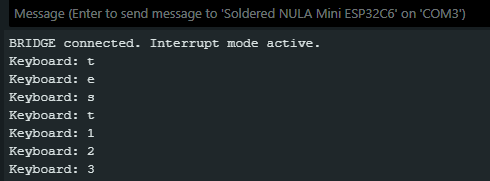
    Serial.println("BRIDGE connected. Interrupt mode active.");
}

void loop()
{
    // Returns immediately without bus traffic unless the INT pin has fired.
    auto events = parser.pollEvents();

    if (events.keyboard.valid)
    {
        Serial.print("Keyboard: ");
        for (uint8_t i = 0; i < events.keyboard.keyCount; i++)
        {
            Serial.print(events.keyboard.keys[i]);
        }
        Serial.println();
    }

    if (events.mouse.valid)
    {
        Serial.printf("Mouse X:%d Y:%d L:%d R:%d\n",
                      events.mouse.x, events.mouse.y,
                      events.mouse.btnLeft, events.mouse.btnRight);
    }

    if (newDataFlag)
    {
        newDataFlag = false;
        // The events above already hold the latest data. Use this flag
        // to trigger extra work when data arrives.
    }
}
parser.begin()
Initializes the parser and enables interrupt-driven polling. pollEvents() then only runs a bus transaction after the INT pin fires.
Returns value: Returns true if the BRIDGE responds to the connection check, false otherwise.
Function parameters:
| Type | Name | Description |
|---|---|---|
CommProtocol | p | The communication protocol to use (e.g., PROTOCOL_I2C, PROTOCOL_UART, PROTOCOL_SPI). |
TwoWire & | wire | Reference to the communication bus object (e.g., Wire). |
bool | enableInterrupt | Set to true to enable interrupt-driven polling. |
int8_t | interruptPin | Host pin connected to the BRIDGE INT output. |
bool | activeHigh | Interrupt edge: true fires on RISING, false fires on FALLING. |
parser.onDataReady()
Registers a user callback that runs inside the interrupt service routine when the BRIDGE signals new data. The callback must be short and must not call Serial or any blocking function.
Returns value: None
Function parameters:
| Type | Name | Description |
|---|---|---|
void (*)() | callback | Pointer to the function to call from the ISR when data is ready. |