NEO-M9N-00B - Get Position
This page contains a simple example of reading GPS position data (latitude, longitude, altitude, and satellites in view) with the NEO-M9N-00B module.
Initialization
To read position data from the NEO-M9N-00B, first include the required libraries and create the module object:
#include <Wire.h>
#include <Soldered-GNSS.h>

Soldered_GNSS myGNSS;

long lastTime = 0;
Next, in the setup() function, initialize and configure the module:
void setup()
{
    Serial.begin(115200);
    while (!Serial);
    Serial.println("Soldered u-blox GNSS Example 2 - Get Position");

    Wire.begin();

    if (myGNSS.begin() == false)
    {
        Serial.println("u-blox GNSS not detected at default I2C address. Please check wiring. Freezing.");
        while (1);
    }

    // Use UBX-only output to reduce I2C traffic
    myGNSS.setI2COutput(COM_TYPE_UBX);
    myGNSS.saveConfigSelective(VAL_CFG_SUBSEC_IOPORT);
}
myGNSS.begin()
Initializes the GNSS module and establishes I2C communication
Returns value: Boolean value, true if the module is detected and communication succeeds, false otherwise
myGNSS.setI2COutput()
Sets the communication protocol output over I2C. Using COM_TYPE_UBX disables NMEA output and reduces I2C traffic
Returns value: Boolean value, true if successful, false for error
Function parameters:
| Type | Name | Description |
|---|---|---|
uint8_t | comSettings | Communication type flag, e.g. COM_TYPE_UBX for UBX-only output |
myGNSS.saveConfigSelective()
Saves a selective subset of the current configuration to the module's flash memory
Returns value: Boolean value, true if successful, false for error
Function parameters:
| Type | Name | Description |
|---|---|---|
uint32_t | configMask | Bitmask specifying which configuration subsections to save, e.g. VAL_CFG_SUBSEC_IOPORT |
Taking measurements
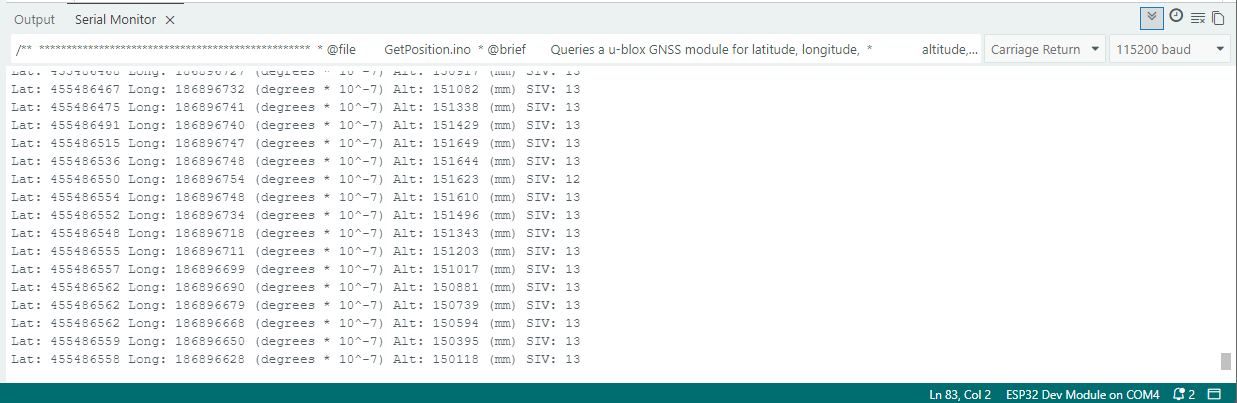
In the loop() function, the module is polled once per second to read the current position:
void loop()
{
    // Query the module only once per second
    if (millis() - lastTime > 1000)
    {
        lastTime = millis();

        long latitude = myGNSS.getLatitude();
        Serial.print(F("Lat: "));
        Serial.print(latitude);

        long longitude = myGNSS.getLongitude();
        Serial.print(F(" Long: "));
        Serial.print(longitude);
        Serial.print(F(" (degrees * 10^-7)"));

        long altitude = myGNSS.getAltitude();
        Serial.print(F(" Alt: "));
        Serial.print(altitude);
        Serial.print(F(" (mm)"));

        byte SIV = myGNSS.getSIV();
        Serial.print(F(" SIV: "));
        Serial.println(SIV);
    }
}
myGNSS.getLatitude()
Reads the current latitude from the GNSS module
Returns value: Long value, latitude in degrees multiplied by 10^-7
myGNSS.getLongitude()
Reads the current longitude from the GNSS module
Returns value: Long value, longitude in degrees multiplied by 10^-7
myGNSS.getAltitude()
Reads the current altitude from the GNSS module
Returns value: Long value, altitude in millimeters
myGNSS.getSIV()
Reads the number of satellites currently in view
Returns value: Byte value, number of satellites in view
Full example
You can find the full sketch below:
GetPosition.ino
An example of reading GPS position data with the NEO-M9N-00B module