NEO-M9N-00B - Geofence
This page contains an example of setting up geofences around the module's current position and monitoring whether it's still inside them. The module supports up to 4 concentric geofences, each with its own radius and confidence level.
Initialization
Include the required libraries, create the module object, and define which pin drives an LED to show the geofence state:
#define LED LED_BUILTIN // Change this if your board's LED is on a different pin

#include <Wire.h>
#include <Soldered-GNSS.h>

Soldered_GNSS myGNSS;
In the setup() function, wait for a 3D fix, then define four geofences (5 m, 10 m, 15 m, and 20 m radius) centered on the current position:
void setup()
{
    pinMode(LED, OUTPUT);

    Wire.begin();

    Serial.begin(115200);
    while (!Serial);
    Serial.println(F("NEO-M9N-00B geofence example"));

    if (myGNSS.begin() == false)
    {
        Serial.println(F("u-blox GNSS not detected at default I2C address. Please check wiring. Freezing."));
        while (1);
    }

    myGNSS.setI2COutput(COM_TYPE_UBX);

    Serial.println(F("Waiting for a 3D fix..."));

    byte fixType = 0;
    while (fixType < 3)
    {
        fixType = myGNSS.getFixType();
        Serial.print(F("Fix: "));
        Serial.println(fixType);
        delay(1000);
    }

    Serial.println(F("3D fix found!"));

    long latitude = myGNSS.getLatitude();
    long longitude = myGNSS.getLongitude();

    myGNSS.clearGeofences(); // Clear any existing geofences first

    byte confidence = 2; // 0 = none, 1 = 68%, 2 = 95%, 3 = 99.7%, 4 = 99.99%

    myGNSS.addGeofence(latitude, longitude, 500, confidence);  // 5 m radius (radius is in cm)
    myGNSS.addGeofence(latitude, longitude, 1000, confidence); // 10 m radius
    myGNSS.addGeofence(latitude, longitude, 1500, confidence); // 15 m radius
    myGNSS.addGeofence(latitude, longitude, 2000, confidence); // 20 m radius
}
myGNSS.getFixType()
Reads the current GNSS fix type
Returns value: Byte value: 0 = no fix, 1 = dead reckoning, 2 = 2D, 3 = 3D, 4 = GNSS + dead reckoning, 5 = time only
myGNSS.clearGeofences()
Removes all currently configured geofences from the module
Returns value: Boolean value, true if successful, false for error
myGNSS.addGeofence()
Adds a circular geofence around a given coordinate. Up to 4 geofences can be active at once
Returns value: Boolean value, true if successful, false for error
Function parameters:
| Type | Name | Description |
|---|---|---|
int32_t | latitude | Latitude of the geofence center, in degrees * 10^-7 |
int32_t | longitude | Longitude of the geofence center, in degrees * 10^-7 |
uint32_t | radius | Radius of the geofence, in centimeters |
byte | confidence | Confidence level: 0 = none, 1 = 68%, 2 = 95%, 3 = 99.7%, 4 = 99.99% |
Monitoring the geofence state
In the loop() function, the combined geofence state is checked once per second. The LED lights up while the module is inside the outermost (combined) geofence:
void loop()
{
    geofenceState currentGeofenceState;

    if (myGNSS.getGeofenceState(currentGeofenceState) == false)
    {
        return;
    }

    Serial.print(F("Combined state: "));
    Serial.print(currentGeofenceState.combState);

    if (currentGeofenceState.combState == 1)
    {
        Serial.println(F(" (Inside)"));
        digitalWrite(LED, HIGH);
    }
    else if (currentGeofenceState.combState == 2)
    {
        Serial.println(F(" (Outside)"));
        digitalWrite(LED, LOW);
    }
    else
    {
        Serial.println(F(" (Unknown)"));
        digitalWrite(LED, LOW);
    }

    delay(1000);
}
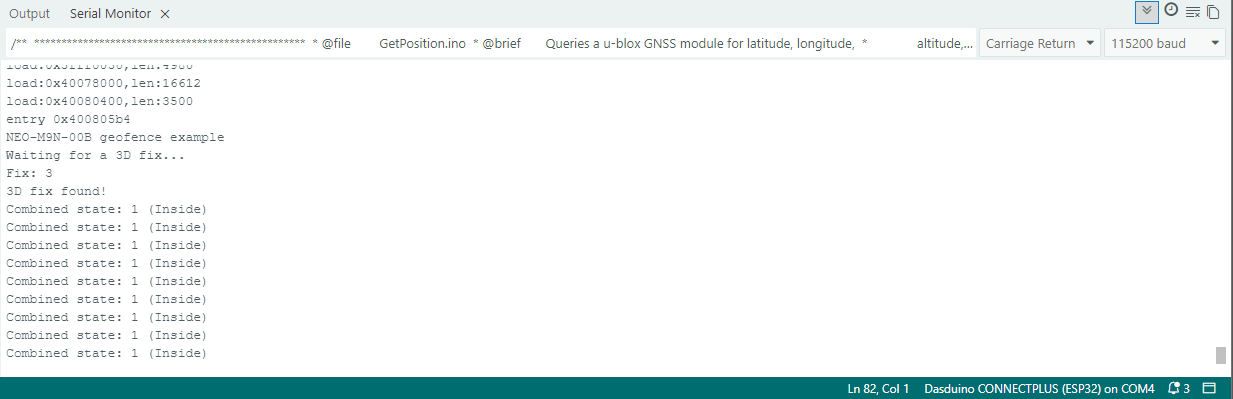
myGNSS.getGeofenceState()
Reads the current state of all configured geofences into the provided struct
Returns value: Boolean value, true if successful, false for error
Function parameters:
| Type | Name | Description |
|---|---|---|
geofenceState & | currentGeofenceState | Struct that receives the combined state and the individual state of each configured geofence |
currentGeofenceState.states[].Full example
You can find the full sketch below:
Geofence.ino
An example of setting up and monitoring geofences with the NEO-M9N-00B module