Inkplate 2 – Basic Graphics
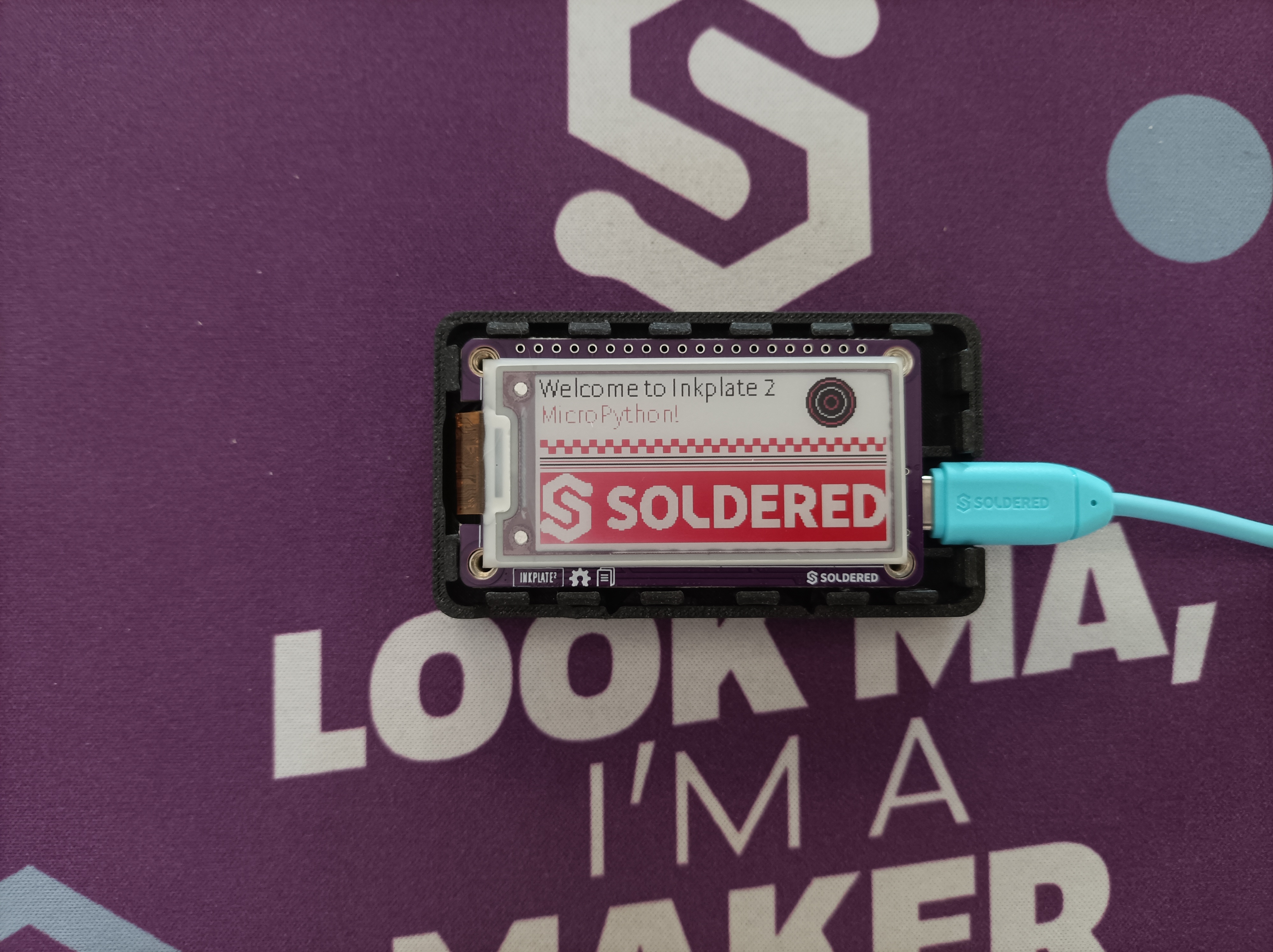
This page demonstrates and explains some basic shape drawing functions and text display all in different colors.
Basic Black-White-Red example
Inkplate2 supports 3 colors to display:
| Color | Value | Int Value |
|---|---|---|
| BLACK | INKPLATE_WHITE | 0 |
| WHITE | INKPLATE_BLACK | 1 |
| RED | INKPLATE_RED | 2 |
from inkplate2 import Inkplate

# Soldered logo bitmap image data is stored in memory
soldered_logo = bytearray(
    b"\xff\xff\xff\xff\xff\xff\xff\xff\xff\xff\xff\xff\xff\xff\xff\xff\xff\xff\xff\xff\xff\xff\xff\xff\xff\xff\xe0\xff\xfc\x3f\xff\xff\xff\xff\xff\xff\xff\xff\xff\xff\xff\xff\xff\xff\xff\xff\xff\xff\xff\xff\xff\xff\xff\xe0\xff\xf0\x0f\xff\xff\xff\xff\xff\xff\xff\xff\xff\xff\xff\xff\xff\xff\xff\xff\xff\xff\xff\xff\xff\xff\xff\xe0\xff\xc0\x07\xff\xff\xff\xff\xff\xff\xff\xff\xff\xff\xff\xff\xff\xff\xff\xff\xff\xff\xff\xff\xff\xff\xff\xe0\xff\x80\x01\xff\xff\xff\xff\xff\xff\xff\xff\xff\xff\xff\xff\xff\xff\xff\xff\xff\xff\xff\xff\xff\xff\xff\xe0\xfe\x00\x00\x7f\xff\xff\xff\xff\xff\xff\xff\xff\xff\xff\xff\xff\xff\xff\xff\xff\xff\xff\xff\xff\xff\xff\xe0\xf8\x00\x00\x1f\xff\xff\xff\xff\xff\xff\xff\xff\xff\xff\xff\xff\xff\xff\xff\xff\xff\xff\xff\xff\xff\xff\xe0\xf0\x00\x00\x01\xff\xff\xff\xff\xff\xff\xff\xff\xff\xff\xff\xff\xff\xff\xff\xff\xff\xff\xff\xff\xff\xff\xe0\xc0\x01\x80\x01\xff\xff\xff\xff\xff\xff\xff\xff\xff\xff\xff\xff\xff\xff\xff\xff\xff\xff\xff\xff\xff\xff\xe0\xc0\x07\xe0\x00\xff\xfe\x03\xff\xf8\x07\xfe\x07\xff\xc0\x0f\xff\x80\x00\x78\x00\xff\xf0\x00\x1e\x00\x7f\xe0\xc0\x1f\xf0\x00\xff\xf8\x00\xff\xe0\x01\xfe\x07\xff\xc0\x00\xff\x80\x00\x78\x00\x0f\xf0\x00\x0e\x00\x0f\xe0\xc0\x3f\xfc\x00\xff\xf0\x00\x3f\x80\x00\xfe\x07\xff\xc0\x00\x3f\x80\x00\x78\x00\x03\xf0\x00\x0e\x00\x03\xe0\xc0\xfe\x7e\x00\xff\xe0\x00\x3f\x00\x00\x7e\x07\xff\xc0\x00\x1f\x80\x00\x78\x00\x01\xf0\x00\x0e\x00\x00\xe0\xc0\xfc\x3f\x01\xff\xc0\x00\x3f\x00\x00\x3e\x07\xff\xc0\x00\x0f\x80\x00\x78\x00\x01\xf0\x00\x0e\x00\x00\x60\xc0\xf8\x0f\x81\xff\xc0\x00\x7e\x00\x80\x1e\x07\xff\xc0\x00\x0f\x80\x00\x78\x1c\x00\xf0\x00\x1e\x00\x00\x60\xc0\xf8\x03\xff\xff\x80\xfc\xfe\x03\xf0\x1e\x07\xff\xc0\xf8\x07\x81\xff\xf8\x1f\x80\xf0\x3f\xfe\x07\xc0\x20\xc0\xf8\x01\xff\xff\x80\xff\xfc\x07\xf8\x0e\x07\xff\xc0\xfc\x07\x81\xff\xf8\x1f\xc0\xf0\x3f\xfe\x07\xe0\x20\xc0\xf8\x00\x7f\xff\x80\xff\xfc\x0f\xf8\x0e\x07\xff\xc0\xfe\x03\x81\xff\xf8\x1f\xc0\xf0\x3f\xfe\x07\xf0\x00\xc0\xfc\x00\x1f\xff\x80\x7f\xfc\x0f\xfc\x0e\x07\xff\xc0\xfe\x03\x81\xff\xf8\x1f\xc0\xf0\x3f\xfe\x07\xf0\x00\xc0\x7e\x00\x07\xff\xc0\x0f\xf8\x0f\xfc\x0e\x07\xff\xc0\xff\x03\x80\x00\xf8\x1f\x80\xf0\x00\x3e\x07\xf0\x00\xc0\x1f\x80\x03\xff\xc0\x03\xf8\x0f\xfc\x0e\x07\xff\xc0\xff\x03\x80\x00\xf8\x1f\x00\xf0\x00\x3e\x07\xf8\x00\xc0\x0f\xc0\x01\xff\xe0\x00\xf8\x0f\xfc\x0e\x07\xff\xc0\xff\x03\x80\x00\xf8\x00\x01\xf0\x00\x3e\x07\xf8\x00\xc0\x03\xf0\x01\xff\xf0\x00\x78\x0f\xfc\x0e\x07\xff\xc0\xff\x03\x80\x00\xf8\x00\x01\xf0\x00\x3e\x07\xf8\x00\xc0\x00\xfc\x01\xff\xfc\x00\x38\x0f\xfc\x0e\x07\xff\xc0\xff\x03\x80\x00\xf8\x00\x03\xf0\x00\x3e\x07\xf8\x00\xf0\x00\x3f\x01\xff\xff\x00\x18\x0f\xfc\x0e\x07\xff\xc0\xff\x03\x80\x01\xf8\x00\x0f\xf0\x00\x3e\x07\xf8\x00\xfc\x00\x1f\x01\xff\xff\xc0\x1c\x0f\xfc\x0e\x07\xff\xc0\xff\x03\x81\xff\xf8\x00\x0f\xf0\x3f\xfe\x07\xf0\x00\xfe\x00\x1f\x01\xff\xff\xf0\x1c\x0f\xf8\x0e\x03\xff\xc0\xfe\x03\x81\xff\xf8\x1c\x07\xf0\x3f\xfe\x07\xf0\x00\xff\x80\x1f\x01\xff\xff\xf8\x1c\x07\xf8\x0e\x01\xff\xc0\xfe\x07\x81\xff\xf8\x1c\x07\xf0\x3f\xfe\x07\xe0\x20\xf3\xe0\x1f\x01\xff\xe7\xf8\x1c\x03\xf0\x1e\x00\xff\xc0\xfc\x07\x81\xff\xf8\x1e\x03\xf0\x3f\xfe\x07\xe0\x20\xc0\xf8\x1f\x01\xff\xc1\xf0\x1e\x01\xe0\x1f\x00\x01\xc0\xf0\x07\x81\xff\xf8\x1e\x03\xf0\x3f\xfe\x07\x80\x60\x80\xfc\x1f\x01\xff\x80\x00\x1e\x00\x00\x3f\x80\x01\xc0\x00\x0f\x80\x00\x38\x1f\x01\xf0\x00\x0e\x00\x00\x60\x80\x7f\x7f\x01\xff\x80\x00\x3f\x00\x00\x3f\xc0\x01\xc0\x00\x1f\x80\x00\x38\x1f\x01\xf0\x00\x0e\x00\x00\xe0\x00\x1f\xfc\x01\xff\x80\x00\x3f\x80\x00\x7f\xe0\x01\xc0\x00\x3f\x80\x00\x38\x1f\x80\xf0\x00\x0e\x00\x01\xe0\x00\x0f\xf8\x01\xff\xc0\x00\xff\xc0\x00\xff\xf0\x01\xc0\x00\x7f\x80\x00\x38\x1f\x80\xf0\x00\x0e\x00\x03\xe0\x80\x03\xe0\x01\xff\xf0\x01\xff\xf0\x03\xff\xf8\x01\xc0\x03\xff\x80\x00\x38\x1f\xc0\x70\x00\x0e\x00\x1f\xe0\x80\x00\x80\x03\xff\xff\x1f\xff\xfe\x3f\xff\xff\xff\xff\xff\xff\xff\xff\xff\xff\xff\xff\xff\xff\xff\xff\xe0\xc0\x00\x00\x07\xff\xff\xff\xff\xff\xff\xff\xff\xff\xff\xff\xff\xff\xff\xff\xff\xff\xff\xff\xff\xff\xff\xe0\xfc\x00\x00\x1f\xff\xff\xff\xff\xff\xff\xff\xff\xff\xff\xff\xff\xff\xff\xff\xff\xff\xff\xff\xff\xff\xff\xe0\xff\x00\x00\x7f\xff\xff\xff\xff\xff\xff\xff\xff\xff\xff\xff\xff\xff\xff\xff\xff\xff\xff\xff\xff\xff\xff\xe0\xff\xc0\x00\xff\xff\xff\xff\xff\xff\xff\xff\xff\xff\xff\xff\xff\xff\xff\xff\xff\xff\xff\xff\xff\xff\xff\xe0\xff\xe0\x03\xff\xff\xff\xff\xff\xff\xff\xff\xff\xff\xff\xff\xff\xff\xff\xff\xff\xff\xff\xff\xff\xff\xff\xe0\xff\xf8\x0f\xff\xff\xff\xff\xff\xff\xff\xff\xff\xff\xff\xff\xff\xff\xff\xff\xff\xff\xff\xff\xff\xff\xff\xe0\xff\xfe\x3f\xff\xff\xff\xff\xff\xff\xff\xff\xff\xff\xff\xff\xff\xff\xff\xff\xff\xff\xff\xff\xff\xff\xff\xe0\xff\xff\xff\xff\xff\xff\xff\xff\xff\xff\xff\xff\xff\xff\xff\xff\xff\xff\xff\xff\xff\xff\xff\xff\xff\xff\xe0"
)

# Create Inkplate object
display = Inkplate()

# Main function
if __name__ == "__main__":

    # Initialize the display, needs to be called only once
    display.begin()

    # Print some text at location x = 5 px, y = 8 px
    # So, close to the upper left corner
    display.println("Welcome to Inkplate 2")

    # Print some larger text in red
    display.set_text_size(1)

    display.set_text_color(display.RED)
    display.print("MicroPython!")

    # Fill a black circle and draw some white and red circles inside it
    display.fill_circle(178, 16, 15, display.BLACK)
    display.draw_circle(178, 16, 13, display.RED)
    display.draw_circle(178, 16, 9, display.WHITE)
    display.draw_circle(178, 16, 4, display.RED)

    # Draw a red checkerboard pattern with a loop
    for x in range(30):
        display.fill_rect(0 + (5*x*2), 38, 5, 5, display.RED)

    for x in range(30):
        display.fill_rect(5 + (5*x*2), 42, 5, 5, display.RED)

    # Draw some horizontal lines
    display.draw_line(0, 49, 214, 49, display.BLACK)
    display.draw_line(0, 51, 214, 51, display.RED)
    display.draw_line(0, 53, 214, 53, display.BLACK)
    display.draw_line(0, 55, 214, 55, display.RED)

    # Draw the soldered logo as a bitmap image in red
    display.draw_bitmap(0, 58, soldered_logo, 211, 44, display.RED)

    # Display everything on Inkplate's display
    # This function must be called after drawing, or else the display won't update
    # The display flickers when it updates and it takes a while, this is normal
    display.display()
inkplate.set_text_color()
Sets the color of the text. Must be called before printing.
Returns value: None
Function parameters:
| Type | Name | Description |
|---|---|---|
int | color | Set text color. |
inkplate.fill_circle()
Function to draw a filled circle with specified color
Returns value: None
Function parameters:
| Type | Name | Description |
|---|---|---|
int | x | X coordinate |
int | y | Y coordinate |
int | r | Circle radius |
int | c | Circle fill color |
inkplate.draw_circle()
Function to draw a circle
Returns value: None
Function parameters:
| Type | Name | Description |
|---|---|---|
int | x | X coordinate |
int | y | Y coordinate |
int | r | Circle radius |
int | c | Circle color |
inkplate.fill_rect()
Function to draw a color filled rectangle
Returns value: None
Function parameters:
| Type | Name | Description |
|---|---|---|
int | x | X coordinate |
int | y | Y coordinate |
int | width | Rectangle width |
int | height | Rectangle height |
int | c | Rectangle color |
inkplate.draw_line()
Function to draw a line from start to end
Returns value: None
Function parameters:
| Type | Name | Description |
|---|---|---|
int | x0 | X coordinate for first point |
int | y0 | Y coordinate for first point |
int | x1 | X coordinate for second point |
int | y1 | Y coordinate for second point |
int | c | Line color |
inkplate.draw_bitmap()
Function which draws bitmap image
Returns value: None
Function parameters:
| Type | Name | Description |
|---|---|---|
int | x | X start coordinate |
int | y | Y start coordinate |
bytearray | data | Bitmap bytearray |
int | w | Width |
int | h | Height |
int | c | Color |
Code Example on GitHub
Basic Black-White-Red example on GitHub
Drawing colored bitmap example
drawColoredBitmap
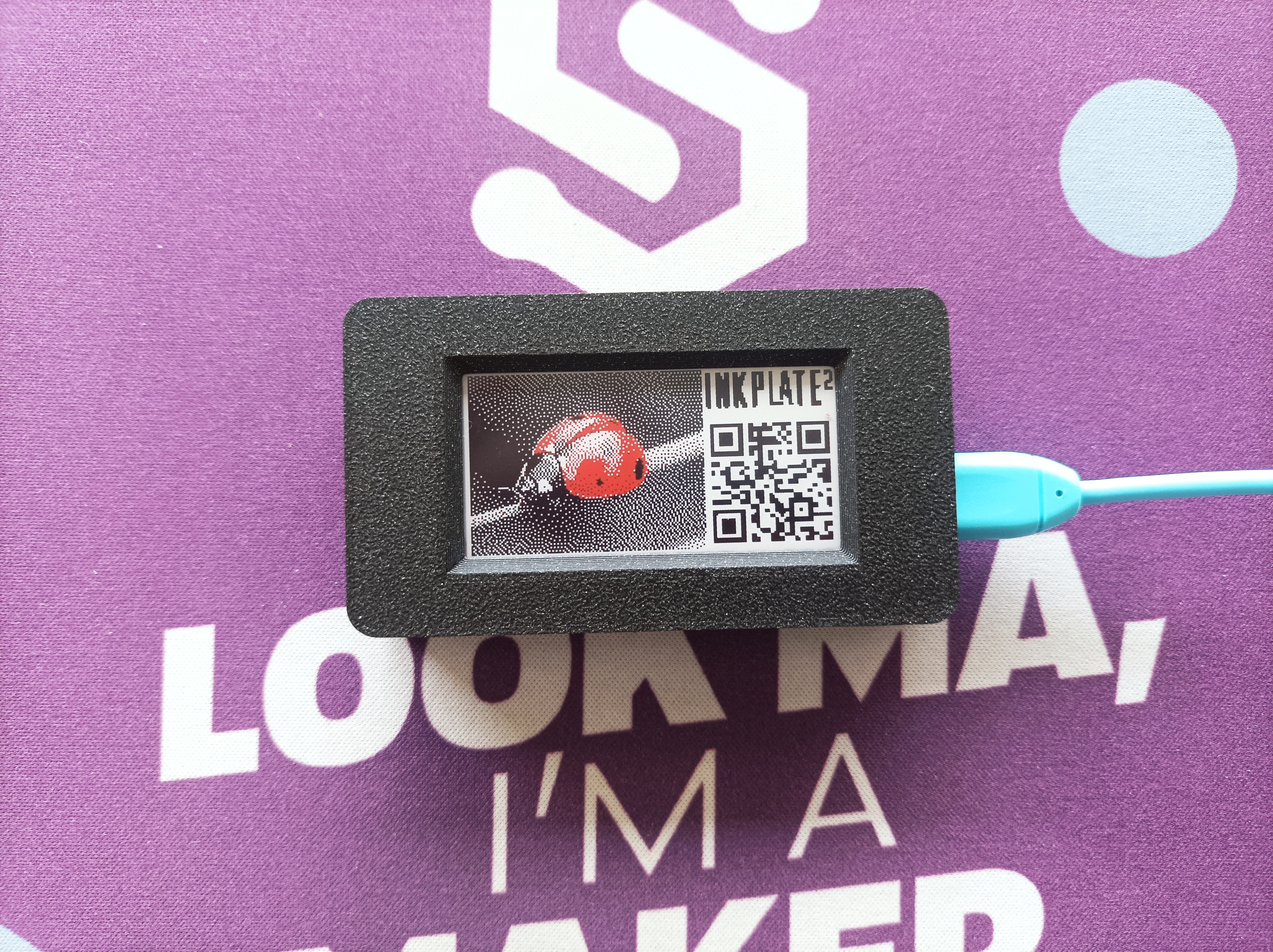
Example showing how to draw a colored bitmap stored in flash memory.
Full example
draw_colored_bitmap.py
Draws a colored bitmap stored in flash memory to the Inkplate 2 display.