Inkplate 13SPECTRA – RTC alarm
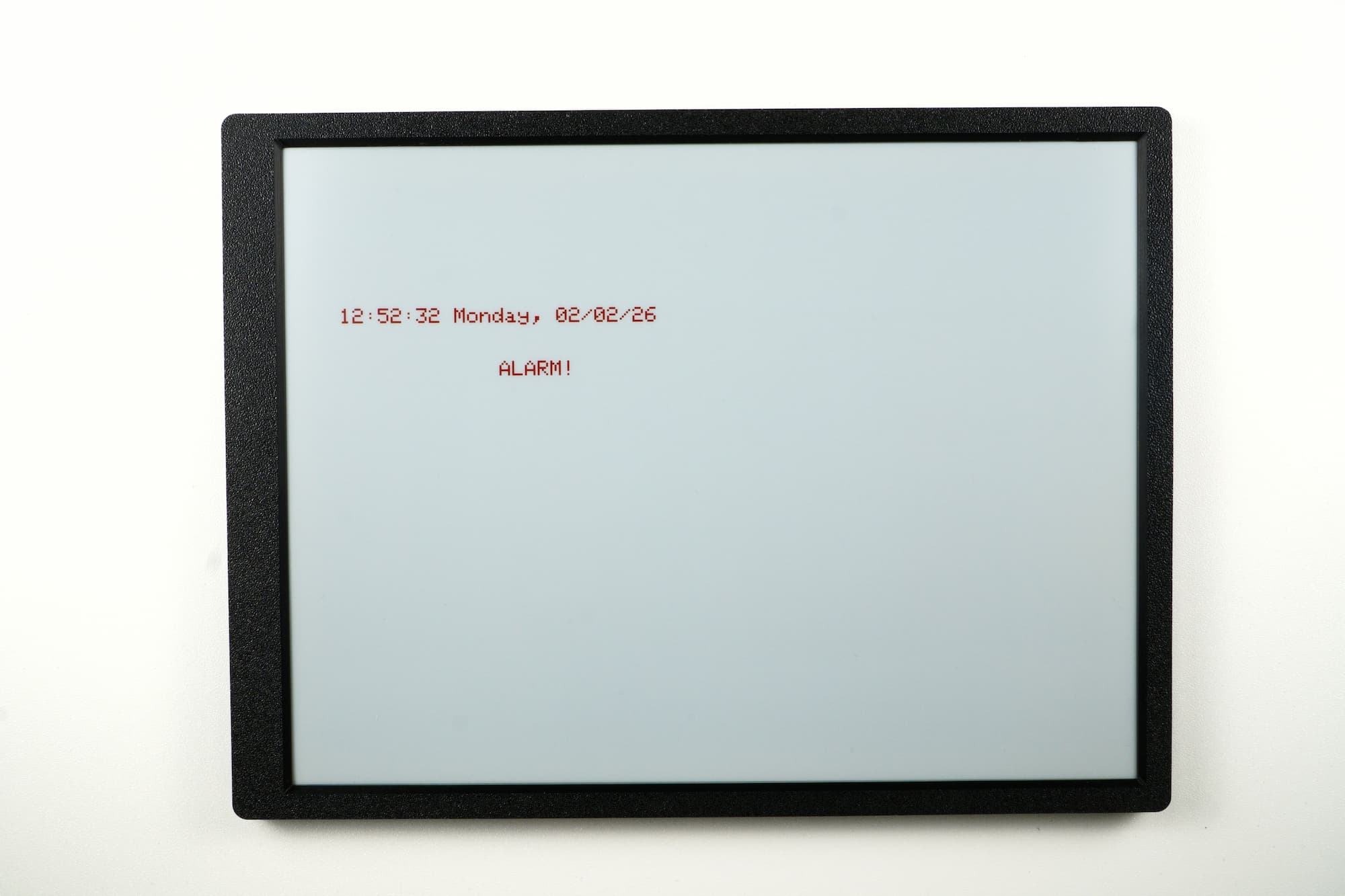
The onboard RTC supports creating an alarm that triggers at a specific time, allowing the firmware to detect and respond accordingly. Alarms can be configured to trigger once per day, per hour, or per minute.
Simple alarm
This section demonstrates setting a simple RTC alarm that is checked using polling. The firmware continuously checks the alarm flag and responds when it is triggered.
#include "Inkplate.h" // Include Inkplate library to the sketch

Inkplate inkplate;     // Create an object on Inkplate library

// Set clock
uint8_t hour = 12;
uint8_t minutes = 51;
uint8_t seconds = 10;

// Set date and weekday (NOTE: In weekdays 0 means Sunday, 1 means Monday, ...)
uint8_t weekday = 1;
uint8_t day = 2;
uint8_t month = 2;
uint8_t year = 26;

// Set alarm time and date (alarm will be generated 60 seconds after board power up)
uint8_t alarmHour = 12;
uint8_t alarmMinutes = 52;
uint8_t alarmSeconds = 10;
uint8_t alarmWeekday = 1;
uint8_t alarmDay = 2;

void setup()
{
  inkplate.begin();         // Init Inkplate library (you should call this function ONLY ONCE)
  inkplate.rtc.reset();     // Reset RTC if there is some data in it
  inkplate.clearDisplay();  // Clear frame buffer of display
  inkplate.setTextSize(4);  // Set text to be 4 times bigger than classic 5x7 px text
  inkplate.setTextColor(INKPLATE_RED, INKPLATE_WHITE);          // Set text color and background

  inkplate.rtc.setTime(hour, minutes, seconds);    // Send time to RTC
  inkplate.rtc.setDate(weekday, day, month, year); // Send date to RTC
  inkplate.rtc.setAlarm(alarmSeconds, alarmMinutes, alarmHour, alarmDay, alarmWeekday); // Set alarm
}

void loop()
{
  inkplate.rtc.getRtcData();           // Get the time and date from RTC
  seconds = inkplate.rtc.getSecond();  // Store senconds in a variable
  minutes = inkplate.rtc.getMinute();  // Store minutes in a variable
  hour = inkplate.rtc.getHour();       // Store hours in a variable
  day = inkplate.rtc.getDay();         // Store day of month in a variable
  weekday = inkplate.rtc.getWeekday(); // Store day of week in a variable
  month = inkplate.rtc.getMonth();     // Store month in a variable
  year = inkplate.rtc.getYear();       // Store year in a variable

  inkplate.clearDisplay();                                        // Clear content in frame buffer
  inkplate.setCursor(100, 300);                                   // Set position of the text
  printTime(hour, minutes, seconds, day, weekday, month, year);   // Print the time on screen

  if (inkplate.rtc.checkAlarmFlag())  // Check if alarm has occurred
  {
    inkplate.rtc.clearAlarmFlag();    // It's recommended to clear alarm flag after alarm has occurred
    inkplate.setCursor(400, 400);     // Set new position for cursor
    inkplate.print("ALARM!");
  }

  inkplate.display(); // Do a full refresh

  delay(60000); // Delay between refreshes one minute
}

void printTime(uint8_t _hour, uint8_t _minutes, uint8_t _seconds, uint8_t _day, uint8_t _weekday, uint16_t _month,
               uint8_t _year)
{
  // Write time and date info on screen
  char *wday[] = {"Sunday", "Monday", "Tuesday", "Wednesday", "Thursday", "Friday", "Saturday"};

  print2Digits(_hour);
  inkplate.print(':');
  print2Digits(_minutes);
  inkplate.print(':');
  print2Digits(_seconds);

  inkplate.print(' ');

  inkplate.print(wday[_weekday]);
  inkplate.print(", ");
  print2Digits(_day);
  inkplate.print('/');
  print2Digits(_month);
  inkplate.print('/');
  inkplate.print(_year, DEC);
}

void print2Digits(uint8_t _d)
{
  if (_d < 10)
      inkplate.print('0');
  inkplate.print(_d, DEC);
}
inkplate.rtc.setAlarm()
Sets the alarm to all the parameters.
Returns type: void
Function parameters:
| Type | Name | Description |
|---|---|---|
uint8_t | rtcAlarmSecond | Set the alarm seconds. |
uint8_t | rtcAlarmminute | Set the alarm minutes. |
uint8_t | rtcAlarmHour | Set the alarm hours. |
uint8_t | rtcAlarmDay | Set the alarm rtcDay. |
uint8_t | rtcAlarmWeekday | Set the alarm rtcWeekday. |
inkplate.rtc.checkAlarmFlag()
Checks if the alarm flag is on
Returns type: bool
Returns value: Returns true if the alarm flag is on
Interrupt Alarm
The RTC alarm can also generate an interrupt instead of requiring polling. The alarm event can wake up the MCU from sleep or trigger an action immediately. To use this, you will need to globally declare a volatile bool to use as the alarm flag and a function that modifies this flag:
#include "Inkplate.h"             // Include Inkplate library to the sketch

Inkplate inkplate;                // Create an object on Inkplate library

volatile int _alarmFlag = 0;      // Variable to store alarm flag

void IRAM_ATTR alarmISR()         // This function will be called when alarm interrupt event happens
{                                 // NOTE: Function must be above setup() and loop()!
  _alarmFlag = 1;                 // Set alarm flag
}

void setup()
{
  pinMode(2, INPUT_PULLUP);      // Set RTC INT pin on ESP32 GPIO2 as input with pullup resistor enabled

  inkplate.begin();           // Init Inkplate library (you should call this function ONLY ONCE)
  inkplate.rtc.reset();       // Reset RTC if there is some data in it
  inkplate.clearDisplay();    // Clear frame buffer of display
  inkplate.display();         // Put clear image on display
  inkplate.setTextSize(4);    // Set text to be 4 times bigger than classic 5x7 px text

  // Set RTC time and date via Epoch
  inkplate.rtc.setEpoch(1770032087);
  // Set alarm using Epoch
  inkplate.rtc.setAlarmEpoch(inkplate.rtc.getEpoch() + 60, RTC_ALARM_MATCH_DHHMMSS);

  // inkplate.rtc.setTime(12, 40, 30);        // Or you can use other way to set the time and date
  // inkplate.rtc.setDate(1, 2, 2, 2026);
  // inkplate.rtc.setAlarm(50, 40, 12, 2, 1); // Set alarm 20 seconds from now

  attachInterrupt(2, alarmISR, FALLING); // Set interrupt function and interrupt mode
}

void loop()
{
  inkplate.clearDisplay();         // Clear frame buffer of display
  inkplate.setCursor(60, 100);     // Set position of the text
  inkplate.setTextColor(INKPLATE_RED, INKPLATE_WHITE);         // Set text color and background
  inkplate.rtc.getRtcData();          // Get the time and date from RTC

  // Print the time on screen
  printTime(inkplate.rtc.getHour(), inkplate.rtc.getMinute(), inkplate.rtc.getSecond(), inkplate.rtc.getDay(), inkplate.rtc.getWeekday(), inkplate.rtc.getMonth(), inkplate.rtc.getYear());

  if (_alarmFlag)     // Check alarm flag
  {
    // _alarmFlag = 0;                  // Uncomment if you want to clear this flag
    inkplate.rtc.clearAlarmFlag();      // It's recommended to clear alarm flag after alarm has occurred
    inkplate.setCursor(200, 200);       // Set position of the text
    inkplate.print("ALARM");            // Print text
  }

  inkplate.display(); // Do a full refresh

  delay(60000); // Wait one minute
}

void printTime(uint8_t _hour, uint8_t _minutes, uint8_t _seconds, uint8_t _day, uint8_t _weekday, uint8_t _month,
               uint16_t _year)
{
  // Write time and date info on screen
  char *wday[] = {"Sunday", "Monday", "Tuesday", "Wednesday", "Thursday", "Friday", "Saturday"};

  print2Digits(_hour);
  inkplate.print(':');
  print2Digits(_minutes);
  inkplate.print(':');
  print2Digits(_seconds);

  inkplate.print(' ');

  inkplate.print(wday[_weekday]);
  inkplate.print(", ");
  print2Digits(_day);
  inkplate.print('/');
  print2Digits(_month);
  inkplate.print('/');
  inkplate.print(_year, DEC);
}

void print2Digits(uint8_t _d)
{
  if (_d < 10)
      inkplate.print('0');
  inkplate.print(_d, DEC);
}
Full examples
For full working code examples, which provide a great overview, a real-world use scenario, and code comments, see the links below:
Inkplate13SPECTRA_RTC_Alarm.ino
Full example of setting a simple RTC alarm.
Inkplate13SPECTRA_RTC_Interrupt_Alarm.ino
Full example of triggering an RTC alarm using a hardware interrupt.