Inkplate 5v2 MicroPython - Setting up Inkplate with MicroPython
To get started with MicroPython on your Inkplate 5v2, follow the steps below. If you are new to MicroPython, check out our MicroPython guide for a full setup and an overview of how it works.
MicroPython runs directly on the Inkplate board. You plug in a USB cable, load the MicroPython firmware and the required libraries, then run your script on the Inkplate itself.
Setting up Inkplate with MicroPython
To run your code on Inkplate, connect the device to your computer via USB and follow these steps:
-
Download the
Inkplate-firmware.binfile onto your computer -
Flash the
.binfile onto the Inkplate device. You can do this with the Soldered MicroPython Helper VS Code Extension or the Thonny IDE
Flashing with the Micropython Helper extension
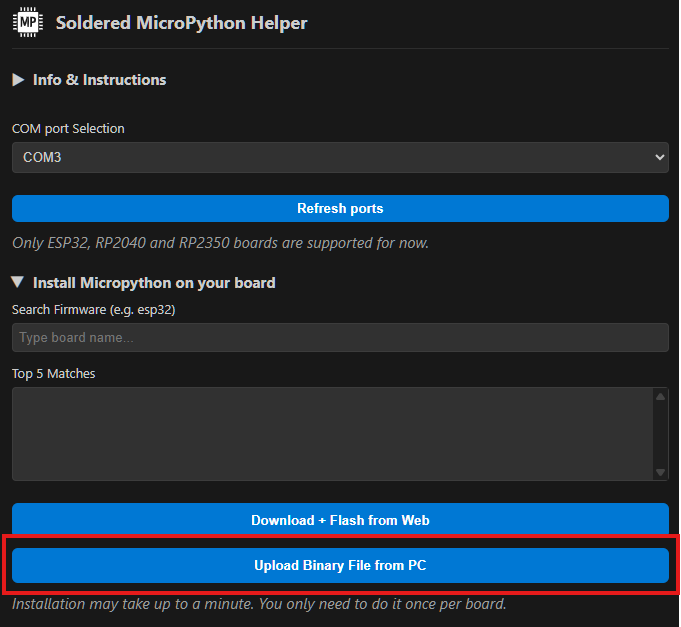
After setting up the MicroPython Helper extension, go to Install Micropython on your board and pick Upload Binary file from PC. Choose the Inkplate-firmware.bin file and wait for it to flash onto the device.
Flashing via Thonny IDE
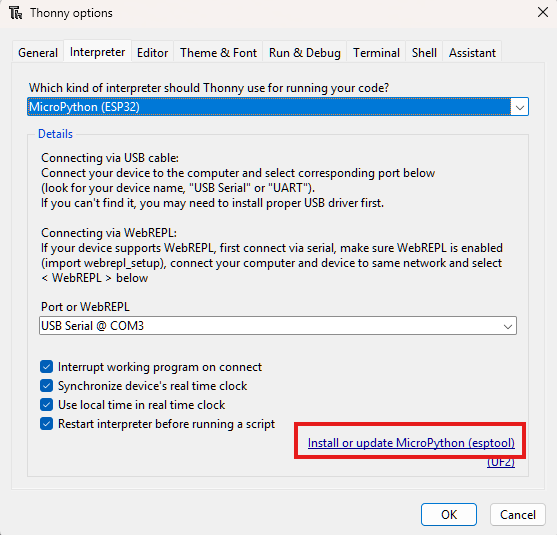
In the Thonny IDE, go to Run -> Configure interpreter and on the bottom of the window go to Install or update Micropython.
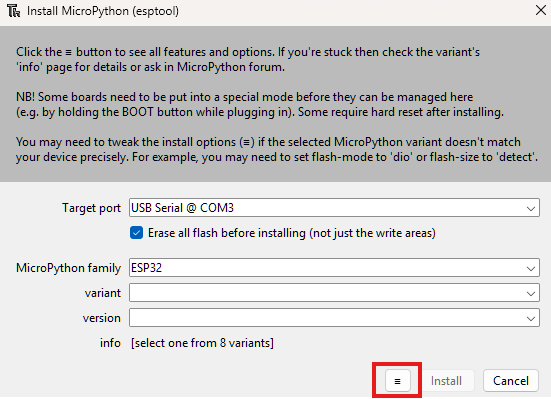
On the bottom of that window click the ≡ button and pick Select local MicroPython image. Choose the Inkplate-firmware.bin file on your computer and press Install.
-
With the mpremote package, you can upload the Inkplate modules onto the device with this command:
mpremote mip install github:SolderedElectronics/Inkplate-micropython/boards/YOUR_DEVICE
or if you're running a Windows OS:
python -m mpremote mip install github:SolderedElectronics/Inkplate-micropython/boards/YOUR_DEVICE
Installing MicroPython on Inkplate
Guide that walks you through MicroPython setup on your Inkplate
Use this command to install the MicroPython library for Inkplate 5v2:
mpremote mip install github:SolderedElectronics/Inkplate-micropython/boards/inkplate5v2
You only have to do steps 1-4 once, when first writing MicroPython firmware to your Inkplate.
Inkplate MicroPython Library
GitHub repo for Inkplate MicroPython library