Inkplate 6FLICK MicroPython - Drawing Graphics
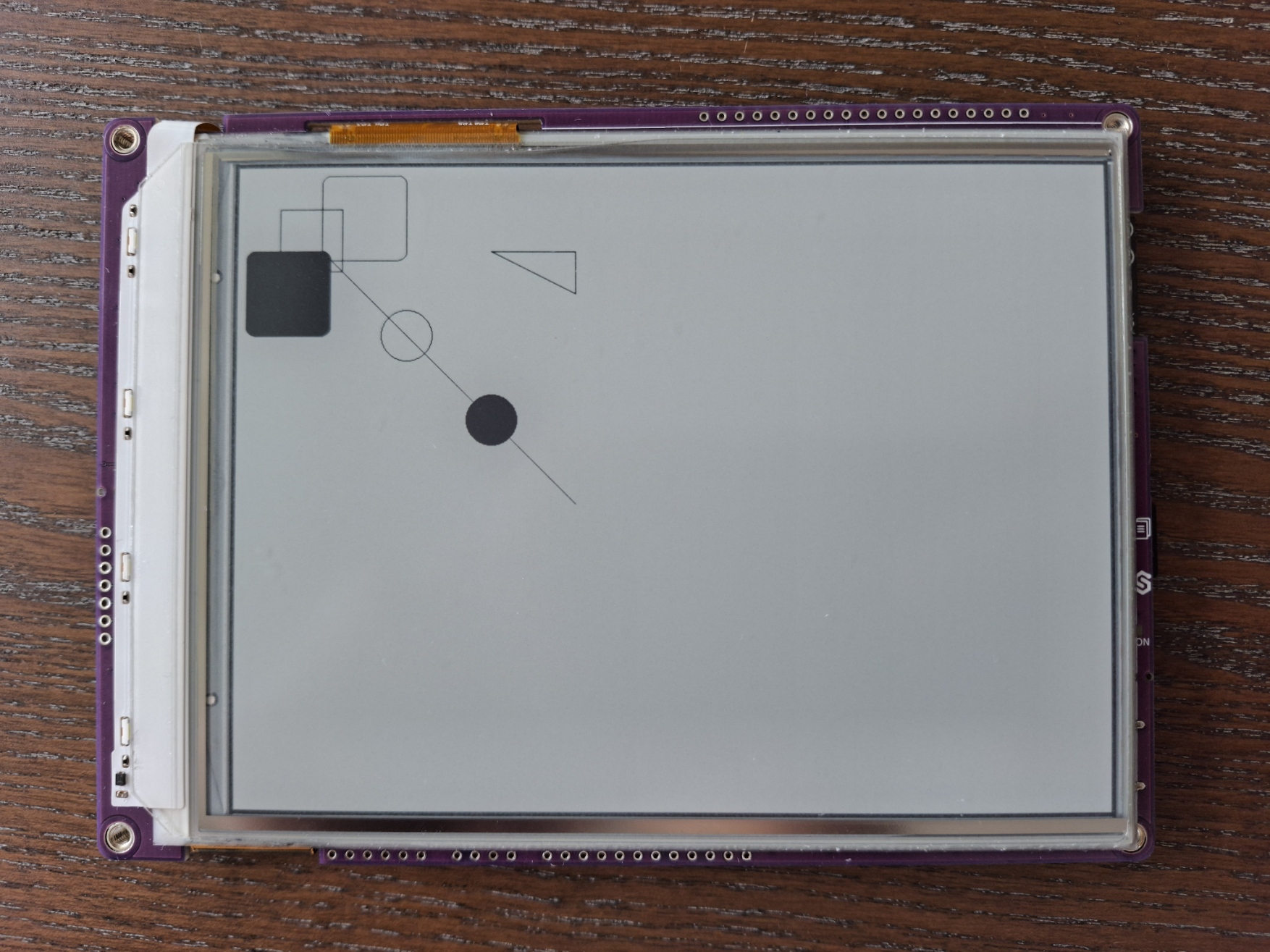
Inkplate 6FLICK allows you to draw different geometric shapes anywhere on its 1024 x 758 px canvas. The shapes can be filled or hollow
Drawing Shapes
Below is a example that demonstrates how to draw basic shapes in Black-White display mode.
inkplate.BLACK use a numeric value: 0-3from inkplate6_flick import Inkplate
import time
inkplate = Inkplate(Inkplate.INKPLATE_1BIT)
inkplate.begin()
inkplate.clear_display()
inkplate.display()
inkplate.draw_pixel(100, 100, inkplate.BLACK)
inkplate.draw_rect(50, 50, 75, 75, inkplate.BLACK)
inkplate.draw_circle(200, 200, 30, inkplate.BLACK)
inkplate.fill_circle(300, 300, 30, inkplate.BLACK)
inkplate.draw_fast_hline(20, 100, 50, inkplate.BLACK)
inkplate.draw_fast_vline(100, 20, 50, inkplate.BLACK)
inkplate.draw_line(100, 100, 400, 400, inkplate.BLACK)
inkplate.draw_round_rect(100, 10, 100, 100, 10, inkplate.BLACK)
inkplate.fill_round_rect(10, 100, 100, 100, 10, inkplate.BLACK)
inkplate.draw_triangle(300, 100, 400, 150, 400, 100, inkplate.BLACK)
inkplate.display()
inkplate.draw_pixel()
Set a single pixel in the frame buffer.
Function parameters:
| Type | Name | Description |
|---|---|---|
Number | x | X coordinate. |
Number | y | Y coordinate. |
Const | color | Color constant (BLACK or WHITE in BW mode). |
inkplate.draw_rect()
Draw an unfilled rectangle outline.
Function parameters:
| Type | Name | Description |
|---|---|---|
Number | x | Left X. |
Number | y | Top Y. |
Number | w | Width in pixels. |
Number | h | Height in pixels. |
Const | color | Outline color. |
inkplate.draw_circle()
Draw an unfilled circle.
Function parameters:
| Type | Name | Description |
|---|---|---|
Number | x0 | Center X. |
Number | y0 | Center Y. |
Number | r | Radius in pixels. |
Const | color | Outline color. |
inkplate.fill_circle()
Draw a filled circle.
Function parameters:
| Type | Name | Description |
|---|---|---|
Number | x0 | Center X. |
Number | y0 | Center Y. |
Number | r | Radius in pixels. |
Const | color | Fill color. |
inkplate.draw_fast_hline()
Draw a horizontal line quickly.
Function parameters:
| Type | Name | Description |
|---|---|---|
Number | x | Start X. |
Number | y | Y position. |
Number | w | Line width in pixels. |
Const | color | Line color. |
inkplate.draw_fast_vline()
Draw a vertical line quickly.
Function parameters:
| Type | Name | Description |
|---|---|---|
Number | x | X position. |
Number | y | Start Y. |
Number | h | Line height in pixels. |
Const | color | Line color. |
inkplate.draw_line()
Draw a line from one point to another.
Function parameters:
| Type | Name | Description |
|---|---|---|
Number | x0 | Start X. |
Number | y0 | Start Y. |
Number | x1 | End X. |
Number | y1 | End Y. |
Const | color | Line color. |
inkplate.draw_round_rect()
Draw an unfilled rectangle with rounded corners.
Function parameters:
| Type | Name | Description |
|---|---|---|
Number | x | Left X. |
Number | y | Top Y. |
Number | w | Width in pixels. |
Number | h | Height in pixels. |
Number | radius | Corner radius in pixels. |
Const | color | Outline color. |
inkplate.fill_round_rect()
Draw a filled rectangle with rounded corners.
Function parameters:
| Type | Name | Description |
|---|---|---|
Number | x | Left X. |
Number | y | Top Y. |
Number | w | Width in pixels. |
Number | h | Height in pixels. |
Number | radius | Corner radius in pixels. |
Const | color | Fill color. |
inkplate.draw_triangle()
Draw a triangle outline using three vertices.
Function parameters:
| Type | Name | Description |
|---|---|---|
Number | x0 | Vertex A X. |
Number | y0 | Vertex A Y. |
Number | x1 | Vertex B X. |
Number | y1 | Vertex B Y. |
Number | x2 | Vertex C X. |
Number | y2 | Vertex C Y. |
Const | color | Outline color. |
Full examples
basic_bw.py
Draw basic black and white shapes, plus a bitmap of the Soldered logo in the middle.
basic_grayscale.py
Draw different shades of gray using grayscale mode, and display a bitmap of the Soldered logo.