SCD43 - Disabling automatic self-calibration
This page walks through the DisableAutoCalibration example: turning off the SCD43's Automatic Self-Calibration (ASC) and saving that setting so it survives a power cycle.
Why disable ASC
As covered on the how it works page, ASC assumes the sensor is periodically exposed to fresh outdoor air at its calibration target (400 ppm by default) and uses that to correct long-term drift. That assumption doesn't hold everywhere: a sensor sealed inside an enclosure, or installed in an industrial space that never sees outdoor-level CO2, will have ASC calibrating against air that never actually shows up, which can make readings drift the wrong way over time. Turning ASC off avoids that.
Checking and changing the ASC setting
Reading or changing the ASC setting requires the sensor to be in idle mode, so stop periodic measurement first:
#include "SCD43-SOLDERED.h"

SCD43 sensor;

void setup()
{
    Serial.begin(115200);
    Serial.println("SCD43 - Disable Auto Calibration");

    Wire.begin();

    if (!sensor.begin())
    {
        Serial.println("Sensor not found. Check wiring. Halting.");
        while (1)
            ;
    }

    if (!sensor.stopPeriodicMeasurement())
    {
        Serial.println("Could not stop periodic measurement. Halting.");
        while (1)
            ;
    }

    Serial.print("ASC enabled before change: ");
    Serial.println(sensor.getAutomaticSelfCalibrationEnabled() ? "yes" : "no");

    if (!sensor.setAutomaticSelfCalibrationEnabled(false))
    {
        Serial.println("Failed to disable ASC.");
    }
    else
    {
        Serial.println("ASC disabled successfully.");
    }
sensor.getAutomaticSelfCalibrationEnabled()
Checks whether automatic self-calibration is currently enabled on the sensor. Only available in idle mode.
Returns value: Returns true if ASC is enabled, false if disabled.
sensor.setAutomaticSelfCalibrationEnabled()
Enables or disables the automatic self-calibration algorithm. Only available in idle mode.
Returns value: Returns true on success, false otherwise.
Function parameters:
| Type | Name | Description |
|---|---|---|
bool | enabled | True to enable ASC, false to disable it |
Making it stick
Disabling ASC only changes the setting in the sensor's volatile memory. Power-cycle the board without saving it, and it goes back to the factory default (ASC enabled). persistSettings() writes the current settings to EEPROM so they survive a reset:
    if (!sensor.persistSettings())
    {
        Serial.println("Failed to persist settings.");
    }
    else
    {
        Serial.println("Settings saved to EEPROM.");
    }

    if (!sensor.startPeriodicMeasurement())
    {
        Serial.println("Could not restart periodic measurement. Halting.");
        while (1)
            ;
    }

    Serial.println("Periodic measurements restarted.");
}
sensor.persistSettings()
Saves the current configuration, including the ASC enabled state, temperature offset, and sensor altitude, to the sensor's EEPROM. Blocks for about 800 ms.
Returns value: Returns true on success, false otherwise.
The EEPROM supports at least 2000 write cycles. Don't call persistSettings() on every boot or in a loop, only after actually changing a setting you want to keep.
Confirming readings still work
With ASC disabled and periodic measurement resumed, loop() reads and prints CO2, temperature, and humidity exactly the same way as the BasicReadings example. Disabling ASC only changes how the sensor corrects long-term drift in the background, it doesn't change how you read measurements:
void loop()
{
    if (sensor.readMeasurement())
    {
        Serial.println();
        Serial.print("CO2 (ppm):       ");
        Serial.println(sensor.getCO2());
        Serial.print("Temperature (C): ");
        Serial.println(sensor.getTemperature(), 1);
        Serial.print("Humidity (%RH):  ");
        Serial.println(sensor.getHumidity(), 1);
    }
    else
    {
        Serial.print(".");
    }

    delay(500);
}
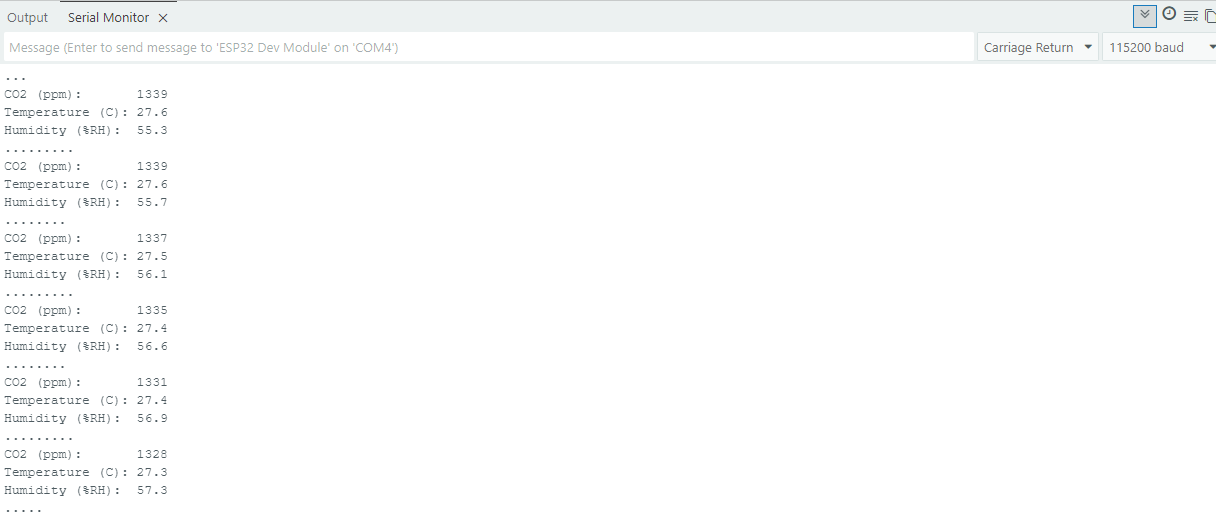
Full example
DisableAutoCalibration.ino
Full example sketch for disabling and persisting the SCD43's automatic self-calibration setting.