SCD43 - Single-shot measurements
This page walks through the SingleShot example: taking on-demand measurements instead of letting the sensor run continuous periodic measurements.
Single-shot mode
By default, begin() starts the SCD43 in periodic measurement mode, taking a new reading every 5 seconds on its own. Single-shot mode is the alternative: the sensor sits idle and only measures when you tell it to, which suits battery-powered or infrequent-sampling projects better than leaving it running continuously.
Switching to single-shot mode just means stopping periodic measurement right after begin():
#include "SCD43-SOLDERED.h"

SCD43 sensor;

void setup()
{
    Serial.begin(115200);
    Serial.println("SCD43 - Single Shot Measurements");

    Wire.begin();

    if (!sensor.begin())
    {
        Serial.println("Sensor not found. Check wiring. Halting.");
        while (1)
            ;
    }

    if (!sensor.stopPeriodicMeasurement())
    {
        Serial.println("Could not stop periodic measurement. Halting.");
        while (1)
            ;
    }

    Serial.println("Sensor in idle mode. Ready for single-shot measurements.");
}
sensor.stopPeriodicMeasurement()
Stops periodic measurements and returns the sensor to idle mode. Required before single-shot measurements or any configuration change. Blocks for about 500 ms.
Returns value: Returns true on success, false otherwise.
Taking a full measurement
measureAndReadSingleShot() triggers one CO2, temperature, and humidity measurement, waits for it to finish, and reads the result in a single call:
void loop()
{
    Serial.println("\nTriggering full single-shot measurement...");

    if (sensor.measureAndReadSingleShot())
    {
        Serial.print("CO2 (ppm):       ");
        Serial.println(sensor.getCO2());
        Serial.print("Temperature (C): ");
        Serial.println(sensor.getTemperature(), 1);
        Serial.print("Humidity (%RH):  ");
        Serial.println(sensor.getHumidity(), 1);
    }
    else
    {
        Serial.println("Full measurement failed.");
    }
sensor.measureAndReadSingleShot()
Triggers a single CO2, temperature, and humidity measurement, blocks for about 5 seconds until it completes, then reads and caches the result.
Returns value: Returns true on success, false otherwise.
A full single-shot measurement blocks for about 5 seconds, the same time a photoacoustic CO2 reading normally takes. There's no way to speed up the CO2 measurement itself, only skip it entirely with the RH-only mode below.
Taking a faster temperature/humidity-only measurement
If you don't need a fresh CO2 reading every time, measureSingleShotRhtOnly() gives you just temperature and humidity in about 50 ms instead of 5 seconds:
    Serial.println("\nTriggering RH + temperature only measurement...");

    if (sensor.measureSingleShotRhtOnly())
    {
        if (sensor.readMeasurement())
        {
            Serial.print("Temperature (C): ");
            Serial.println(sensor.getTemperature(), 1);
            Serial.print("Humidity (%RH):  ");
            Serial.println(sensor.getHumidity(), 1);
        }
    }
    else
    {
        Serial.println("RH-only measurement failed.");
    }

    delay(2000);
}
sensor.measureSingleShotRhtOnly()
Triggers a single temperature and humidity measurement only, blocking for about 50 ms. The cached CO2 value is not updated by this command.
Returns value: Returns true on success, false otherwise.
measureSingleShotRhtOnly() only updates the measurement inside the sensor. Call readMeasurement() afterward to actually pull it into the cache the getter functions read from.
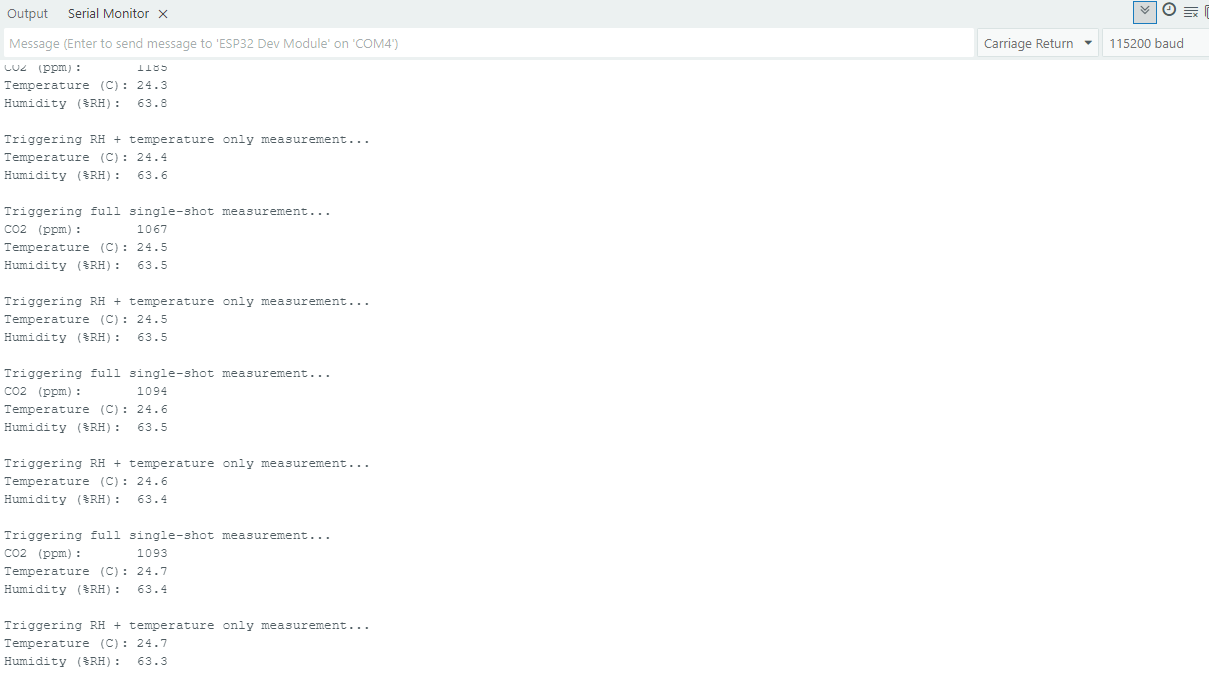
Running the sketch above alternates between the two measurement types and produces output like this:
Saving power between measurements
Between single-shot readings, you can put the sensor into a low-power sleep state with powerDown(), then wake it back up with wakeUp() right before the next measurement:
sensor.powerDown();
// ... do other work or sleep ...
sensor.wakeUp();
sensor.powerDown()
Puts the sensor into low-power sleep mode. Only useful between single-shot measurements, since periodic measurement mode needs the sensor awake.
Returns value: Returns true on success, false otherwise.
sensor.wakeUp()
Wakes the sensor from sleep mode back to idle mode. The sensor does not acknowledge this command, so the library can't confirm it worked beyond assuming success. Blocks for about 30 ms.
Returns value: Returns true on success, false otherwise.
Full example
SingleShot.ino
Full example sketch for taking on-demand single-shot measurements from the SCD43 sensor.