SCD43 - Basic readings
This page contains a simple example with function documentation on how to read CO2 concentration, temperature, and relative humidity from the SCD43 sensor.
Initialization
To start working with the SCD43 breakout, include the library, create the sensor object, initialize I2C, and call begin() in setup(). The return value of begin() tells you whether the sensor was found:
#include "SCD43-SOLDERED.h"

SCD43 sensor;

void setup()
{
    Serial.begin(115200);
    Serial.println("SCD43 - Basic Readings");

    Wire.begin();

    if (!sensor.begin())
    {
        Serial.println("Sensor not found. Check wiring. Halting.");
        while (1)
            ;
    }
}
sensor.begin()
Initializes the SCD43 sensor over I2C, starts periodic measurement mode, and verifies the sensor is present on the bus.
Returns value: Returns true if the sensor was found and initialized successfully, false otherwise.
Function parameters:
| Type | Name | Description |
|---|---|---|
TwoWire& | wire | Optional. The I2C bus to use. Defaults to Wire, pass a different TwoWire instance to use a second I2C bus. |
Reading measurements
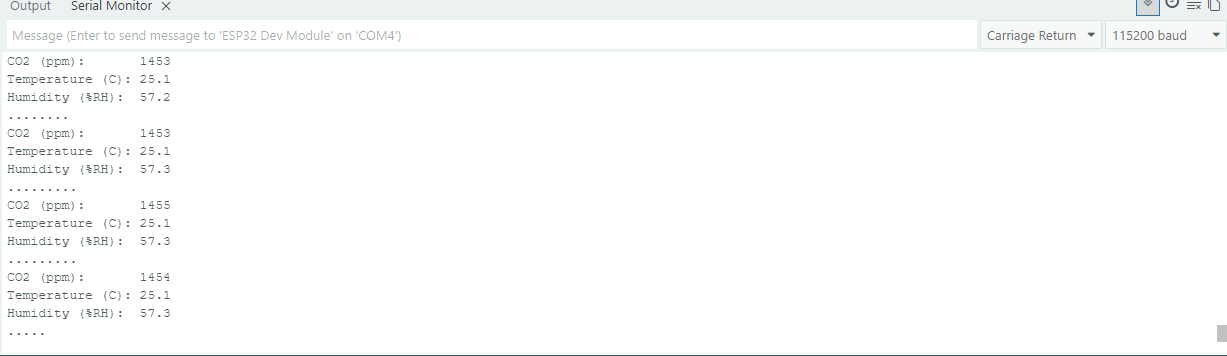
The SCD43 produces a new measurement every 5 seconds. Call readMeasurement() in a loop: it returns true when fresh data is ready. Then use the individual getter functions to retrieve each value:
void loop()
{
    if (sensor.readMeasurement()) // returns true when fresh data is available
    {
        Serial.println();
        Serial.print("CO2 (ppm):       ");
        Serial.println(sensor.getCO2());
        Serial.print("Temperature (C): ");
        Serial.println(sensor.getTemperature(), 1);
        Serial.print("Humidity (%RH):  ");
        Serial.println(sensor.getHumidity(), 1);
    }
    else
    {
        Serial.print(".");
    }

    delay(500);
}
sensor.readMeasurement()
Checks whether a fresh measurement is available from the SCD43 and, if so, reads and caches the CO2, temperature, and humidity values.
Returns value: Returns true if new data was available and successfully read, false if the sensor is still processing.
sensor.getCO2()
Returns the CO2 concentration from the most recent measurement.
Returns value: CO2 concentration in parts per million (ppm) as a uint16_t.
sensor.getTemperature()
Returns the temperature from the most recent measurement.
Returns value: Temperature in degrees Celsius as a float.
sensor.getHumidity()
Returns the relative humidity from the most recent measurement.
Returns value: Relative humidity in %RH as a float.
Serial Monitor output
Full example
/**
 **************************************************
 *
 * @file        BasicReadings.ino
 * @brief       Read CO2 concentration, temperature, and relative humidity
 *              from the SCD43 sensor using periodic measurements.
 *
 *              The SCD43 outputs a new measurement every 5 seconds.
 *              This example polls for fresh data and prints it to Serial.
 *
 * Hardware connections:
 *   - Connect the SCD43 breakout to your board via the Qwiic / I2C connector.
 *   - Open Serial Monitor at 115200 baud.
 *
 * @copyright   GNU General Public License v3.0
 * @authors     Soldered <[email protected]>
 *
 * @see         solde.red/333414
 ***************************************************/

#include "SCD43-SOLDERED.h"

SCD43 sensor;

void setup()
{
    Serial.begin(115200);
    Serial.println("SCD43 - Basic Readings");

    Wire.begin();

    if (!sensor.begin())
    {
        Serial.println("Sensor not found. Check wiring. Halting.");
        while (1)
            ;
    }

    // The SCD43 produces a new reading every 5 seconds.
}

void loop()
{
    if (sensor.readMeasurement()) // returns true when fresh data is available
    {
        Serial.println();
        Serial.print("CO2 (ppm):       ");
        Serial.println(sensor.getCO2());
        Serial.print("Temperature (C): ");
        Serial.println(sensor.getTemperature(), 1);
        Serial.print("Humidity (%RH):  ");
        Serial.println(sensor.getHumidity(), 1);
    }
    else
    {
        Serial.print(".");
    }

    delay(500);
}
BasicReadings.ino
Full example sketch for reading CO2, temperature, and humidity from the SCD43 sensor.