SCD43 - Low power readings
This page walks through the LowPowerReadings example: reading CO2, temperature, and humidity using the SCD43's low-power periodic measurement mode.
Low-power periodic mode
begin() starts the sensor in normal periodic measurement mode by default, taking a new reading every 5 seconds. Low-power mode is a slower variant of the same idea: the sensor still measures continuously and stores the latest result on its own, just roughly every 30 seconds instead of 5, which cuts average current draw considerably. It's a good fit for battery-powered projects that don't need CO2 updates every few seconds.
Switching to it means stopping normal periodic measurement first, then starting the low-power variant instead:
#include "SCD43-SOLDERED.h"

SCD43 sensor;

void setup()
{
    Serial.begin(115200);
    Serial.println("SCD43 - Low Power Readings");

    Wire.begin();

    if (!sensor.begin())
    {
        Serial.println("Sensor not found. Check wiring. Halting.");
        while (1)
            ;
    }

    if (!sensor.stopPeriodicMeasurement())
    {
        Serial.println("Could not stop periodic measurement. Halting.");
        while (1)
            ;
    }

    if (!sensor.startLowPowerPeriodicMeasurement())
    {
        Serial.println("Could not start low-power measurement. Halting.");
        while (1)
            ;
    }

    Serial.println("Low-power mode active. New reading every ~30 seconds.");
}
sensor.startLowPowerPeriodicMeasurement()
Starts low-power periodic measurements, updating roughly every 30 seconds instead of the normal 5-second interval. Only available in idle mode.
Returns value: Returns true on success, false otherwise.
Reading measurements works exactly the same way in low-power mode as in normal periodic mode, still readMeasurement() and the getter functions. The only difference is how often fresh data actually shows up.
Reading measurements
Since fresh data now only arrives roughly every 30 seconds instead of every 5, readMeasurement() returns false far more often between readings. That's expected, not a sign anything is wrong:
void loop()
{
    if (sensor.readMeasurement()) // returns true when fresh data is available
    {
        Serial.println();
        Serial.print("CO2 (ppm):       ");
        Serial.println(sensor.getCO2());
        Serial.print("Temperature (C): ");
        Serial.println(sensor.getTemperature(), 1);
        Serial.print("Humidity (%RH):  ");
        Serial.println(sensor.getHumidity(), 1);
    }
    else
    {
        Serial.print(".");
    }

    delay(1000);
}
sensor.readMeasurement()
Checks whether a fresh measurement is available and, if so, reads and caches the CO2, temperature, and humidity values. Behaves identically in low-power and normal periodic mode.
Returns value: Returns true if new data was available and successfully read, false if the sensor is still processing.
This example polls every 1 second instead of every 500 ms, since there's no benefit to checking faster when new data only shows up roughly every 30 seconds anyway.
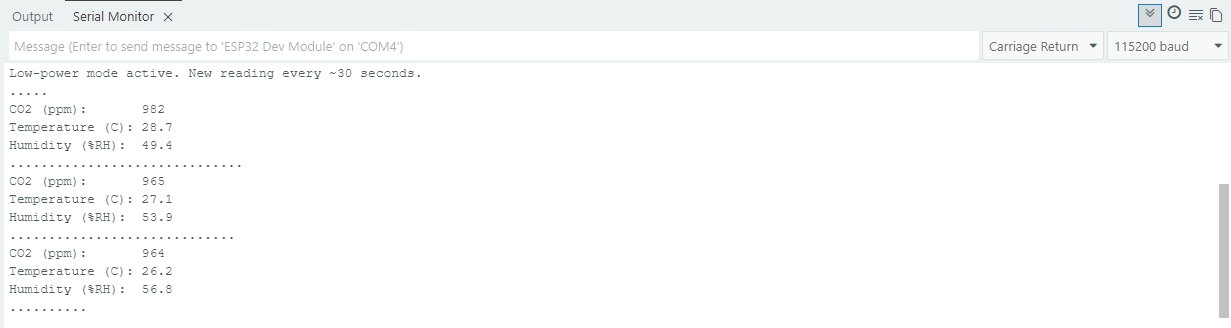
Running the sketch above produces long runs of dots between readings, much longer than in normal periodic mode, since each one now represents a 1-second poll while waiting for the ~30-second update:
Full example
LowPowerReadings.ino
Full example sketch for reading CO2, temperature, and humidity in low-power periodic measurement mode.