Inkplate 13SPECTRA – GET & POST requests
Now that Inkplate is connected to the internet, you will likely want to send and receive data from sensors, messages, or your custom APIs, etc. This page contains examples of how to send and receive data on Inkplate via the internet
GET request
Using http.GET() enables you to easily download and handle data on Inkplate however you want. Here is an example of how to GET an .html file and print it on Inkplate:
#include "Inkplate.h"   //Include Inkplate library to the sketch
#include <HTTPClient.h> //Include HTTP library to this sketch
#include <WiFi.h>       //Include ESP32 WiFi library to our sketch

#define ssid "" // Name of the WiFi network (SSID) that you want to connect Inkplate to
#define pass "" // Password of that WiFi network

Inkplate inkplate; // Create an object on Inkplate library

void setup()
{
  Serial.begin(115200);                            // Begin Serial for debugging
  inkplate.begin();                                 // Init Inkplate library (you should call this function ONLY ONCE)
  inkplate.clearDisplay();                          // Clear frame buffer of display
  inkplate.display();                               // Put clear image on display
  inkplate.setTextSize(4);                          // Set text scaling to four (text will be two times bigger)
  inkplate.setCursor(0, 0);                         // Set print position
  inkplate.setTextColor(INKPLATE_BLACK);            // Set text color to black and background color to white
  Serial.println("Scanning for WiFi networks..."); // Write text

  int n =
      WiFi.scanNetworks(); // Start searching WiFi networks and put the nubmer of found WiFi networks in variable n
  if (n == 0)
  { // If you did not find any network, show the message and stop the program.
    Serial.print("No WiFi networks found!");
    while (true);
  }
  else
  {
    if (n > 10)
        n = 10; // If you did find, print name (SSID), encryption and signal strength of first 10 networks
    for (int i = 0; i < n; i++)
    {
      inkplate.print(WiFi.SSID(i));
      inkplate.print((WiFi.encryptionType(i) == WIFI_AUTH_OPEN) ? 'O' : '*');
      inkplate.print('\n');
      inkplate.print(WiFi.RSSI(i), DEC);
    }
    inkplate.display();
  }

  inkplate.clearDisplay();         // Clear everything in frame buffer
  inkplate.setCursor(0, 0);        // Set print cursor to new position
  Serial.print("Connecting to "); // Print the name of WiFi network
  Serial.print(ssid);
  WiFi.begin(ssid, pass); // Try to connect to WiFi network
  while (WiFi.status() != WL_CONNECTED)
  {
    delay(1000); // While it is connecting to network, display dot every second, just to know that Inkplate is
                 // alive.
    Serial.print('.');
  }
  Serial.print("connected"); // If it's connected, notify user

  HTTPClient http;
  if (http.begin("http://example.com/index.html"))
  { // Now try to connect to some web page (in this example www.example.com. And yes, this is a valid Web page :))
    if (http.GET() > 0)
    { // If connection was successful, try to read content of the Web page and display it on screen
      String htmlText;
      htmlText = http.getString();
      inkplate.setTextSize(4);
      inkplate.clearDisplay();
      inkplate.setCursor(0, 0);
      inkplate.print(htmlText);
      inkplate.display();
    }
  }
}

void loop()
{
  // Nothing
}
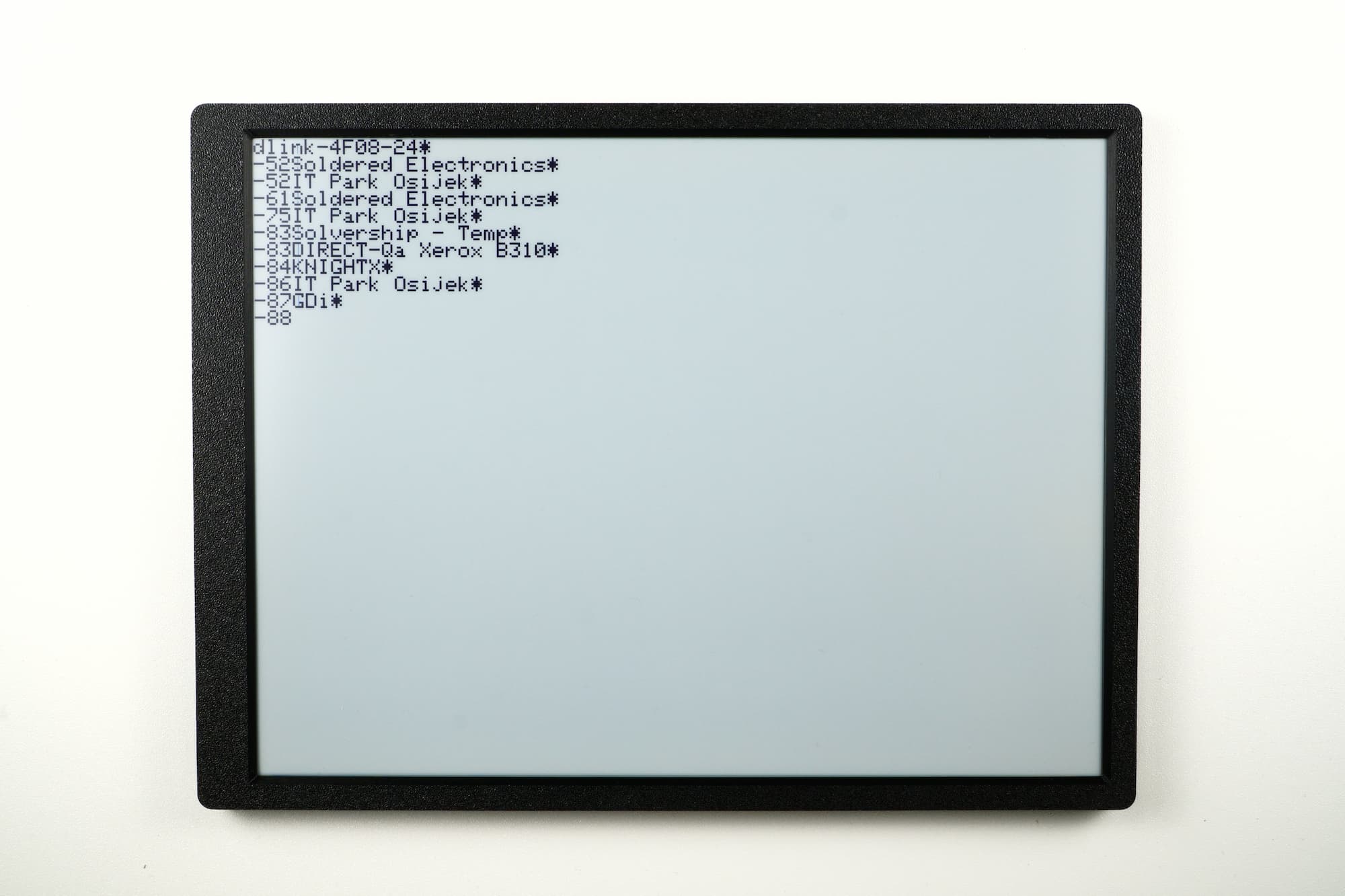
WiFi.begin()
This function attempts to connect to WiFi
Returns type: wl_status_t
Returns value: Returns wl_status_t enum value
Function parameters:
| Type | Name | Description |
|---|---|---|
const char* | ssid | Network SSID. |
const char* | passphrase | Optional, depends on WiFi network security certificate |
http.begin()
This function attempts to open an HTTP communication to a given URL
Returns type: bool
Returns value: Returns true if the communication is successful, otherwise returns false.
Function parameters:
| Type | Name | Description |
|---|---|---|
String | url | URL of the specified website |
http.GET()
This function handles GET requests.
Returns type: int
Returns value: Returns the size of available data
Inkplate13SPECTRA_HTTP_Request.ino
Full example of connecting to WiFi and making an HTTP GET request.
POST request
To send data from Inkplate to a web server, you can use the same built-in WiFiClient class. Let's use ThingSpeak.com, which is a great resource for testing POST and GET requests. By visiting the site, you get a unique URL to which you can send a POST request from Inkplate; the data will then be visible on the site:
// Include needed libraries
#include "Inkplate.h"
#include "WiFi.h"

// Create objects from included libraries
Inkplate display;
WiFiClient client;

// Here you can change the interval of sending POST requests (minimum 15 seconds with a free license)
#define POSTING_INTERVAL_IN_SESCS 20

// Enter your WiFi credentials
const char *ssid = "YOUR_SSID_HERE";
const char *pass = "YOUR_PASSWORD_HERE";

// ThingSpeak settings
char *server = "api.thingspeak.com";
String writeAPIKey = ""; // Enter your Write API Key

// Variable that holds last connection time
unsigned long lastConnectionTime = 0;

void setup()
{
  // Init serial communication
  Serial.begin(115200);

  // Init Inkplate library (you should call this function ONLY ONCE)
  display.begin();

  // Clear frame buffer of display
  display.clearDisplay();

  // Set text color and size
  display.setTextColor(INKPLATE_BLACK);
  display.setTextSize(4);

  // Display a message
  display.printf("HTTP POST request example\n\n");
  display.printf("Open Serial Monitor at \n115200 baud rate to see \nwhat's happening.");
  display.display();

  // Connect to the WiFi network
  WiFi.mode(WIFI_MODE_STA);
  WiFi.begin(ssid, pass);
  Serial.print("Connecting to Wifi ");
  while (WiFi.status() != WL_CONNECTED)
  {
    delay(500);
    Serial.print(".");
  }
  Serial.println();
  Serial.print("Connected to WiFi network with IP Address: ");
  Serial.println(WiFi.localIP());
}


void loop()
{
  // Every POSTING_INTERVAL_IN_SESCS seconds make the POST request
  if ((unsigned long)(millis() - lastConnectionTime) > POSTING_INTERVAL_IN_SESCS * 1000LL)
  {
    // Clear frame buffer of display
    display.clearDisplay();

    // Connect the WiFi client to the server via port 80
    if (!client.connect(server, 80))
    {
      // If it fails, print a message, remember time, stop the client and reset the loop
      Serial.println("Connection failed");
      lastConnectionTime = millis();
      client.stop();
      return;
    }
    else
    {
      // If you have any sensor or something else, here you have to put data to send instead of a random number
      int field1Data = random(40);

      // Create data string to send to ThingSpeak
      String data = "field1=" + String(field1Data); // shows how to include additional field data in http post

      // POST data to ThingSpeak
      if (client.connect(server, 80))
      {
        client.println("POST /update HTTP/1.1");
        client.println("Host: api.thingspeak.com");
        client.println("Connection: close");
        client.println("User-Agent: ESP32WiFi/1.1");
        client.println("X-THINGSPEAKAPIKEY: " + writeAPIKey);
        client.println("Content-Type: application/x-www-form-urlencoded");
        client.print("Content-Length: ");
        client.print(data.length());
        client.print("\n\n");
        client.print(data);

        Serial.print("The POST request is done: ");
        Serial.println(data);
        lastConnectionTime = millis();
        delay(250);
      }
    }
    client.stop();
  }
}
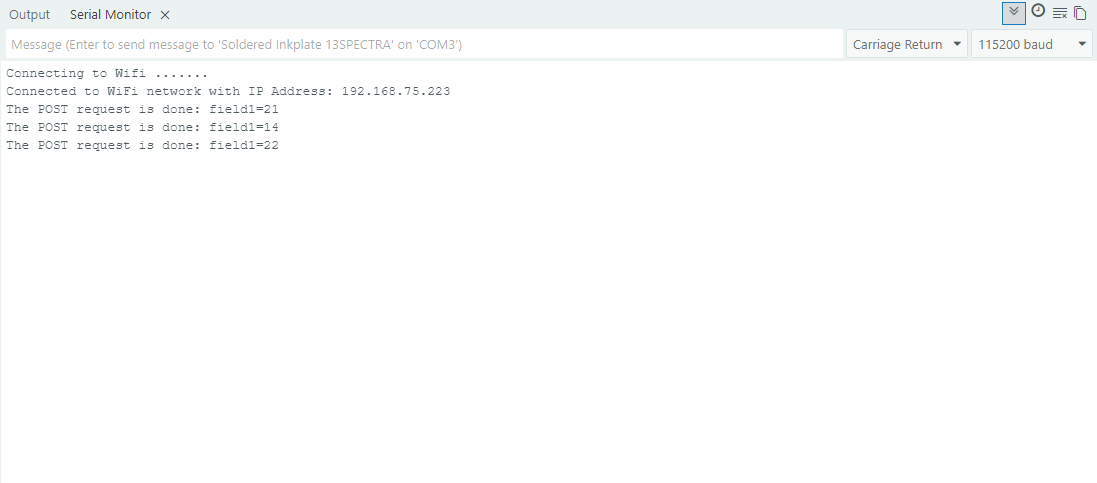
WiFi.mode()
This function sets the MCU WiFi chip as STA or AP.
Returns type: bool
Function parameters:
| Type | Name | Description |
|---|---|---|
wifi_mode_t | mode | WiFi mode value, can be either WIFI_MODE_STA or WIFI_MODE_AP |
WiFi.begin()
This function attempts to connect to WiFi
Returns type: wl_status_t
Returns value: Returns wl_status_t enum value
Function parameters:
| Type | Name | Description |
|---|---|---|
const char* | ssid | Network SSID. |
const char* | passphrase | Optional, depends on WiFi network security certificate |
http.begin()
This function attempts to open an HTTP communication to a given URL
Returns type: bool
Returns value: Returns true if the communication is successful, otherwise returns false.
Function parameters:
| Type | Name | Description |
|---|---|---|
String | url | URL of the specified website |
Inkplate13SPECTRA_HTTP_POST_ThingSpeak.ino
Full example of connecting to WiFi and sending a POST request to ThingSpeak.