Inkplate 5V2 – Drawing graphics
Inkplate 5V2 gives you a 1280 x 720px canvas to draw on.
Adafruit GFX Library
The core graphics library for Inkplate library, created by Adafruit.
Drawing geometric shapes
Here's an example using the drawing functions on Inkplate 5V2:
color parameter in these functions depends on the display mode. In black-and-white mode, use BLACK or WHITE. In grayscale mode, use values from 0 to 7. See the display modes page for more details.#include "Inkplate.h"
Inkplate inkplate(INKPLATE_3BIT);
void setup() {
inkplate.begin();
inkplate.clearDisplay();
inkplate.display();
// Draw a pixel
inkplate.drawPixel(100, 50, 0);
// Draw a line
inkplate.drawLine(0, 0, 1279, 719, 1);
// Draw a rectangle
inkplate.drawRect(100, 100, 200, 200, 2);
// Draw a filled rectangle
inkplate.fillRect(300, 100, 200, 300, 3);
// Draw a circle
inkplate.drawCircle(640, 100, 75, 4);
// Draw a filled circle
inkplate.fillCircle(860, 100, 75, 5);
// Draw a rounded rectangle
inkplate.drawRoundRect(310, 300, 400, 300, 10, 4);
// Draw a filled rounded rectangle
inkplate.fillRoundRect(750, 300, 400, 300, 10, 3);
// Draw a triangle
inkplate.drawTriangle(300, 500, 700, 500, 512, 200, 2);
// Draw a filled triangle
inkplate.fillTriangle(350, 467, 650, 467, 512, 250, 1);
// Update the display to render the drawings
inkplate.display();
}
void loop() {
}
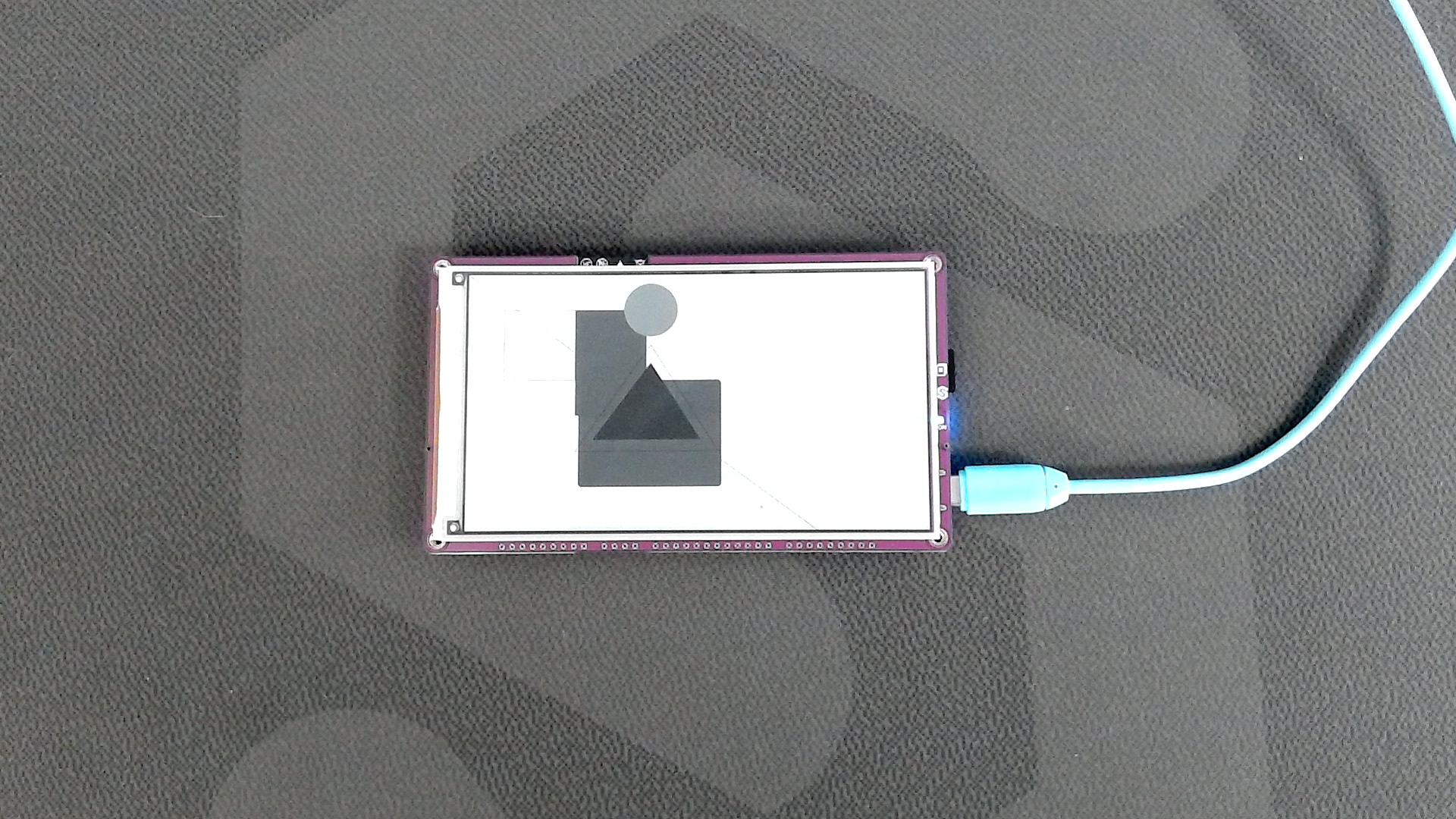
Here are the references for these functions:
inkplate.drawPixel()
Draws a single pixel on the display at the specified coordinates.
Returns type: none
Function parameters:
| Type | Name | Description |
|---|---|---|
int | x | The x-coordinate of the pixel. |
int | y | The y-coordinate of the pixel. |
uint8_t | color | The color of the pixel. |
inkplate.drawLine()
Draws a straight line between two points on the display.
Returns type: none
Function parameters:
| Type | Name | Description |
|---|---|---|
int | x0 | The x-coordinate of the starting point. |
int | y0 | The y-coordinate of the starting point. |
int | x1 | The x-coordinate of the ending point. |
int | y1 | The y-coordinate of the ending point. |
uint8_t | color | The color of the line. |
inkplate.drawRect()
Draws a rectangle outline on the display.
Returns type: none
Function parameters:
| Type | Name | Description |
|---|---|---|
int | x | The x-coordinate of the top-left corner. |
int | y | The y-coordinate of the top-left corner. |
int | width | The width of the rectangle. |
int | height | The height of the rectangle. |
uint8_t | color | The color of the rectangle outline. |
inkplate.fillRect()
Draws a filled rectangle on the display.
Returns type: none
Function parameters:
| Type | Name | Description |
|---|---|---|
int | x | The x-coordinate of the top-left corner. |
int | y | The y-coordinate of the top-left corner. |
int | width | The width of the rectangle. |
int | height | The height of the rectangle. |
uint8_t | color | The fill color. |
inkplate.drawCircle()
Draws a circle outline on the display.
Returns type: none
Function parameters:
| Type | Name | Description |
|---|---|---|
int | x | The x-coordinate of the circle center. |
int | y | The y-coordinate of the circle center. |
int | radius | The radius of the circle. |
uint8_t | color | The color of the circle outline. |
inkplate.fillCircle()
Draws a filled circle on the display.
Returns type: none
Function parameters:
| Type | Name | Description |
|---|---|---|
int | x | The x-coordinate of the circle center. |
int | y | The y-coordinate of the circle center. |
int | radius | The radius of the circle. |
uint8_t | color | The fill color. |
inkplate.drawRoundRect()
Draws a rounded rectangle outline on the display.
Returns type: none
Function parameters:
| Type | Name | Description |
|---|---|---|
int | x | The x-coordinate of the top-left corner. |
int | y | The y-coordinate of the top-left corner. |
int | width | The width of the rectangle. |
int | height | The height of the rectangle. |
int | radius | The radius of the rounded corners. |
uint8_t | color | The color of the rectangle outline. |
inkplate.fillRoundRect()
Draws a filled rounded rectangle on the display.
Returns type: none
Function parameters:
| Type | Name | Description |
|---|---|---|
int | x | The x-coordinate of the top-left corner. |
int | y | The y-coordinate of the top-left corner. |
int | width | The width of the rectangle. |
int | height | The height of the rectangle. |
int | radius | The radius of the rounded corners. |
uint8_t | color | The fill color. |
inkplate.drawTriangle()
Draws a triangle outline on the display.
Returns type: none
Function parameters:
| Type | Name | Description |
|---|---|---|
int | x0 | The x-coordinate of the first vertex. |
int | y0 | The y-coordinate of the first vertex. |
int | x1 | The x-coordinate of the second vertex. |
int | y1 | The y-coordinate of the second vertex. |
int | x2 | The x-coordinate of the third vertex. |
int | y2 | The y-coordinate of the third vertex. |
uint8_t | color | The color of the triangle outline. |
inkplate.fillTriangle()
Draws a filled triangle on the display.
Returns type: none
Function parameters:
| Type | Name | Description |
|---|---|---|
int | x0 | The x-coordinate of the first vertex. |
int | y0 | The y-coordinate of the first vertex. |
int | x1 | The x-coordinate of the second vertex. |
int | y1 | The y-coordinate of the second vertex. |
int | x2 | The x-coordinate of the third vertex. |
int | y2 | The y-coordinate of the third vertex. |
uint8_t | color | The fill color. |
Full example
Inkplate5V2_Black_And_White.ino
Full example using a black-and-white display mode on Inkplate 5V2.
Inkplate5V2_Grayscale.ino
Full example using grayscale display mode on Inkplate 5V2.