Inkplate 5V2 – Soldered Image Converter
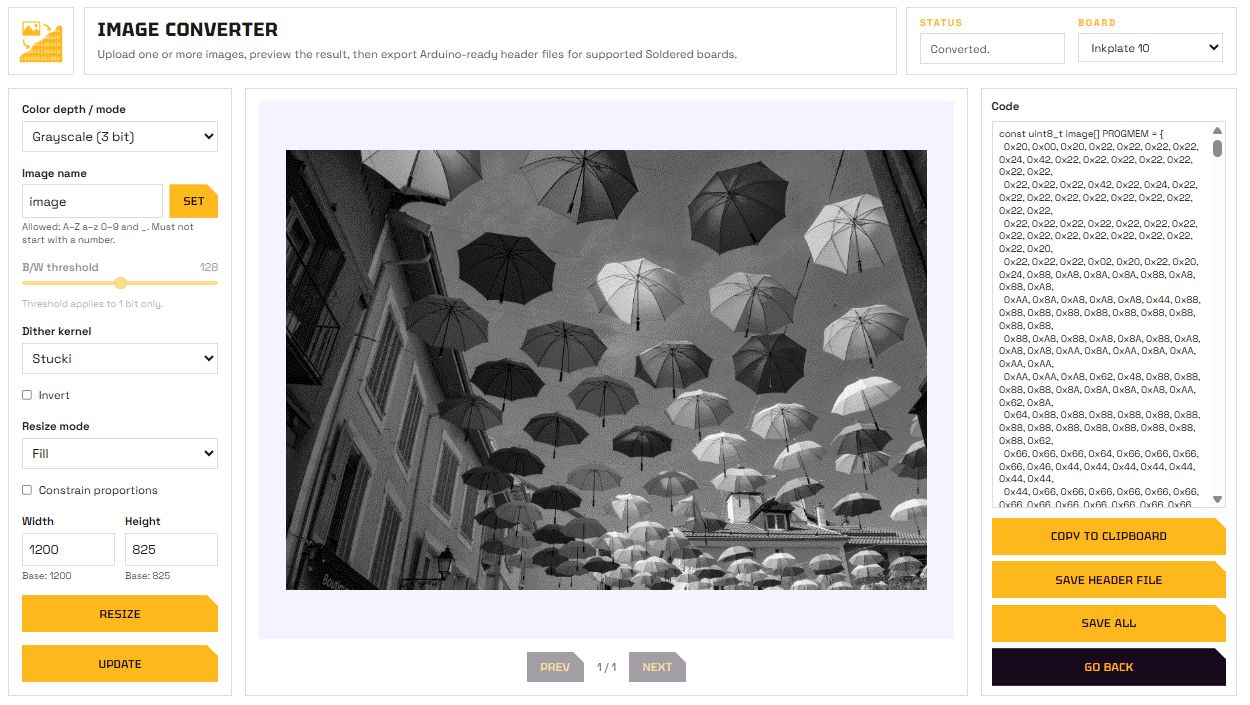
Soldered Image Converter web tool
The Soldered Image Converter is a free web tool that converts images into .h header files ready to include in your Arduino sketch and display on Inkplate.
Soldered Image Converter
Open the web-based image converter tool.
Workflow
- Open the tool at tools.soldered.com/tools/image-converter.
- Upload your image (PNG, JPG, or BMP).
- Select Inkplate 5V2 as the target board.
- Choose the display mode: 1-bit (Black & White) for the fastest refresh and highest contrast, or 3-bit (Grayscale) for 8 shades of gray.
- Adjust dithering, resize, and other options as needed.
- Download the generated
image.hfile.
Using the generated file
Place image.h in your sketch's project folder. To find this folder, go to Sketch → Show Sketch Folder in Arduino IDE.
Then include it and draw the image:
#include "Inkplate.h"
#include "image.h"    // Generated by the Image Converter tool

Inkplate display(INKPLATE_1BIT); // Use INKPLATE_3BIT for grayscale

void setup() {
    display.begin();
    display.clearDisplay();

    // image, image_w, and image_h are defined in image.h
    display.image.draw(image, 0, 0, image_w, image_h);

    display.display();
}

void loop() {}
Inkplate5V2_Image_Converter.ino
Full example showing how to display an image generated by the Image Converter tool.